
Ask three vendors about the difference between a "cloud PBX" and a "hosted PBX" and you'll get three different answers — and possibly a sales pitch embedded in each one. The terminology around PBX deployment has been blurring for years, and what vendors call things doesn't always reflect meaningful technical differences. This article maps the terms to what they actually describe, clarifies where the real distinction lies, and explains who typically chooses each deployment model.
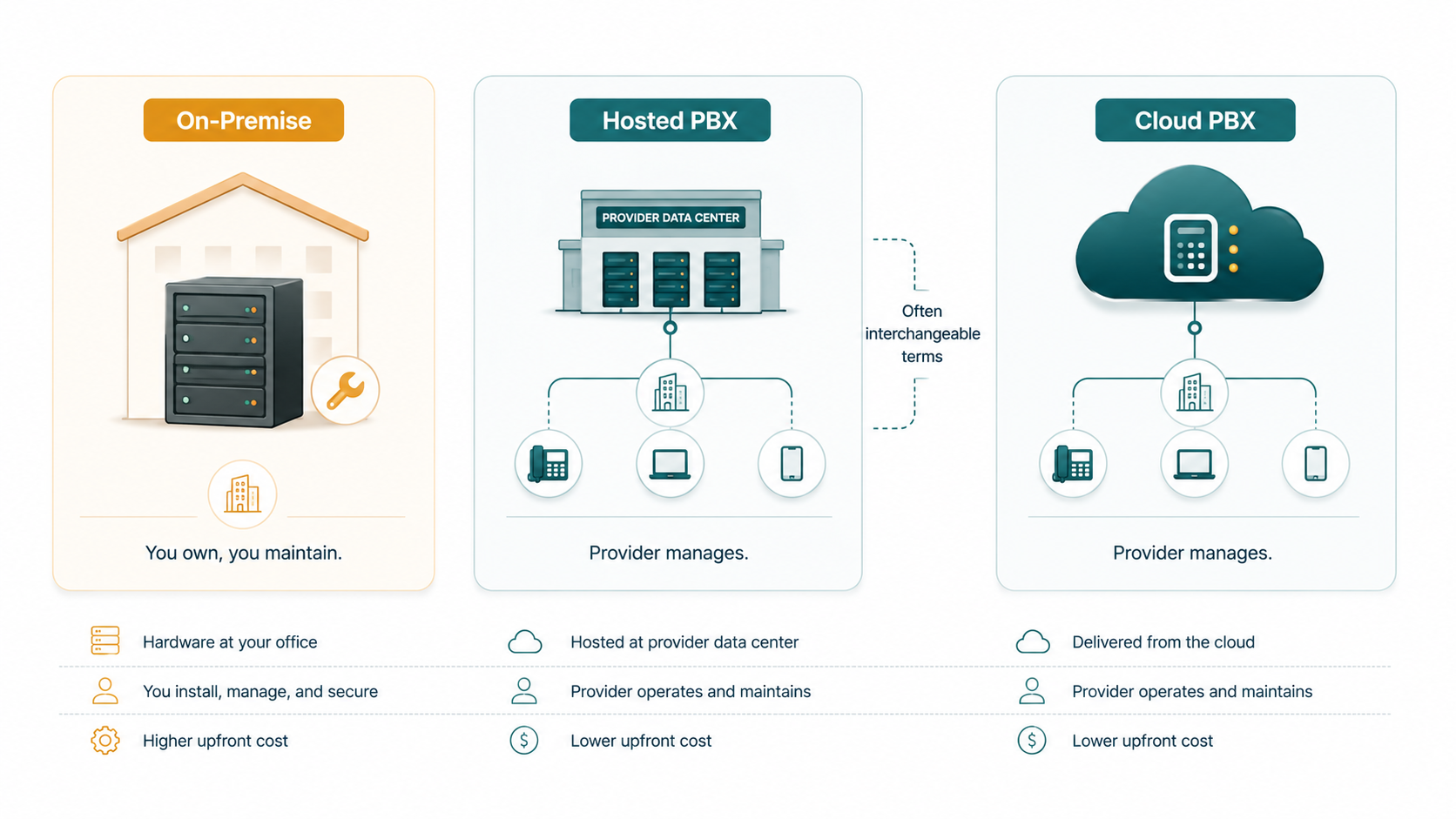
The short version: In modern usage, "cloud PBX" and "hosted PBX" are largely interchangeable — both mean the switching system runs on infrastructure managed by a service provider, not hardware at your location. The meaningful distinction is between cloud/hosted (provider-managed, off-site) and on-premise (customer-owned, on-site hardware). When evaluating a phone system, focus on that deployment model divide rather than the cloud-vs-hosted label.
For how cloud PBX works and how to choose a provider, see cloud PBX.
What Is an On-Premise PBX?
An on-premise PBX is a physical telephone switching system installed and operated at your location — a server room, a wiring closet, or wherever your IT infrastructure lives. The organization owns the hardware outright. The organization's IT team (or a contracted telecom specialist) is responsible for installation, configuration, ongoing maintenance, firmware updates, and hardware replacement when components fail or reach end-of-life.
PSTN connectivity — the link from your internal phone system to the public telephone network — is provisioned separately. Traditionally this was PRI (Primary Rate Interface) lines leased from the local telephone carrier, each carrying up to 23 simultaneous calls. More recently, organizations connect on-premise PBX systems to the PSTN via SIP trunks, which deliver the same connectivity over an IP connection. In both cases, the organization manages those carrier relationships directly.
Capacity is finite and pre-planned. The PBX hardware you buy is sized for a maximum number of concurrent calls and a maximum number of extensions. Exceeding those limits means hardware expansion — additional line cards, additional server capacity, or in some cases a full system replacement. Adding a new office location to the same phone system requires dedicated connectivity between sites and additional configuration effort.
Who still chooses on-premise today: Organizations with specific regulatory or compliance requirements that demand data-sovereignty (calls processed entirely on their own hardware in their own facility), businesses with existing substantial hardware investments they need to amortize, organizations with specialized integrations built into proprietary PBX systems that cloud equivalents don't support, and some large enterprises with their own data center infrastructure where the economics favor ownership.
What Is a Hosted PBX?
The "hosted PBX" model emerged in the 2000s as a middle ground: instead of running PBX hardware at the customer's location, the provider installed dedicated PBX hardware at a data center (either the provider's own facility or a co-location data center) and delivered telephone services to the customer over the internet.
In the hosted model, the hardware serving a specific customer organization might be dedicated to that customer — a server or appliance allocated exclusively to their account. This distinguished hosted from traditional on-premise primarily by the location of the hardware (data center rather than customer's office) and the shift of maintenance responsibility to the provider.
From the customer's perspective, the experience was similar to what we now call cloud PBX: phones register over the internet, configuration is managed through a provider-supplied interface, and the organization doesn't need on-site technical expertise to maintain the system. The underlying architecture — dedicated server per customer — is what differentiated it technically.
What Is a Cloud PBX?
A cloud PBX runs on virtualized or multi-tenant infrastructure rather than dedicated per-customer hardware. The provider's platform serves many customers simultaneously on shared infrastructure, with each customer's configuration logically isolated. This is the same model used by modern SaaS applications generally: the underlying servers serve multiple tenants, with each tenant's data and configuration kept separate.
The practical implications of this architecture are lower cost (infrastructure cost is shared across many customers), faster feature deployment (the provider can update the platform for all customers simultaneously without per-customer hardware operations), and elastic scalability (adding users or capacity doesn't require provisioning additional hardware).
How the Terms Are Used Today
In practice, the hosted-vs-cloud distinction has collapsed. Most providers that marketed "hosted PBX" in the 2010s have migrated their infrastructure to the same virtualized, multi-tenant model that "cloud PBX" describes. The terms are now used interchangeably in vendor marketing, analyst reports, and buyer conversations. When a vendor says "hosted PBX" in 2026, they almost certainly mean a cloud-based, provider-managed system — not a dedicated physical server at a co-location facility.
The distinction that remains meaningful — and that should drive your evaluation — is cloud/hosted versus on-premise. That divide reflects genuinely different decisions about infrastructure ownership, maintenance responsibility, administrative model, and the trade-offs that come with each.
Three-Way Comparison
| Factor | On-Premise PBX | Hosted PBX | Cloud PBX |
|---|---|---|---|
| Infrastructure ownership | Customer-owned | Provider-owned (dedicated) | Provider-owned (shared/virtual) |
| Hardware at your office | Yes — PBX appliance on-site | No (hardware at data center) | No |
| Maintenance responsibility | Your IT team | Provider | Provider |
| Scalability | Hardware-limited; expansion may need new equipment | Provider-managed; may require provisioning time | Elastic; add users from admin console |
| Remote access | Requires VPN or dedicated remote config | Internet-based; built-in remote support | Internet-based; built-in remote support |
| Admin interface | On-site CLI or proprietary software | Web-based portal | Web-based portal |
| Typical fit | Compliance-specific, specialized integrations, large enterprise with existing investment | Largely interchangeable with cloud PBX in modern market | Most modern businesses; remote teams; multi-location |
Who Chooses On-Premise — and Why
On-premise PBX is not obsolete — it remains the right choice for specific situations. The organizations that choose it today typically fall into one of these categories:
- Regulatory or data-sovereignty requirements: Some industries or jurisdictions require that voice traffic and call data be processed entirely on infrastructure the organization controls directly, not on shared provider infrastructure. Defense contractors, certain financial institutions, and some government entities may face these requirements.
- Specialized proprietary integrations: An organization may have invested substantially in a custom integration between their PBX and a line-of-business application — a healthcare records system, a specialized CRM, a contact center platform built around a specific PBX API. Migrating to cloud may require rebuilding that integration against a different API set, which can be expensive.
- Existing hardware investment: A business that purchased an on-premise system three years ago may reasonably choose to continue operating it until the natural hardware refresh cycle, rather than writing off the investment early. This is a financial, not technical, decision.
- Reliability through internet independence: In locations with poor or unreliable internet connectivity, an on-premise PBX connected via traditional PSTN lines (PRI) can provide more consistent service than a cloud system that depends on internet quality.
Who Chooses Cloud or Hosted PBX — and Why
The majority of new business phone system deployments today are cloud-based. The operational and economic reasons are straightforward:
- No capital expenditure on hardware: Subscription pricing means no large upfront investment in PBX equipment that will depreciate and eventually require replacement.
- No IT burden for phone system maintenance: The provider handles infrastructure maintenance, security patching, and feature updates. IT teams focus on other priorities.
- Remote and distributed teams: Any employee with internet access is a full extension on the system. No VPN configuration, no special hardware — just a softphone app or SIP device.
- Predictable scaling: Adding a user means adding a license, not buying hardware. Removing a user means removing a license.
- Feature pace: Cloud providers can roll out new features to all customers simultaneously. On-premise systems receive feature updates tied to hardware and firmware release cycles.
EaseDial Business Phone
Full PBX capability — extensions, IVR, queues, recording — without owning any hardware.
A Note on Hybrid Setups
Some organizations run a hybrid model: an on-premise PBX connected to cloud services via SIP trunks. This is common among businesses that have an existing on-premise investment they're not ready to replace, but want to modernize their PSTN connectivity and reduce traditional line costs. In this setup, the on-premise PBX handles internal routing while the SIP trunk to a cloud carrier handles external calls. It's a migration path, not a permanent destination for most organizations — but it allows a gradual transition rather than a hard cutover.
A similar pattern involves deploying a cloud PBX for most users while keeping a legacy on-premise system operational for a subset of users or locations with specific requirements. As those requirements evolve or the legacy contracts expire, the remaining users migrate to cloud.
For a deeper explanation of how SIP trunking makes hybrid setups possible, see our SIP trunking guide.


