Every business call, answered and routed on one cloud phone and contact center platform
EaseDial runs your business phone system and contact center together. AI voice agents pick up
routine calls around the clock, and everything else reaches the right person with the full story.
UCaaS, CCaaS, and AI: everything your teams need to talk to customers
EaseDial is a cloud communications platform that combines UCaaS (business phone, messaging,
and video) and CCaaS (contact center queues, IVR, skills-based routing, and a predictive
dialer) with AI voice and chat agents, so call centers, sales, and support teams work in one
system with one login, one bill, and no hardware to install.
A UCaaS cloud phone system with extensions, voicemail, auto attendant, SMS, video, and team messaging. Staff keep one business number on desktop, mobile, or desk phone, and admins manage users from a web dashboard. No hardware to install.
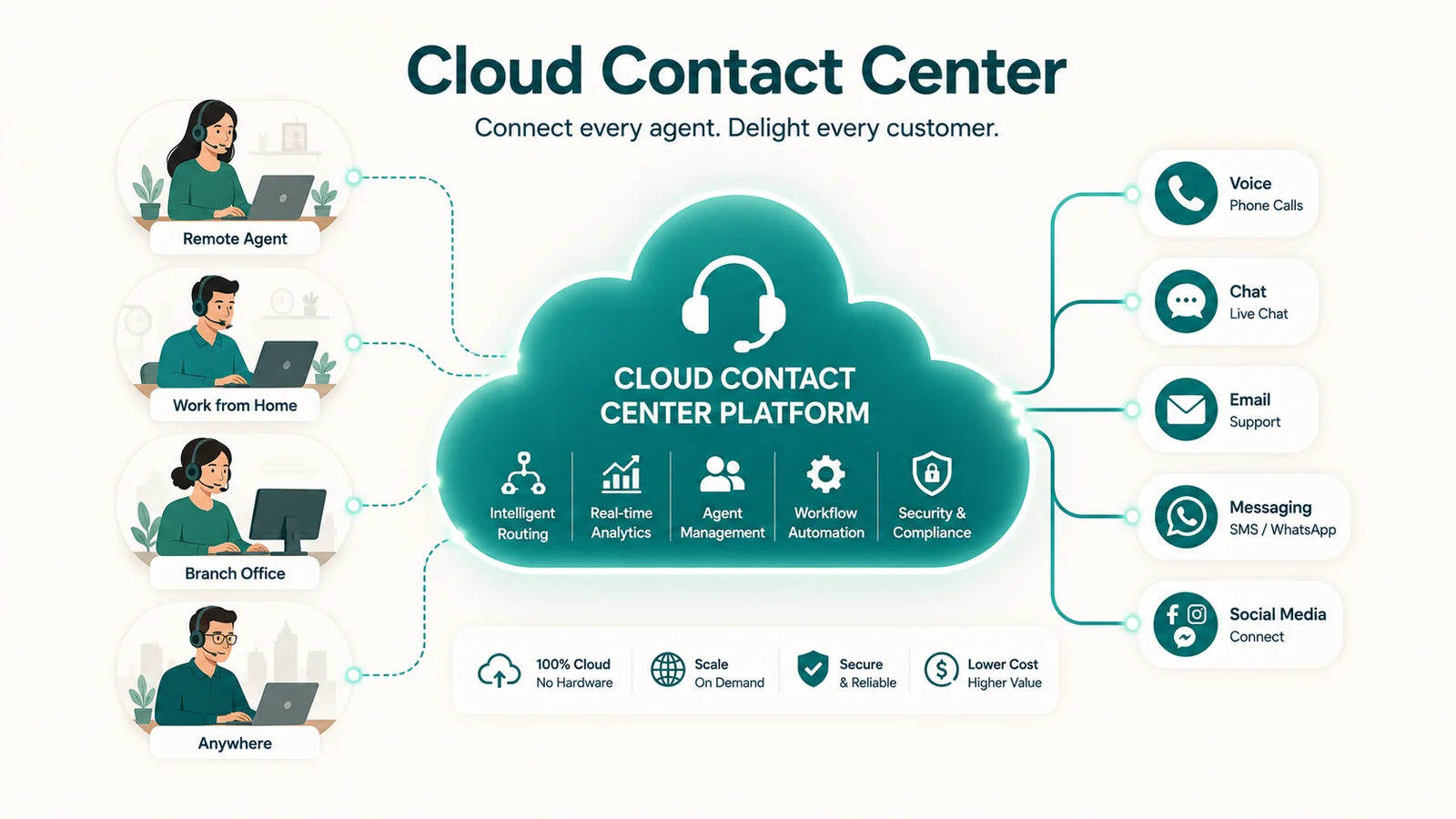
CCaaS call center software with inbound queues, IVR, skills-based routing, outbound dialers, and supervisor controls. Callers reach the agent best suited to help, and managers see queue waits and service levels as they happen.
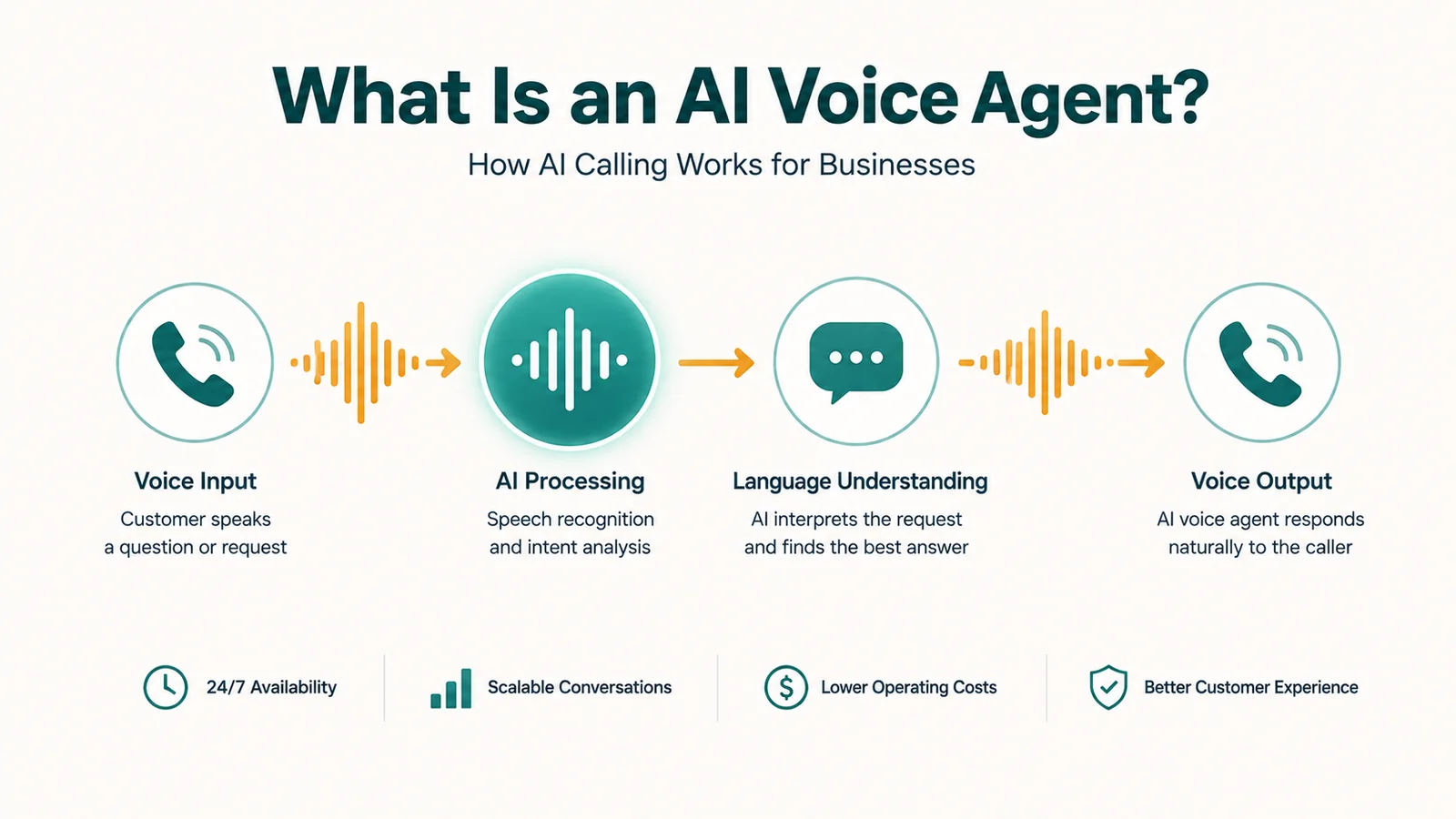
AI Voice and Chat Agents answer 24/7, detect intent, and resolve routine requests like order status, opening hours, and appointment booking. When a caller needs a person, the AI hands off with the details already captured.
Voice, SMS, and chat conversations handled by the same team, from the same workspace. Agents see each customer’s history in one place, so nobody has to repeat themselves when they switch channels.
Preview, progressive, and predictive dialer modes let outbound call center teams work
lists efficiently, with recording and supervisor visibility built in.
Preview mode to review each contact before dialing
Progressive mode dials the next number when an agent is free
Predictive dialer mode connects agents as people answer
Most businesses run their phone system and contact center on separate vendors: separate
logins, separate data, and integration work to connect them. The result is disconnected
workflows and incomplete customer visibility.
The separate-vendor stack
Phone system from a UCaaS vendor
Contact center from a separate CCaaS vendor
AI tools on another subscription
Analytics in yet another dashboard
Integration maintenance, data silos, multiple contracts.
The EaseDial unified platform
One platform
UCaaS, CCaaS, and AI managed together, not as separate products.
One customer view
Internal and customer-facing calls share the same data layer.
One administration
Configure routing, users, and AI from a single admin portal.
No integration overhead
UCaaS and CCaaS are native to the platform, not connected via API.
Moving from an on-premise system? Cloud communication removes the PBX, desk-phone wiring, and
equipment purchases. Add users and features from the admin portal instead. Learn
the difference between UCaaS and CCaaS or read about a
cloud phone system.
How it works
From setup to real calls, with no hardware to install
Add business phone numbers, import contacts, and configure extensions for your team. Your cloud phone system runs in the browser and on mobile, with no hardware required.
Set up IVR menus, call routing rules, queues, and an auto attendant to match how your business handles calls, including business hours, holidays, and overflow.
The AI Voice Agent handles routine calls, the co-pilot listens live, and summaries file automatically after each call, so agents spend less time on notes.
Real-time dashboards, agent reports, queue analytics, and CSAT scores help call center managers coach agents and fix bottlenecks.
Teams
How sales, support, and managers use one platform
Sales teams
Reach more prospects, track every conversation
The campaign dialer handles outbound volume in preview, progressive, or predictive mode, while AI and analytics show managers which calls and scripts are working.
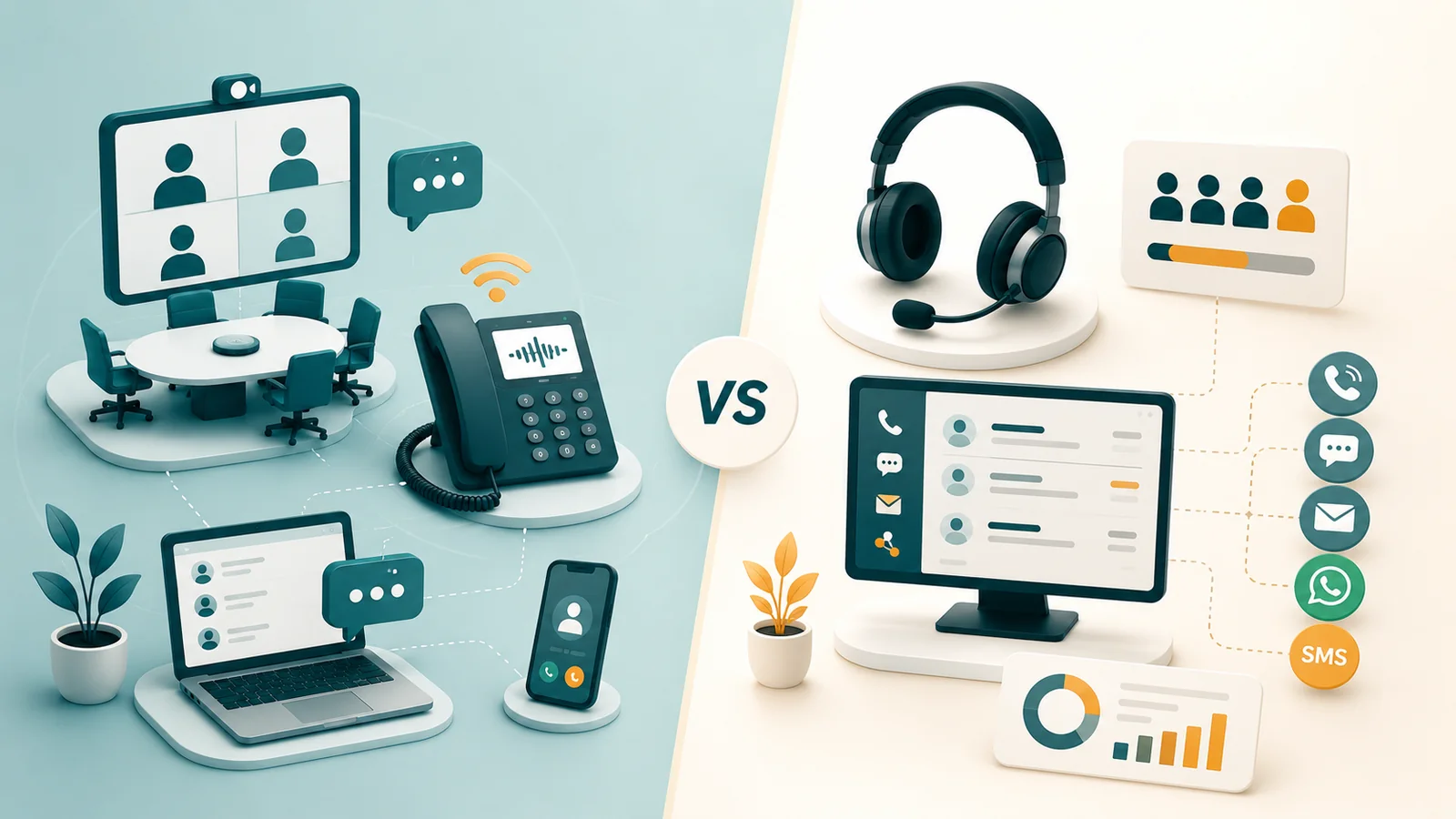
UCaaS handles internal employee communications; CCaaS handles customer-facing contact center operations. This guide explains the distinction, compares every feature dimension, covers pricing for both, maps the AI capabilities in each, and gives a practical decision framework for choosing one, the other, or both.
UCaaS (Unified Communications as a Service) is a cloud-delivered service that consolidates business calling, messaging, video meetings, and related tools into a single platform. Instead of managing separate phone systems, conferencing tools, and messaging apps, teams work from one place. EaseDial provides UCaaS capabilities including cloud business phone, team messaging, SMS, and video meetings.
What is CCaaS and how is it different from UCaaS?
CCaaS (Contact Center as a Service) delivers customer-facing communication infrastructure through the cloud, including inbound call queues, IVR, skills-based routing, outbound dialers, call recording, and supervisor monitoring. UCaaS is primarily for internal team communication; CCaaS is for the teams handling customer contacts. EaseDial provides both, on the same platform.
Can UCaaS and CCaaS work together on the same platform?
Yes. EaseDial brings UCaaS and CCaaS into a connected platform. Business phone extensions and contact center queues run on the same infrastructure, so routing calls between internal teams and customer-facing agents does not require separate systems or complex integrations.
What is an AI Voice Agent?
An AI Voice Agent handles inbound calls automatically, answering, understanding what the caller needs, retrieving relevant information, and either resolving the issue or transferring to a human agent. EaseDial's AI Voice Agent can handle routine inquiries at scale without putting callers on hold.
How does skills-based call routing work?
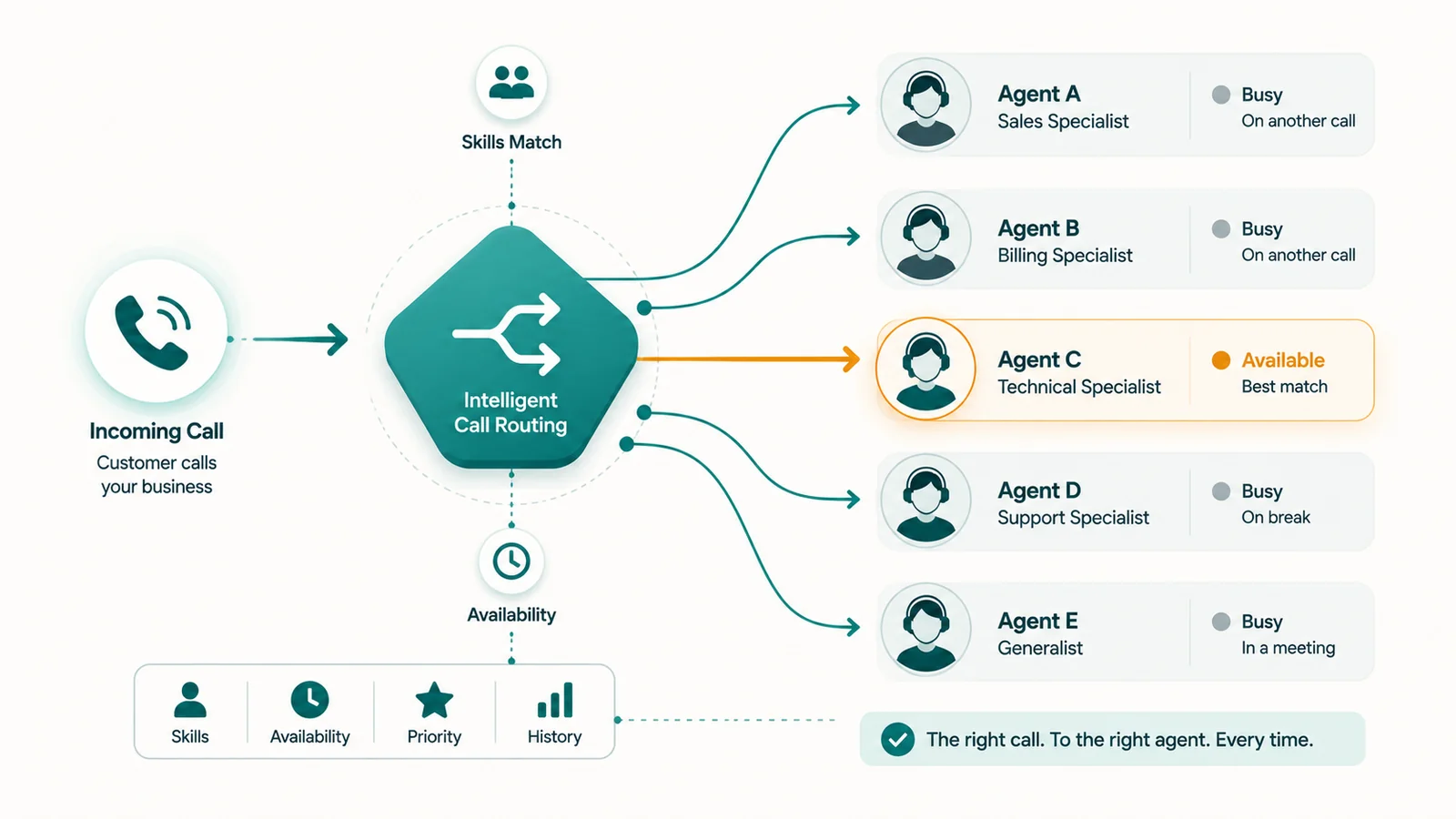
Skills-based routing matches incoming calls to the most appropriate available agent based on defined skill sets, language, product knowledge, account type, or any criteria the team configures. Calls go to the right person first rather than whichever agent is next in a generic queue.
What is an IVR?
An IVR (Interactive Voice Response) is the automated menu system that greets callers and routes them based on their input, "Press 1 for billing, Press 2 for support." In EaseDial, IVR is configurable as part of the call flow, connecting to queues, individual extensions, voicemail, or the AI Voice Agent.
What is a campaign dialer?
A campaign dialer automates outbound calling for sales, collections, appointment setting, or survey campaigns. EaseDial supports preview, progressive, and predictive dialing modes. Preview lets agents review contact information before each call; progressive dials automatically when an agent becomes available; predictive dials ahead of availability to maximize agent talk time.
What is a cloud phone system?
A cloud phone system runs your business phone lines over the internet instead of on a PBX server in your office. Calls, extensions, voicemail, and the auto attendant are managed from a web dashboard, and staff can call from a desktop app, a mobile app, or a desk phone while keeping the same business number. EaseDial's business phone system is cloud-based, so there is no hardware to install or maintain.
What features does call center software need?
Most call center teams rely on call queues, IVR menus, skills-based routing, call recording, supervisor tools to listen, whisper, and barge on live calls, and real-time reporting on queue waits and agent status. Outbound teams also need a campaign dialer. EaseDial includes these in its CCaaS platform alongside the business phone system and AI voice agents.
Will an AI voice agent replace my human agents?
No. An AI voice agent is designed to take routine calls, such as opening hours, order status, or appointment booking, so your team can focus on conversations that need a person. When a caller needs help the AI cannot give, EaseDial transfers the call to the right queue or agent with the details already captured.
Is call recording legal?
Call recording rules vary by country and by state. Some places require only one party to agree to a recording, while others require notice to or consent from everyone on the call. Check the rules that apply to your business, and use a recorded announcement where consent is needed, before turning on call recording.
See EaseDial in action
Talk with our team about your phone system, contact center, and AI plans.


 EaseDial AI Voice Agent