

A cloud phone system runs the phone software on a provider's servers instead of on hardware at your office. Calls still use a business phone number, but they travel over your internet connection rather than a dedicated phone line. This guide covers how that works, what changes compared with a traditional PBX, and what a migration involves.
Your current phone system probably works. Calls connect, voicemails pile up, and the receptionist transfers people using a process everyone half-understands. The question isn't whether it works — it's whether it still makes sense to run it the way you're running it, once you compare the real costs and trade-offs against what a cloud phone system actually offers.
What follows covers how cloud phone systems work technically, what you lose and gain compared to a traditional PBX, how to build a realistic cost comparison, and what the migration process actually looks like.
What a cloud phone system actually is
Cloud phone system: A business phone service where the switching, routing, and call management software runs on servers operated by a provider — not on hardware you own at your location. Calls travel over your existing internet connection rather than a dedicated phone line. You access features through apps on any device.
The underlying technology is VoIP (Voice over IP): voice audio is converted into data packets and transmitted over the internet, just like a video call or a file download. A cloud phone system wraps that core technology with a full business phone feature set — extensions, auto-attendants, call queues, voicemail, call recording, and more — and manages all of it from a provider's infrastructure rather than from equipment in your server room.
The term gets used interchangeably with "hosted PBX," "cloud PBX," and sometimes "UCaaS" (Unified Communications as a Service). There's nuance between them: a UCaaS platform typically adds video, messaging, and collaboration tools on top of the phone system. A cloud phone system in the narrower sense is specifically the phone layer. For a deeper look at how UCaaS fits in, see our UCaaS guide — this article stays focused on the phone system itself. If you want to understand the PBX architecture specifically — what a PBX is, how cloud PBX works technically, and how it differs from on-premise hardware — see our dedicated cloud PBX guide.
How it works technically
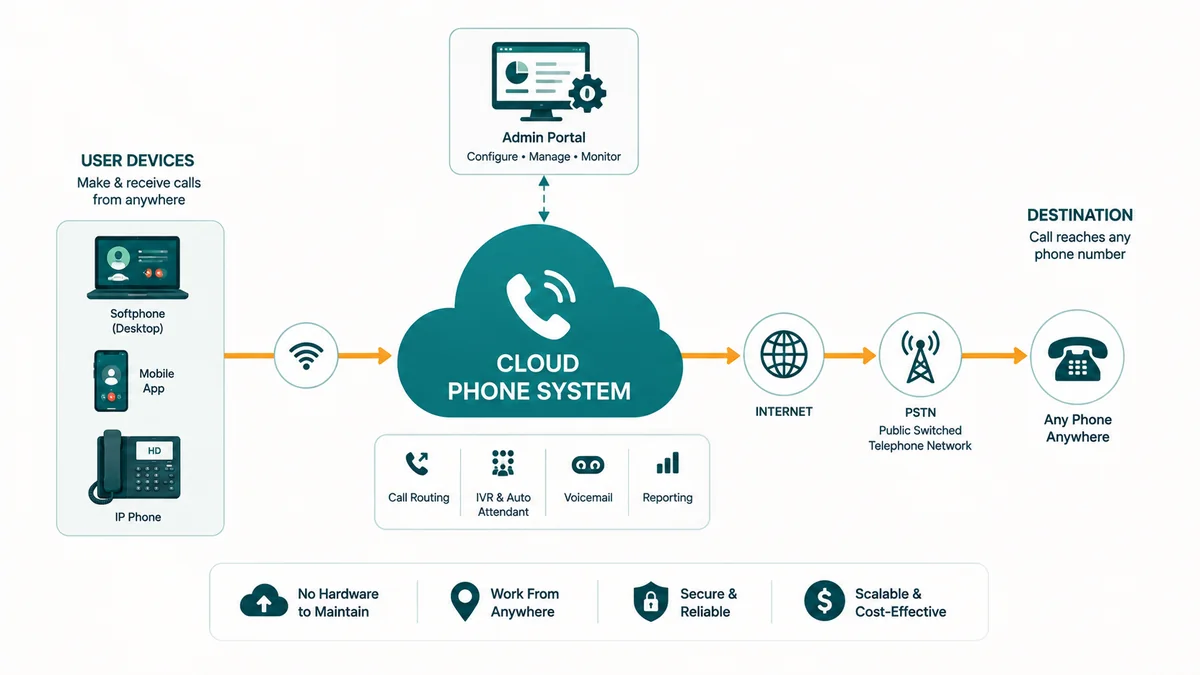
When someone dials your business number, here is what happens:
- The call arrives at your provider's servers over the public telephone network (PSTN) or directly over the internet if the caller is also using VoIP.
- The provider's system reads your routing rules: which extension to ring, whether to play an auto-attendant menu, how long to ring before going to voicemail or a queue.
- The call is pushed out to whatever device your extension is registered on — a desk phone, a laptop app, a mobile app — over your internet connection.
- Audio travels as compressed data packets (typically using the G.711 or G.722 codec) in both directions for the duration of the call.
Outbound calls work the same way in reverse. Your device sends audio packets to your provider's servers, which convert the call to PSTN and connect it to the destination number.
The provider's servers handle all the logic that a traditional PBX would handle locally: digit mapping, call routing, hold music, conferencing, voicemail transcription, call recording storage. None of that requires hardware at your office.
What your internet connection needs to handle
A single HD voice call uses roughly 85–100 kbps of bandwidth in each direction. For a business with 20 employees where perhaps 8–10 might be on calls simultaneously, that's under 1 Mbps — a small fraction of what a typical business broadband connection provides. Bandwidth is rarely the limiting factor.
What matters more is network quality: low latency (under 150 ms ideally), low jitter (variation in packet arrival time), and low packet loss. If your office uses a consumer-grade router with no Quality of Service (QoS) configuration, voice traffic can get deprioritized behind a file download or a large upload, causing choppy audio. This is fixable — most business routers support QoS rules that prioritize voice packets — but it's worth knowing upfront rather than discovering it after you've signed a contract.
Cloud phone system vs. traditional PBX
A traditional PBX (Private Branch Exchange) is a physical appliance installed at your office. It connects your internal extensions to each other and to the outside phone network through physical lines (ISDN, T1/E1, or analog). Everything runs locally.
| Factor | Traditional PBX | Cloud Phone System |
|---|---|---|
| Upfront cost | Hardware purchase, installation labor, wiring | None (or small setup fee), optional IP phones |
| Ongoing cost | Maintenance contracts, line rentals, on-site IT | Per-user monthly subscription |
| Scaling up | Requires hardware capacity planning, sometimes hardware upgrade | Add users in the admin portal, done in minutes |
| Remote work | Requires VPN or forwarding setup; calls may not show business number | Full functionality on any device, any location |
| Feature updates | Firmware upgrades, sometimes new hardware required | Provider pushes updates automatically |
| Reliability dependency | On-site hardware and physical phone lines | Internet connection and provider uptime |
| Admin control | On-site system, sometimes requires vendor for changes | Web portal; most changes self-serve in minutes |
| Multi-site | Separate hardware per location, inter-site calling via leased lines | All locations share one system; transfers between sites are internal |
What you actually get with a cloud phone system
The feature set varies by provider, but most cloud phone systems at the business tier include:
- Extensions and direct-dial numbers (DIDs) — each user gets an internal extension and typically a direct number that rings them specifically
- Auto-attendant / IVR — "Press 1 for sales, 2 for support" menus that route calls without a receptionist
- Call queues — callers wait in line when all agents are busy; queue position and hold music are configurable
- Voicemail with email delivery — voicemails arrive as audio attachments or transcriptions in your inbox
- Call recording — on-demand or automatic, stored in the cloud with searchable access
- Call forwarding and simultaneous ring — ring your desk phone and mobile at once, or forward to another number after a set number of rings
- Hunt groups / ring groups — route inbound calls to a group of extensions and ring them in sequence or simultaneously
- Business hours and holiday routing — automatically redirect calls after hours without anyone touching a setting
- Number porting — keep your existing business numbers when you switch providers
- Analytics and call logs — call volume, duration, missed calls, and queue performance data in a dashboard
Some providers also include SMS, team messaging, or video meetings on the same platform. Whether you need those features determines which tier to evaluate — though for the phone system specifically, the list above is table stakes from any serious provider.
Cost comparison: building a realistic picture
The cost comparison between a traditional PBX and a cloud phone system depends on your specific situation, but there's a consistent framework for building an honest number.
Traditional PBX total cost of ownership
On-premises PBX costs typically include:
- Hardware purchase: A PBX system for a 25-seat office can run from a few thousand dollars for a basic system to $15,000+ for a feature-rich deployment. Add IP desk phones at $80–$300 per unit.
- Installation and configuration: Professional installation labor, which varies by system complexity and your location.
- PSTN lines: SIP trunks or PRI circuits to connect the PBX to the phone network, typically priced per channel or per trunk.
- Maintenance contract: Ongoing vendor support, often 15–20% of hardware cost annually.
- IT staff time: Every time you add an extension, change routing, or troubleshoot audio quality, someone internal or external handles it.
- Hardware refresh: PBX hardware has a finite life; expect a replacement or major upgrade every 7–10 years.
Cloud phone system total cost
Cloud pricing is simpler to model:
- Per-user monthly fee: Most providers charge $15–$35 per user per month for a full-featured business phone plan. Some have a base platform fee plus per-user charges.
- Included calling: Most US/Canada plans include unlimited calling in the monthly fee. International calls are typically per-minute add-ons.
- Optional desk phones: IP phones compatible with the provider's system, purchased outright or rented. Many businesses skip physical phones entirely and use the desktop or mobile app.
- Number porting: Usually free or a small one-time charge per number.
Where cloud saves money — and where it doesn't
For a 20-person business that doesn't already own a PBX, cloud is almost always cheaper from day one. No hardware to buy, no installation labor, and the per-user fee covers support.
For a business with a PBX that was purchased three years ago, still under warranty, and fully paid off, the math changes. The PBX itself isn't costing you anything monthly — but the PSTN lines, maintenance contract, and IT overhead still are. The real question is whether those ongoing costs plus the cost of eventually replacing the hardware exceed what you'd pay in cloud subscription fees over the same period.
The factor that consistently tips the math toward cloud is remote work and multi-site. A cloud system treats a remote employee identically to an office employee: same extension, same outbound caller ID, same ability to transfer calls. Adding a second office location means adding users, not installing a second PBX and linking them with a leased line.
EaseDial Business Phone
See plans, features, and pricing — no sales call required
Common concerns — answered honestly
Call quality: is it as good as a traditional phone line?
With a decent internet connection and proper QoS configuration, HD VoIP audio (using codecs like G.722) is objectively better than the compressed audio on a standard PSTN call. The issue is not the technology — it's the network path. If your office has congested Wi-Fi, a router without QoS, or inconsistent broadband, calls will sound worse than a traditional line.
Most businesses switch cloud providers after a bad experience with a previous one and assume cloud is inherently unreliable. Usually the issue was poor network configuration, not the technology. Before you switch, run a network quality test specifically for VoIP (providers often offer these), and make sure your router is business-grade and configured to prioritize voice traffic.
Reliability: what happens if the internet goes down?
This is the most legitimate concern, and it deserves a direct answer. If your internet connection drops, your cloud phone system stops working for calls at that location. Traditional PSTN lines continue to work during power outages (with a simple desk phone) because the signal comes through the line itself.
The practical mitigations: most cloud phone systems let you configure a mobile failover — if your office internet drops, incoming calls automatically forward to mobile numbers. Many businesses also maintain a 4G/LTE backup connection specifically for this scenario. For critical lines (a medical practice, for example), this failover configuration isn't optional; it's part of the setup.
It's also worth putting the risk in perspective. Modern business broadband is far more reliable than it was a decade ago, and cloud provider uptime — when they publish it — is typically 99.99% or better at the platform level. The single point of failure is your last-mile internet connection, not the provider's infrastructure.
Security: is it safe to run business calls over the internet?
Reputable cloud phone providers encrypt calls in transit using SRTP (Secure Real-time Transport Protocol) and TLS for signaling. This is the same category of encryption used for HTTPS web traffic and banking applications. Unencrypted VoIP calls (still used by some low-cost providers) are a different matter — calls can be intercepted on the same network.
When evaluating providers, ask specifically whether they use SRTP for media encryption and TLS for SIP signaling. Any provider targeting businesses should be able to answer yes to both without hesitation. For industries with compliance requirements — healthcare, financial services — also ask about data residency, call recording access controls, and their SOC 2 or HIPAA BAA status. Our article on UCaaS security and compliance covers this in more depth.
Number porting: can I keep my existing business numbers?
Yes, with rare exceptions. Number porting is a standardized process regulated in the US, and any carrier must release your numbers when you request it. The process typically takes 2–4 weeks. During porting, your numbers continue to work on your current system until the port completes.
The exceptions: some very old or specialized number types can be difficult to port, and vanity numbers on certain carriers occasionally have complications. Before you commit to switching, confirm with your new provider that your specific numbers are portable — they can check this in advance.
The implementation process
Most cloud phone migrations follow a similar sequence. The specifics vary by business size and provider, but this is a realistic picture of what to expect.
1. Audit your current setup
Document every number you use, every extension, every piece of call routing logic (auto-attendant menus, after-hours rules, call queue configurations). This is the most time-consuming step — not because it's technically complex, but because it reveals routing logic that was configured years ago and nobody fully remembers. You can't build the new system until you know what the old one is actually doing.
2. Map the new system design
Decide how the new system should work: which extensions map to which users, what the auto-attendant should say, what hours things should route to voicemail versus a live person. This is also a good time to simplify — many businesses migrate and discover their current call flow has three levels of IVR menus that could be collapsed into one. See our call routing guide for a breakdown of the routing strategies available.
3. Configure and test before porting
Your new provider gives you temporary numbers during setup. Configure and test the entire system on those numbers before you submit port requests. This means testing every call flow, every voicemail, every transfer, every auto-attendant menu. Do this when you're not under time pressure — discovering a misconfigured queue on the day of cutover is stressful.
4. Port numbers and cut over
Submit number porting requests once you're satisfied with the configuration. Most providers will work with you to schedule the cutover at a low-traffic time. Some businesses do a staged port — porting one department's numbers first to confirm everything works before porting the main line.
5. Train staff
Cloud phone apps are generally intuitive, but staff still need to know where to find voicemail, how to transfer a call, and what to do if they have an audio quality problem. A 30-minute training session typically covers everything. Most providers also have video tutorials and help documentation.
Who switches to cloud — and who waits
Cloud phone systems make the most immediate sense for:
- Businesses with remote or hybrid employees who need full phone functionality outside the office
- Businesses with multiple locations that want one unified phone system rather than separate PBX installations
- Growing businesses that need to add seats quickly without hardware planning
- Businesses whose current PBX is aging and approaching end-of-life
- Startups and new businesses with no existing hardware investment
The businesses that reasonably wait tend to be:
- Single-location offices with a recently purchased PBX that still has years of useful life
- Businesses in locations with poor or unreliable broadband where VoIP quality would be a real problem
- Organizations with very specific compliance or regulatory requirements that need careful provider vetting before any change
The industry has been moving toward cloud phone systems for over a decade, and the trajectory is clear — but "clear direction" doesn't mean every business should switch on the same timeline. If your PBX was installed two years ago and runs reliably, the financial case for an immediate switch is weak. If it's eight years old, requires specialized maintenance, and your staff includes remote workers who feel like second-class citizens on the phone system, the case is strong.
For a more detailed look at how to evaluate options for smaller teams specifically, see our best business phone systems for small business guide, or the broader how to choose a business phone system framework.
Cloud phone system vs. UCaaS: understanding the scope difference
A cloud phone system and a UCaaS (Unified Communications as a Service) platform both deliver cloud-hosted calling, but they differ in scope. A cloud phone system is the phone layer — calling, extensions, voicemail, auto-attendant, and call routing. UCaaS wraps the phone layer with video meetings, team messaging, and sometimes file sharing or collaboration tools, all managed through one platform and one license.
| Dimension | Cloud Phone System | UCaaS Platform |
|---|---|---|
| Core scope | Voice calls, extensions, voicemail, IVR, call routing | Voice calls plus video meetings, team messaging, and collaboration tools in one platform |
| Video meetings | Not included — requires a separate video platform | Included as a native channel, same identity and scheduling as phone |
| Team messaging | Not standard; some providers offer it as an add-on | Native — persistent chat, channels, and direct messages alongside calls |
| Admin complexity | Simpler — one set of policies, one call platform to configure | More surfaces — video, messaging, and call policies each have separate configuration |
| Cost structure | Lower per-seat cost; phone-focused pricing | Higher per-seat cost; covers voice, video, and messaging in one license |
| Best fit | Teams that primarily communicate by phone and already have video covered elsewhere | Teams that want one vendor and one interface for all real-time communication |
The practical decision point: if your team already runs video meetings on a platform you have no plans to replace, a cloud phone system covers everything you need without the added cost and complexity of a larger platform. If you are consolidating communication tools — eliminating a separate video conferencing license, a separate messaging app, and a separate phone system — a UCaaS platform can reduce both cost and vendor count. For a detailed comparison of the two deployment models, see our UCaaS guide and the UCaaS vs. CCaaS comparison.
Frequently asked questions
See EaseDial's cloud phone system: Cloud extensions, IVR, auto attendant, and call routing — no hardware required. Business phone details →

