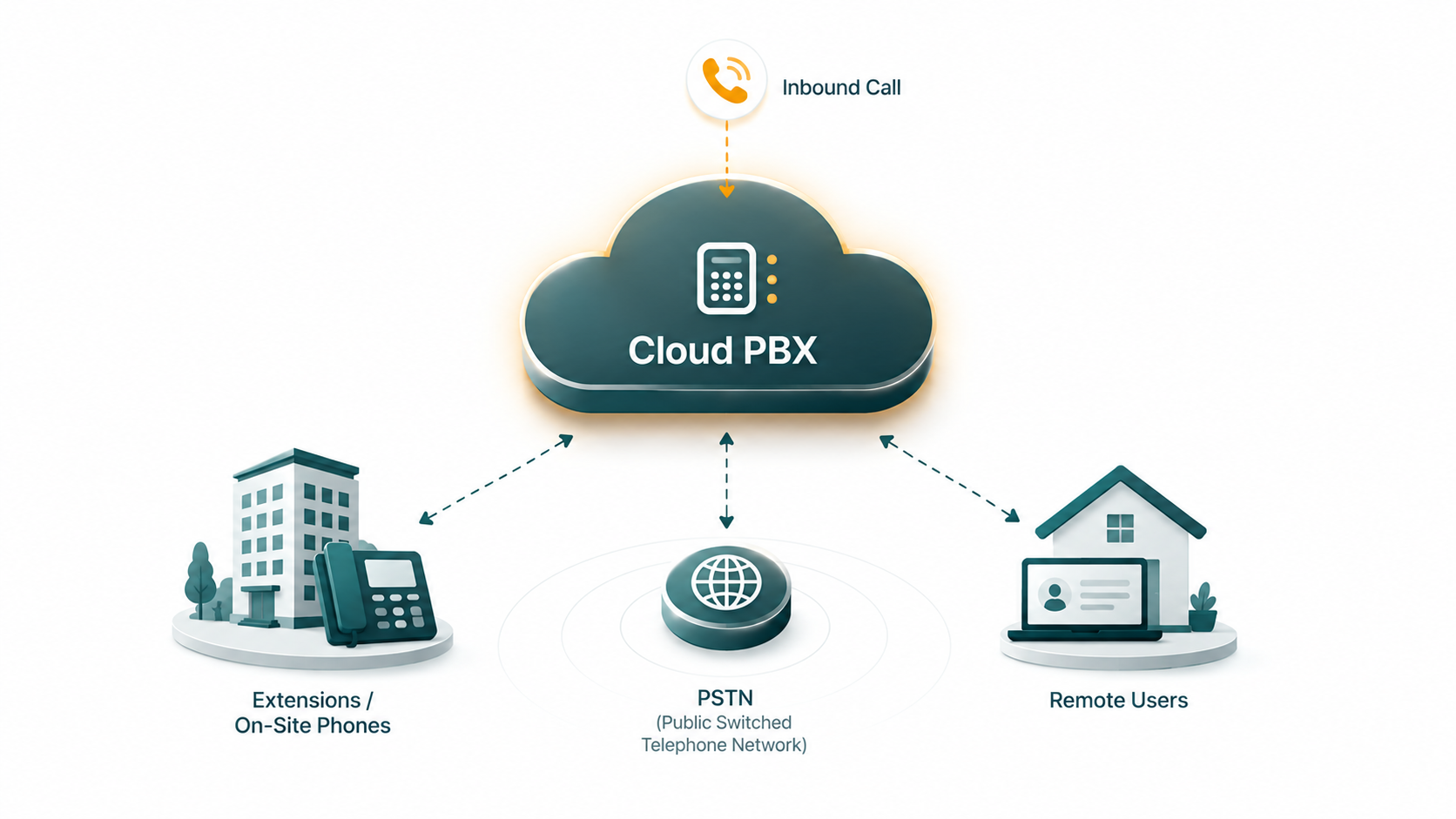
PBX stands for Private Branch Exchange — the switching system that routes calls between the phones inside a business and connects those phones to the public telephone network. For most of the 20th century, a PBX was a rack of physical hardware sitting in a server room or telephone closet, wired to every desk phone in the building. A cloud PBX moves that switching infrastructure off your premises entirely, running it on servers managed by a service provider and accessed over the internet.
The result is the same core capability — internal extensions, inbound number routing, outbound PSTN calling, voicemail, and auto-attendant — without owning or maintaining the underlying hardware yourself.
What Is a Cloud PBX?
Definition: A cloud PBX is a business telephone switching system hosted and operated by a service provider on remote servers, accessed over the internet. It performs the same core functions as a traditional on-premise PBX — routing calls between extensions, connecting to the public telephone network, and managing features like auto-attendant, voicemail, and call queues — but requires no dedicated phone hardware at the customer's location. The provider manages infrastructure, feature updates, and reliability. Businesses pay a subscription fee rather than purchasing equipment.
How a Traditional On-Premise PBX Works
To understand what cloud changes, it helps to understand what it replaces. A traditional PBX is a physical appliance — sometimes a dedicated rack-mounted server, sometimes a smaller box depending on business size — installed at your location.
The PBX connects to two things simultaneously. On one side, it connects to the internal phone network: desk phones throughout the building are physically wired (or, in later systems, networked over Ethernet) to the PBX. Each phone gets an extension number — a short internal dial code — managed by the PBX's routing logic. On the other side, the PBX connects to the public telephone network (PSTN) via telephone circuits: traditionally PRI (Primary Rate Interface) T1 or E1 lines leased from the local telephone company, or more recently via SIP trunks provisioned from a carrier.
When an outside call arrives on one of those PSTN circuits, the PBX receives it and determines where to route it — to the auto-attendant, to a specific extension, to a ring group. When an internal extension dials an outside number, the PBX seizes an available PSTN circuit and completes the call. When one extension dials another, the PBX routes the call entirely internally without touching the PSTN at all.
The PBX hardware must be sized for the business's maximum concurrent call volume. Adding capacity means buying hardware. Supporting a new office location means either installing a second PBX or extending the existing one's reach — which gets complicated quickly. Adding a feature the hardware doesn't support means a firmware upgrade, a new hardware module, or in some cases a replacement system.
What "Cloud" Changes
A cloud PBX replaces the on-site switching hardware with software running on the provider's servers. The provider's infrastructure handles the call routing logic that the physical PBX box used to perform. Your team's phones — whether desk phones, software clients (softphones) on computers, or mobile apps — connect to that remote infrastructure over the internet using VoIP protocols, primarily SIP.
VoIP and SIP
VoIP (Voice over Internet Protocol) converts voice audio into data packets and sends them over an IP network rather than a dedicated analog circuit. SIP (Session Initiation Protocol) is the signaling standard that manages call setup, modification, and teardown — it's what controls the "call this number, ring that phone, connect, hang up" sequence. A cloud PBX uses SIP-registered endpoints (desk phones, apps, or hardware adapters) to communicate with the cloud infrastructure.
PSTN connectivity
The cloud provider handles the connection to the public telephone network. Rather than your business provisioning PRI lines or SIP trunks from a local carrier, the provider maintains those carrier relationships. When a caller dials your business number, the call arrives at the provider's infrastructure, gets routed according to your configuration, and reaches the appropriate phone or queue. Outbound calls traverse the same path in reverse. From the caller's perspective, nothing about this is visible — it looks and sounds like any other phone call.
Remote administration
Traditional PBX administration required either direct access to the physical appliance or specialist knowledge of the vendor's CLI or proprietary management software. Changes — adding an extension, adjusting business hours routing, updating voicemail greetings — often required an on-site technician or significant IT involvement.
Cloud PBX administration is handled through a web-based interface. Adding an extension, creating a new call queue, updating business hours, or reassigning a phone number typically takes minutes from a browser, without any hardware configuration.
Core Technical Concepts
Extensions
Extensions are the internal short-code dial addresses assigned to users or devices. Dialing extension 101 rings a specific person's phone directly, without consuming an external PSTN number. Extensions exist within the cloud PBX's internal routing table and don't require a separate phone number for each user — though users can also have DIDs (Direct Inward Dialing numbers) that allow outside callers to reach them directly.
DIDs (Direct Inward Dialing numbers)
A DID is a full phone number provisioned from the carrier network that routes to a specific destination within your cloud PBX — a user extension, a department queue, an auto-attendant, or a conference bridge. Businesses typically have a main number (often routing to the auto-attendant) plus individual DIDs for key staff or departments. See our guide on DID numbers for a detailed explanation.
SIP trunking
In a cloud PBX context, SIP trunking is the connection between the cloud provider's infrastructure and the carrier network that carries calls to and from the PSTN. The provider manages this, but understanding the concept is useful — particularly for businesses that want to connect an existing on-premise PBX to cloud services via SIP. See our SIP trunking guide for a full explanation of how that connectivity works.
Key Capabilities of a Cloud PBX
The features available in a cloud PBX system vary by provider, but the core capability set typically includes:
- Extensions and internal calling — users reach each other by short code without consuming PSTN minutes
- Auto-attendant / IVR — an automated greeting that answers inbound calls and routes them based on caller input ("Press 1 for Sales, press 2 for Support")
- Call queues — holds callers when agents are busy and distributes them as agents become available, with configurable routing strategies
- Voicemail — per-user or shared voicemail boxes, often with email notification and transcription
- Call recording — inbound and outbound calls captured for quality assurance, training, or compliance
- Business hours routing — different call handling rules for open hours, after hours, and holidays
- Remote user support — any user with an internet connection and a SIP-capable device can be a fully functional extension, regardless of location
- Multi-site support — users across multiple offices share the same phone system and can transfer calls between locations as if they were in the same building
EaseDial Business Phone
Extensions, queues, IVR, voicemail, and call recording — configured from a browser, no hardware required.
Cloud PBX vs Traditional On-Premise PBX
| Factor | Cloud PBX | On-Premise PBX |
|---|---|---|
| Infrastructure ownership | Provider-owned, off-site | Customer-owned, on-site |
| Hardware at your office | None required (IP phones or softphones) | PBX appliance, wiring, possible phone hardware |
| Maintenance responsibility | Provider handles patches, updates, and hardware | Your IT team handles maintenance and upgrades |
| Scaling | Add users and numbers from admin interface | May require hardware expansion or replacement |
| Remote work support | Built-in — any internet-connected device works | Requires VPN or additional remote access setup |
| Feature updates | Provider deploys automatically | Require maintenance windows or hardware upgrades |
| Reliability dependency | Internet connection and provider infrastructure | On-site hardware; PSTN lines can survive power outages |
Who Uses Cloud PBX and Why
Small businesses
For businesses under 50 employees, the economics of on-premise PBX rarely make sense. The upfront hardware investment, ongoing maintenance, and need for technical expertise to manage the system are hard to justify when a cloud subscription delivers equivalent or superior functionality at a predictable monthly cost with no capital outlay.
Mid-market companies
Businesses with 50–500 employees often find that a cloud PBX reduces administrative overhead significantly — IT teams stop spending time on phone system maintenance and focus on higher-value work. Feature parity has reached the point where most mid-market businesses find everything they need in cloud offerings.
Remote and hybrid teams
This is where cloud PBX has the clearest structural advantage. A team distributed across multiple cities, countries, or home offices is simply a list of SIP-registered endpoints from the cloud PBX's perspective. Every user has a full extension, can receive calls on their business number wherever they are, and can transfer, conference, or queue calls as if they were all in the same building. Remote support requires no VPN configuration or special hardware — just an app or a SIP-capable phone.
Multi-location businesses
When a business has multiple offices, a traditional on-premise PBX setup requires either separate systems per location (with no integration between them) or a central PBX with dedicated connectivity to each branch. A cloud PBX handles all locations as extensions of the same system by default.
Limitations to Understand Before You Switch
Internet dependency
A cloud PBX requires a working internet connection to function. If your internet goes down, so does your phone system — unless you have a backup connection or configure call forwarding to mobile numbers as a failover. On-premise PBX systems connected via traditional PSTN circuits can survive an internet outage. For most businesses this is manageable, but it's a real consideration for locations where internet reliability is inconsistent.
Quality of Service (QoS) requirements
Voice calls are sensitive to network latency, jitter, and packet loss in a way that web browsing and email are not. A cloud PBX requires a network that can prioritize voice traffic, particularly when the internet connection is shared with heavy data workloads. Configuring QoS on your router — giving VoIP packets priority — is a standard step in cloud PBX deployments that on-premise systems with dedicated PSTN lines don't require.
Vendor dependency
Your phone system is now operated by a third party. Service outages, pricing changes, and feature decisions are outside your control in ways that an on-premise system is not. Evaluating provider reliability, support quality, and contract terms is important — as is understanding how to port your numbers out if you ever need to switch providers.