Commercial WiFi installation is one of the most consequential infrastructure decisions a business makes — and one of the most commonly underplanned. A residential router repurposed for an office, an access point placed by feel rather than coverage analysis, or a network built for 10 users that now serves 50 are all versions of the same problem: the network becomes the bottleneck for every other system the business depends on.
This guide covers what commercial WiFi installation involves, how it differs from consumer network setup, what to plan before any hardware is ordered, and how your phone system interacts with WiFi quality in ways most businesses discover too late.
Key point: Commercial WiFi installation is not a product purchase — it is an infrastructure project. Done correctly, it involves a site survey, coverage design, access point placement engineering, VLAN segmentation, QoS configuration for voice traffic, and ongoing management. Done incorrectly, it degrades every application that depends on the network, including VoIP phone systems.
Commercial vs residential WiFi: what actually differs
Consumer WiFi equipment is designed for a single household with a predictable number of devices and one person managing it. Commercial WiFi is designed for environments with fundamentally different demands:
- Device density. A 50-person office may have 150+ devices simultaneously on the network — laptops, phones, tablets, VoIP handsets, printers, IoT devices. Consumer access points are not designed to handle this concurrent load cleanly.
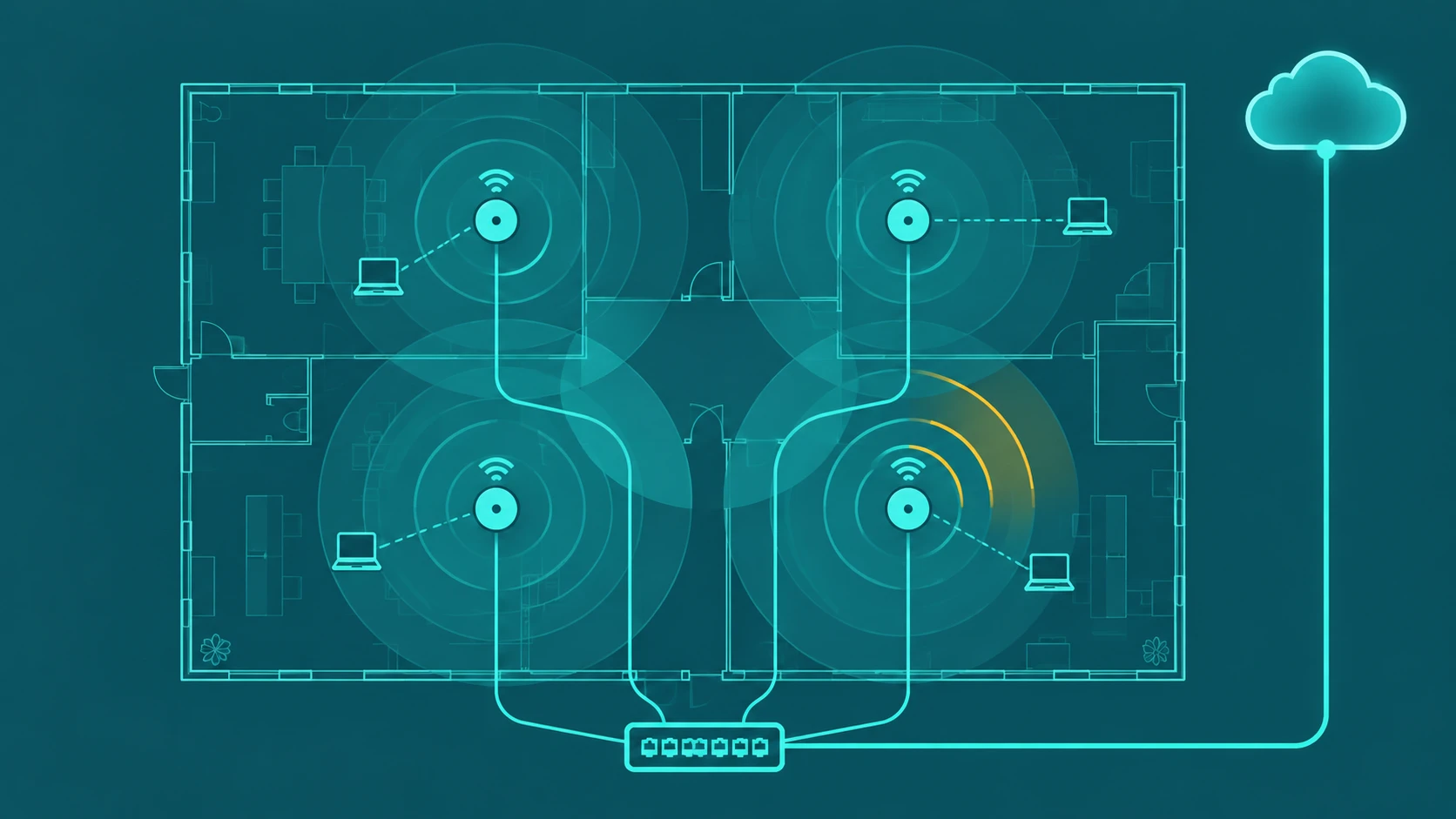
- Coverage geometry. Offices have irregular floor plans, thick walls, server room interference, and areas where reliable coverage is non-negotiable (conference rooms, reception, warehouse floors). Coverage cannot be estimated without a site survey.
- Multiple SSIDs and VLANs. Commercial environments typically segment traffic: staff network, guest WiFi, VoIP, IoT, and management traffic run on separate logical networks. This segmentation requires managed access points and switches.
- Centralized management. Commercial access points are managed from a controller (cloud-based or on-premise) that handles configuration, monitoring, firmware updates, and roaming across access points without dropping connections.
- QoS for voice. Voice calls require consistent low-latency delivery. Commercial WiFi systems support Quality of Service rules that prioritize voice traffic packets over background data, preventing a large file download from degrading a live call.
The commercial WiFi installation process
Site survey
A proper commercial WiFi installation starts with a site survey — either a passive survey (measuring existing RF environment) or a predictive survey (modeling coverage before installation). The survey identifies interference sources, wall materials and their attenuation characteristics, coverage gaps, and optimal access point placement locations. Skipping the survey is the most common reason commercial WiFi installations underperform.
Network design
Based on survey data, a network design specifies: number of access points and their placement coordinates, access point model and antenna type, SSID architecture, VLAN segmentation plan, IP addressing scheme, switch requirements, uplink bandwidth requirements, and UPS/power redundancy for critical access points.
Infrastructure preparation
Access points require power (typically Power over Ethernet — PoE) and a wired uplink to a managed switch. If the building lacks ethernet cabling to the planned access point locations, structured cabling installation (Cat6 or Cat6A) is a prerequisite. This is often the largest cost component of a commercial WiFi project in older buildings.
Access point installation and configuration
Access points are mounted at planned locations — typically ceiling-mount for even omnidirectional coverage — and configured through the management controller. Configuration includes: SSID setup, VLAN tagging, radio channel assignments (to avoid inter-AP interference), transmit power settings, and roaming thresholds.
QoS and voice traffic configuration
For businesses running VoIP over WiFi, QoS configuration is not optional. Voice packets are tagged with DSCP (Differentiated Services Code Point) values that tell the network to prioritize them. This requires QoS support at the access point, the switch, and ideally the router/firewall. A network without QoS will deliver variable call quality under load.
Testing and documentation
Post-installation testing validates: coverage across all planned areas, throughput at coverage boundaries, roaming behavior as devices move between access points, and VoIP call quality under simulated concurrent call load. Documentation of the final installation — AP placements, channel assignments, VLAN architecture — is essential for future troubleshooting and expansion.
WiFi and VoIP: the intersection businesses often miss
Cloud VoIP phone systems depend entirely on the quality of the underlying network. Voice calls are real-time traffic with tight latency requirements — typically under 150ms one-way for acceptable quality. WiFi networks that perform well for email and web browsing may fail VoIP calls in ways that are not obvious until calls are in production.
Common WiFi-related VoIP problems:
- Jitter. Variable packet delivery timing caused by network congestion or poor QoS configuration. Audible as choppy or garbled audio.
- Packet loss. Dropped packets from interference or overloaded access points. Audible as audio dropouts or clicks.
- Roaming latency. Delay when a device moves between access points. Audible as a brief audio gap. Fast roaming protocols (802.11r) reduce this.
- Co-channel interference. Multiple access points on the same channel competing. Causes retransmissions that add latency.
Businesses that install VoIP before properly designing their WiFi infrastructure frequently blame the VoIP provider for quality problems that are actually network problems. A proper commercial WiFi installation eliminates these variables before VoIP goes live.
Key specifications to understand when scoping a commercial WiFi project
| Specification | What it means | Why it matters |
|---|---|---|
| WiFi standard | WiFi 6 (802.11ax) or WiFi 6E | Better performance in high-density environments |
| Concurrent clients per AP | Devices served simultaneously | Determines AP density needed for headcount |
| PoE standard | PoE (15W), PoE+ (30W), PoE++ (60W) | Determines switch PoE budget and AP model compatibility |
| Controller type | Cloud-managed vs on-premise | Affects management overhead and monthly licensing cost |
| VLAN support | Logical network segmentation | Required for separating voice, data, and guest traffic |
What commercial WiFi installation costs
Costs vary significantly by building size, existing cabling infrastructure, and access point hardware selected. General ranges for a professional installation:
- Small office (under 2,500 sq ft, 2–3 APs): $1,500–$4,000 including hardware and labor
- Mid-size office (2,500–10,000 sq ft, 4–12 APs): $4,000–$15,000 depending on cabling runs
- Large or multi-floor space (10,000+ sq ft): $15,000–$60,000+ depending on complexity
Structured cabling (if not already installed) adds cost. Buildings with existing Cat6 runs to ceiling locations significantly reduce installation cost. Ongoing costs include cloud controller licensing ($3–8 per AP per month for managed systems) and support contracts.
Frequently asked questions
How many WiFi access points does my office need?
There is no reliable rule of thumb — access point count depends on building geometry, wall materials, device density, and the applications running on the network. A rough starting estimate is one access point per 1,500–2,500 square feet in a typical open office, but offices with many private rooms, thick walls, or high device density need more. A proper site survey replaces guesswork with data and is the only reliable basis for an access point count.
Can I run VoIP phones over WiFi in my office?
Yes — WiFi VoIP (both softphone apps and WiFi-capable desk phones) works well on a properly designed commercial network. The key requirements: QoS configured to prioritize voice traffic, sufficient access point density so WiFi VoIP devices maintain strong signal, and fast roaming support (802.11r) if devices move between access points during calls. On an improperly designed consumer-grade network, WiFi VoIP quality is unreliable. The network design comes before the VoIP deployment, not after.
What is the difference between a mesh WiFi system and a commercial access point system?
Mesh systems (Eero, Google Nest, Orbi) are designed for homes and small spaces. They use wireless backhaul between nodes — meaning the access points communicate with each other over WiFi, not a wired uplink. This reduces wiring requirements but also reduces capacity: bandwidth is consumed by backhaul traffic. Commercial access point systems use wired Ethernet uplinks for every access point, preserve full capacity for client devices, support VLANs and QoS natively, and are managed centrally. For a business with 10+ employees, commercial access point systems are the correct choice.
What should I ask a commercial WiFi installer before hiring them?
Key questions: Do you perform a site survey before designing the network, or do you estimate AP count from square footage? What access point brands do you install and why? How do you handle QoS for VoIP traffic? What management platform do you use and what does ongoing monitoring cost? What documentation do you provide at project completion? What is included in your post-installation support? A reputable installer starts with a site survey and provides a detailed network design before any hardware is purchased.