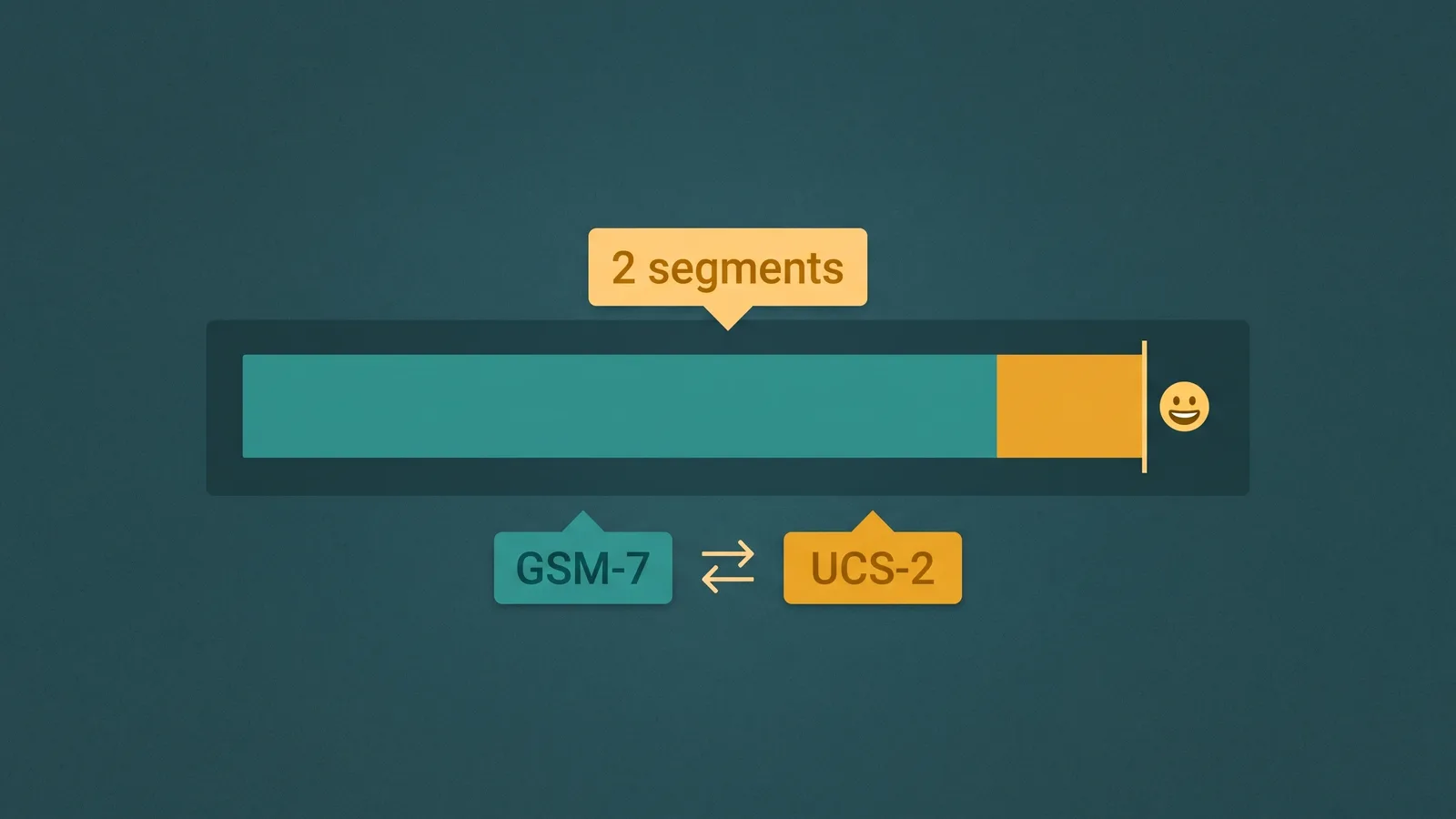
An SMS message is not simply text. Before it leaves your platform, every character is inspected against an encoding standard, and the result of that inspection determines how many message segments are sent — and therefore how much you pay. A single emoji or one curly quote copied from a word processor can switch your encoding from GSM-7 to UCS-2, cutting your per-segment character capacity nearly in half and doubling or tripling the number of segments in a long message.
This guide explains GSM-7 and UCS-2 encoding in plain terms, shows exactly how the math works for single and concatenated segments, walks through what happens when you add emoji, and covers the template characters that catch most teams off guard.
The core rule: Every SMS segment carries exactly 140 bytes of payload. GSM-7 packs 7 bits per character, fitting 160 characters into those 140 bytes. UCS-2 uses 16 bits per character, fitting only 70. Adding a single character outside GSM-7 — including most emoji — forces the entire message to UCS-2. For concatenated (multi-segment) messages, a 6-byte header in each segment reduces usable capacity to 153 characters per GSM-7 segment and 67 per UCS-2 segment.
How GSM-7 Encoding Works
The GSM 03.38 standard defines the character set used for SMS since the protocol was designed in the late 1980s. It encodes each character in 7 bits, which means 8 characters consume only 7 bytes — and a 140-byte payload holds exactly 160 characters (7 × 160 = 1,120 bits = 140 bytes).
The GSM-7 basic charset covers the characters you would expect: A–Z, a–z, 0–9, spaces, newlines, and standard punctuation like . , ! ? ( ) @ # $ % + - = * &. Less intuitively, it also includes the Greek uppercase letters used in mathematics and science — Δ, Φ, Γ, Λ, Ω, Π, Ψ, Σ, Θ, and Ξ — because SMS was designed with European telecommunications in mind.
Beyond the basic 128-character set, GSM-7 defines an extended charset accessed via an escape sequence. Each extended character consumes the escape code plus the character itself — effectively costing 2 characters of your 160-character budget. Extended characters include:
- Curly braces:
- Square brackets:
[ ] - Backslash:
\ - Pipe:
| - Caret:
^ - Tilde:
~ - The euro sign:
€
Note that the euro sign is in GSM-7 — but because it is an extended character, it costs 2 characters, not 1. A message that contains € but otherwise uses basic GSM-7 characters stays in GSM-7 encoding; it does not trigger UCS-2. You just have one fewer character available per segment than you might expect.
As long as every character in your message is from the GSM-7 basic or extended set, the message uses GSM-7 encoding and you get 160 characters per segment.
How UCS-2 Encoding Works
UCS-2 is a 16-bit encoding that covers the Unicode Basic Multilingual Plane. It is used whenever any character in a message falls outside GSM-7. One character outside the GSM-7 charset forces the entire message into UCS-2 — there is no mixed-encoding mode.
At 16 bits per character and the same 140-byte payload (1,120 bits), a UCS-2 segment holds 70 characters (16 × 70 = 1,120 bits). That is 56% fewer characters per segment than GSM-7.
Characters that trigger UCS-2 include:
- Most emoji (they are Unicode code points outside the GSM-7 range)
- Chinese, Japanese, and Korean (CJK) characters
- Arabic, Hebrew, Devanagari, and other non-Latin scripts
- Curly (typographic) quotes:
“ ” ‘ ’ - Em dash (
—) and en dash (–) - Ellipsis as a single Unicode character (
…U+2026) - Accented characters not in GSM-7 — for example,
üandñare in GSM-7, but many others are not
This last group is where most teams get caught off guard. Template content written in a word processor or copied from a rich-text email frequently contains curly quotes and em dashes. Those characters look identical to their GSM-7-safe equivalents when rendered on screen, but they carry different Unicode code points and force UCS-2 encoding on the entire message.
GSM-7 vs UCS-2: Segment Capacity at a Glance
| Encoding | Bits per Character | Chars per Single Segment | Chars per Concatenated Segment | When Used |
|---|---|---|---|---|
| GSM-7 | 7 | 160 | 153 | All characters are in the GSM-7 basic or extended charset |
| UCS-2 | 16 | 70 | 67 | Any character outside GSM-7 — emoji, CJK, Arabic, curly quotes, em dash, etc. |
Concatenation: Why Multi-Segment Messages Have Different Limits
When a message exceeds the single-segment character limit — 160 for GSM-7 or 70 for UCS-2 — the platform splits it into multiple segments and sends them separately. The receiving device reassembles them into one message before displaying it to the user, which is why long messages appear as one message on modern smartphones.
Reassembly requires each segment to carry metadata: a reference number (so the device knows which segments belong together), the total number of segments, and the position of each segment in the sequence. This metadata is carried in a 6-byte User Data Header (UDH) prepended to each segment's payload.
Because the UDH consumes 6 of the 140 available bytes, there are only 134 bytes left for character data in each segment of a concatenated message:
- GSM-7 concatenated: 134 bytes × 8 ÷ 7 = approximately 153 characters per segment (153 × 7 bits = 1,071 bits = ~134 bytes)
- UCS-2 concatenated: (140 − 6) ÷ 2 = 134 ÷ 2 = 67 characters per segment
The practical effect: a GSM-7 message of exactly 161 characters splits into two segments of 153 characters each (306 total capacity, 161 used). A UCS-2 message of exactly 71 characters splits into two segments of 67 characters each (134 total capacity, 71 used). Both cost you twice the per-segment fee.
Most carriers bill per segment, not per message. Three segments cost three times a one-segment message. There is no volume discount within a single message.
Emoji and the Segment Multiplication Effect
Emoji are the most common trigger for accidental UCS-2 encoding — and they carry an additional complication. Standard emoji in the Unicode standard are assigned code points above U+FFFF, in the supplementary planes. UCS-2 cannot represent these directly; it encodes them as surrogate pairs — two 16-bit code units per character. This means each such emoji costs 2 characters in segment-count terms, not 1.
Common emoji like 😀, 🎉, ❤️, and 👍 are supplementary plane characters. Each one consumes 2 of your 70 (or 67 in concatenated) UCS-2 characters.
Example: the cost of adding one emoji to a short message
Without emoji: "Thanks for your order! Your delivery is on the way and will arrive by 5pm today." — 83 characters, all GSM-7. Result: 1 segment.
With one emoji: "Thanks for your order! 🎉 Your delivery is on the way and will arrive by 5pm today." — The 🎉 emoji forces UCS-2. The message is now 84 characters long in text, but 🎉 costs 2 UCS-2 code units, so the segment counter sees 85 code units. The UCS-2 single-segment limit is 70. Result: 2 segments.
Adding one emoji more than doubled the segment count from 1 to 2, doubling the per-message cost.
At scale, this effect compounds quickly. A campaign sending 100,000 messages at 2 segments each costs the same as 200,000 single-segment messages. If your template originally passed segment-count testing without emoji and emoji were added later during copywriting review, the campaign budget can change substantially without anyone realizing it.
A message with three supplementary-plane emoji plus 60 characters of text would be: 3 emoji × 2 code units each = 6 code units for emoji, plus 60 text characters = 66 total. That fits in 1 UCS-2 segment (limit: 70). Add a fourth emoji and you are at 68 — still one segment. Add a fifth and you reach 70, right at the limit. Add a sixth, or make the text slightly longer, and you tip into 2 segments at 67 characters each.
The practical guidance for high-volume marketing SMS: either count segments carefully before sending, or avoid supplementary-plane emoji entirely and keep your message in GSM-7 where you have 160 characters per segment to work with.
Hidden GSM-7 Violations in Templates
The characters most likely to silently trigger UCS-2 in business messaging templates are not exotic scripts or emoji — they are punctuation characters that look correct but carry the wrong Unicode code point.
| Character | GSM-7 Safe? | Notes |
|---|---|---|
Straight double quote " | Yes | Standard ASCII quotation mark — safe |
Curly double quotes “ ” | No | U+201C / U+201D — common in word processors, forces UCS-2 |
Hyphen-minus - | Yes | Standard ASCII hyphen — safe |
Em dash — | No | U+2014 — forces UCS-2 |
Three periods ... | Yes | Three separate period characters — safe (and counts as 3 characters) |
Ellipsis … | No | U+2026 — single Unicode character, forces UCS-2 |
Euro sign € | Yes (extended) | In GSM-7 extended set — stays in GSM-7 but costs 2 characters |
Curly braces | Yes (extended) | In GSM-7 extended set — stays in GSM-7 but each costs 2 characters |
When writing or reviewing SMS templates, paste the content into a GSM-7 character checker before finalizing. Most SMS APIs also return the detected encoding and segment count in the response to a send request — review that field before launching a large campaign.
Provider Billing and Segment Counting in Practice
Most SMS carriers and CPaaS providers bill per segment. The specific billing mechanics vary, and it is worth understanding your provider's model before sending high-volume campaigns.
Some providers bill based on the number of segments at submission — meaning you pay for the segment count the platform calculates before dispatching, regardless of how the carrier handles the message at delivery. Others reconcile billing against delivery data from carrier detail records (CDRs). In practice, for well-formed messages within carrier segment limits, these approaches usually produce the same result.
Carriers typically support a maximum of 6 to 8 concatenated segments per message. Messages that exceed this limit may be truncated, rejected, or fragmented in ways that make the receiving device unable to reassemble them correctly. For most business messaging use cases this limit is not reached — a 6-segment UCS-2 message would be 6 × 67 = 402 characters, which is longer than almost any practical SMS notification or marketing message. The limit matters most for automated messages that concatenate dynamic content without character-length validation.
For international destinations, carrier behavior around concatenation can differ. Some international carriers impose lower segment limits or handle the UDH differently. If you are sending to international numbers, test with real carrier paths rather than relying solely on platform-side segment counts.
The practical takeaway is straightforward: segment count is a billing unit, not a message size limit. Every decision that affects segment count — encoding, character length, emoji use, template punctuation — is a cost decision. Build segment-count awareness into your template review and campaign QA process, not as an afterthought.
To check the segment count for your own message before sending, use the free SMS Segment Calculator — paste any message and instantly see encoding, segment count, and remaining character capacity. Extension characters and emoji are counted correctly.
Frequently Asked Questions
Understanding how encoding drives segment count is one part of managing SMS effectively at scale. For the broader picture — including number registration, consent rules, and opt-out handling — see our business SMS guide. If you are deciding between SMS and MMS for specific use cases, SMS vs MMS covers the protocol differences, media capabilities, and cost trade-offs. And for guidance on interpreting what happens after a message is sent, SMS delivery receipts explains what each carrier status actually means.