
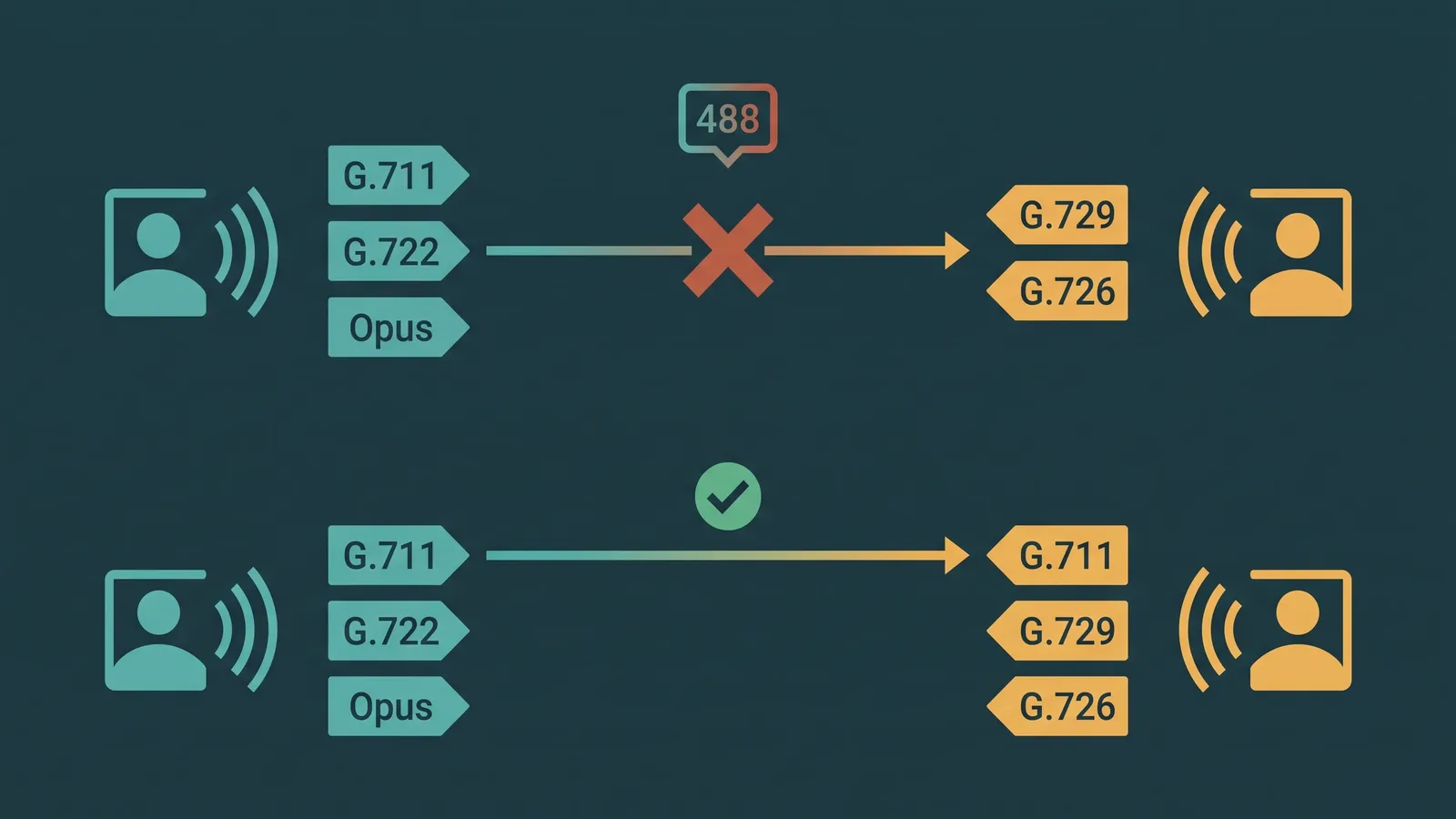
A VoIP call that fails immediately with no ringback, or a call that connects but delivers complete silence, often has the same root cause: the two endpoints tried to set up an audio session but could not agree on how to encode the voice data. That disagreement is a codec mismatch — and it happens more often than most teams expect, particularly when a new SIP trunk is introduced, when devices from different vendors are combined, or when a carrier updates its supported codec list.
Unlike network problems that cause intermittent quality degradation, a true codec mismatch is binary. Either SDP negotiation succeeds and a codec is agreed upon, or it fails and the call dies before audio begins. Understanding how SDP offer/answer works makes it straightforward to diagnose.
VoIP Codec Mismatch Defined: A VoIP codec mismatch occurs when two endpoints in a SIP call cannot find a common audio codec during SDP (Session Description Protocol) offer/answer negotiation. The caller's SDP offer lists its supported codecs; the called endpoint's SDP answer must select one codec from that list. If the endpoint supports none of the offered codecs, it returns a SIP 488 Not Acceptable Here response and the call fails. A mismatch can also occur in subtler forms: the audio codec matches but DTMF (telephone-event) negotiation fails, or a payload type conflict causes silent audio even though both sides list the same codec name.
What a Codec Is and Why It Matters
A codec — short for coder-decoder — is the algorithm that compresses voice audio into digital packets for transmission over IP networks and decompresses those packets back into audio at the receiving end. Every codec makes different trade-offs between audio quality, bandwidth consumption, processing overhead, and latency.
Two endpoints must use the same codec because the encoding and decoding algorithms must match exactly. If endpoint A encodes audio as G.729 and endpoint B is configured to decode G.711, the resulting audio is unintelligible noise — or more typically, the phone system detects the mismatch before it happens and refuses to establish the call at all.
For background on how call quality is affected by the audio path, see VoIP call quality: what affects it and fixes.
Common VoIP Codecs Compared
| Codec | Bitrate | Quality | License | Typical Use |
|---|---|---|---|---|
| G.711u (PCMU) | 64 kbps | Excellent narrowband (3.4 kHz) | Royalty-free | PSTN-compatible; universal fallback in North America (payload type 0) |
| G.711a (PCMA) | 64 kbps | Excellent narrowband (3.4 kHz) | Royalty-free | PSTN-compatible; standard in Europe and ITU regions (payload type 8) |
| G.729 | ~8 kbps | Good narrowband; slight quality reduction vs G.711 | G.729A/B patents expired ~2017; G.729.1 may still have encumbrances | Low-bandwidth links; SIP trunks where bandwidth cost is a factor |
| G.722 | 64 kbps | HD voice (7 kHz; significantly better than narrowband) | Royalty-free | Internal calls between HD-capable desk phones and PBX systems |
| Opus | 6–510 kbps (variable) | Excellent; wideband and fullband, adaptive to network conditions | Open-source, royalty-free | WebRTC, modern UCaaS softphones; not universally supported on PSTN SIP trunks |
| G.726 | 16–40 kbps | Narrowband; lower quality than G.711 | Royalty-free | Legacy DECT systems, some analog gateway scenarios |
G.711u (PCMU, payload type 0) is the universal fallback in North American business VoIP. Virtually all IP phones, PBX systems, and SIP carriers support it. If you configure nothing else, having G.711u in the codec list of every endpoint and trunk guarantees that a common codec will always be available.
How SDP Offer/Answer Works (RFC 3264)
When a SIP INVITE is sent to initiate a call, it carries an SDP body that describes what the caller can receive. This SDP offer lists the codecs the caller supports, in preference order, each identified by a payload type number. The called endpoint reads this list and selects exactly one codec from it — the codec it will use to encode audio for this call. This selection is returned in the SDP answer inside the 200 OK response.
A real SDP offer excerpt looks like this:
m=audio 10000 RTP/AVP 0 8 18 101
a=rtpmap:0 PCMU/8000
a=rtpmap:8 PCMA/8000
a=rtpmap:18 G729/8000
a=rtpmap:101 telephone-event/8000
The m=audio line lists payload types in preference order: 0 (G.711u / PCMU) is first and most preferred, then 8 (G.711a / PCMA), then 18 (G.729), then 101 (telephone-event for DTMF). The a=rtpmap lines map each payload type number to its codec name and clock rate.
The callee examines this list and selects the first payload type it supports, or sends a SIP 488 Not Acceptable Here if it supports none of the offered codecs. No common codec means no call. For a full reference on SIP response codes including 488, see SIP response codes explained.
The telephone-event entry (payload type 101, defined in RFC 2833) carries DTMF digits as named events rather than audio tones. It is treated like a codec in SDP but serves a separate function. If telephone-event is not offered and accepted by both sides, DTMF keypresses either fail silently or are sent as audio tones — which IVR systems typically cannot detect reliably.
SIP trunking and how SDP fits into the overall call setup is explained in what is SIP trunking.
What Causes a Codec Mismatch
- No common codec in the offer/answer. The caller offers only Opus and G.722 (HD codecs typical of a modern softphone). The SIP carrier or destination supports only G.711 and G.729. No codec from the offer appears in the destination's supported list. The call fails immediately with SIP 488 Not Acceptable Here.
- Restricted codec list on one side. A SIP trunk configured by the carrier allows only G.729, while the PBX prefers G.722 and Opus without G.729 or G.711 as a fallback. The mismatch is a configuration omission, not an incompatible device — adding G.711u to the PBX codec list resolves it.
- DTMF mismatch. The audio codec is agreed upon successfully, but telephone-event (RFC 2833) is not included in one side's SDP. DTMF digits from callers pressing IVR menu options are transmitted as audio tones the IVR cannot interpret — keypresses fail silently and callers cannot navigate menus.
- Fax codec conflict. T.38 (fax over IP) requires explicit negotiation in SDP. If the PBX offers G.711 for fax passthrough but the carrier requires T.38 negotiation, fax calls fail even though voice calls work. The inverse is also possible: the PBX offers T.38, the carrier does not support it, and fax fails.
- Payload type conflict. Both sides list G.711u but assign it different dynamic payload type numbers (uncommon with well-known codecs that have static types, but can occur with fax, DTMF, or proprietary codecs assigned to dynamic payload type ranges). One side sends RTP packets with payload type 96 expecting a known codec; the other interprets payload type 96 as something different.
Symptoms by Severity
Codec mismatches produce different failure modes depending on where and how the negotiation breaks down:
- Call fails immediately with SIP 488 Not Acceptable Here. This is the cleanest symptom: no codec was agreed upon at all. The call never connects. You will see the 488 response in the SIP trace directly after the INVITE. Check the SDP offer in the INVITE against the codec list of the refusing endpoint.
- Call connects but audio is completely silent on both sides (or one side). A codec was nominally agreed upon in SDP, but one side is encoding audio in a format the other cannot decode. This happens due to firmware bugs, configuration errors that declare codec support without actually implementing it, or payload type conflicts. The call log shows a successful 200 OK but the call is unusable.
- Call connects with degraded quality (muffled, robotic, or compressed audio). A gateway in the call path is performing transcoding — converting between two codecs in real time. The call works but quality is lower than expected. Transcoding adds processing delay and each encode/decode cycle introduces compression artifacts.
- DTMF digits not recognized by IVR. Voice audio works correctly but callers cannot navigate phone menus. The audio codec matched but telephone-event (RFC 2833) was not negotiated. The IVR receives DTMF as audio tones rather than named events. This is identifiable because voice works perfectly while menu navigation is completely broken.
- Fax transmissions fail even though voice calls succeed. The voice codec is negotiated successfully, but T.38 fax signaling is not supported or enabled on both ends. Fax calls time out or produce garbled output.
Transcoding: When It Helps and When It Hurts
Transcoding is the process by which a media gateway in the call path converts audio from one codec to another in real time. It allows two endpoints with no common codec to communicate — the gateway decodes the incoming audio stream from codec A, then re-encodes it as codec B before forwarding it.
When transcoding helps: a business phone that supports only Opus can call a PSTN number that understands only G.711, because the carrier's gateway transcodes between them. Without transcoding, this call would fail.
When transcoding hurts: each transcoding step degrades audio quality. Every encode/decode cycle introduces compression artifacts, particularly with lossy narrowband codecs like G.729. A single transcoding step is often imperceptible. But cascaded transcoding — where a call passes through two or more gateways that each perform their own codec conversion — degrades audio quality additively. This is sometimes called a codec cascade or tandem encoding problem. Each gateway in the chain is working correctly in isolation, but the combined effect is audibly worse audio at the destination. Transcoding also adds latency (processing time per frame) and is computationally expensive, which is why carriers sometimes bill for transcoding or limit it.
The best practice is to configure a common codec — typically G.711u in North America — that spans all endpoints in a call path. When every endpoint and trunk includes G.711u as a fallback, transcoding is avoided and quality is determined by the network path, not codec conversion overhead. For a wider look at the network factors that affect call quality, see VoIP call quality: what affects it and fixes.
How to Fix a VoIP Codec Mismatch
- Identify where the mismatch occurs. Pull a SIP trace for a failed call. Look for a 488 Not Acceptable Here response immediately after the INVITE. If you see a 488, the SDP offer in the INVITE and the codec list of the rejecting endpoint are the two things to compare. For guidance on reading SIP response codes, see SIP response codes explained.
- Compare codec lists on each endpoint. Check the PBX or phone system's configured codec preferences. Check the SIP trunk or carrier's allowed codec list (usually in the trunk configuration or carrier documentation). Note which codecs appear in both lists — if the intersection is empty, you have the root cause.
- Add G.711u (PCMU) to both sides as a universal fallback. G.711u (payload type 0) is supported by virtually all VoIP equipment and all North American SIP carriers. Adding it to the codec list of any endpoint that is missing it guarantees at least one common codec will always be available. For Europe and international trunks, also add G.711a (PCMA, payload type 8).
- Reorder codec preferences to put your preferred codec first. Endpoints negotiate using the first matching codec in the offer, in preference order. Put G.722 or Opus first if your devices support them and your carrier does too — but always include G.711u as a fallback further down the list.
- Fix DTMF: ensure telephone-event/101 is in the codec list on all endpoints. If IVR digits are failing while voice audio works, open the SDP of the INVITE for a failing call and check whether telephone-event appears in the
m=audioline. If it is missing from the PBX or endpoint configuration, add it. The payload type should be 101 on both sides. - Fix fax: enable T.38 on both the PBX and the carrier trunk. Voice codec success does not imply fax success. T.38 must be explicitly enabled on both ends. Do not rely on G.711 passthrough for fax across carriers that block or do not reliably pass audio-rate fax tones. Confirm T.38 support with your carrier and enable the re-INVITE mechanism that switches a connected call from voice to T.38 mode when a fax tone is detected.
Codec Mismatch Diagnosis Workflow
Use this sequence when a call fails or has audio problems you suspect are codec-related:
- Reproduce the failure and capture the SIP dialog (Wireshark, SIP trunk logging, or PBX packet capture).
- Locate the INVITE and open its SDP body. Note every payload type listed in the
m=audioline. - If the response is 488, open the 488 message and check any reason text. Then compare the INVITE SDP payload types against the supported codecs on the refusing endpoint — look for the gap.
- If the call connects but audio is silent, compare the SDP offer and answer. Both sides should echo back a single matching codec in their
m=audiolines. A discrepancy between what was offered and what was answered (or an outright missinga=rtpmapline) points to a configuration or firmware bug. - If DTMF is failing, check specifically for
telephone-eventin both the offer and the answer. Its absence on either side explains IVR failures. - Add the missing codec or telephone-event to the deficient endpoint's configuration, save, and re-test.


