
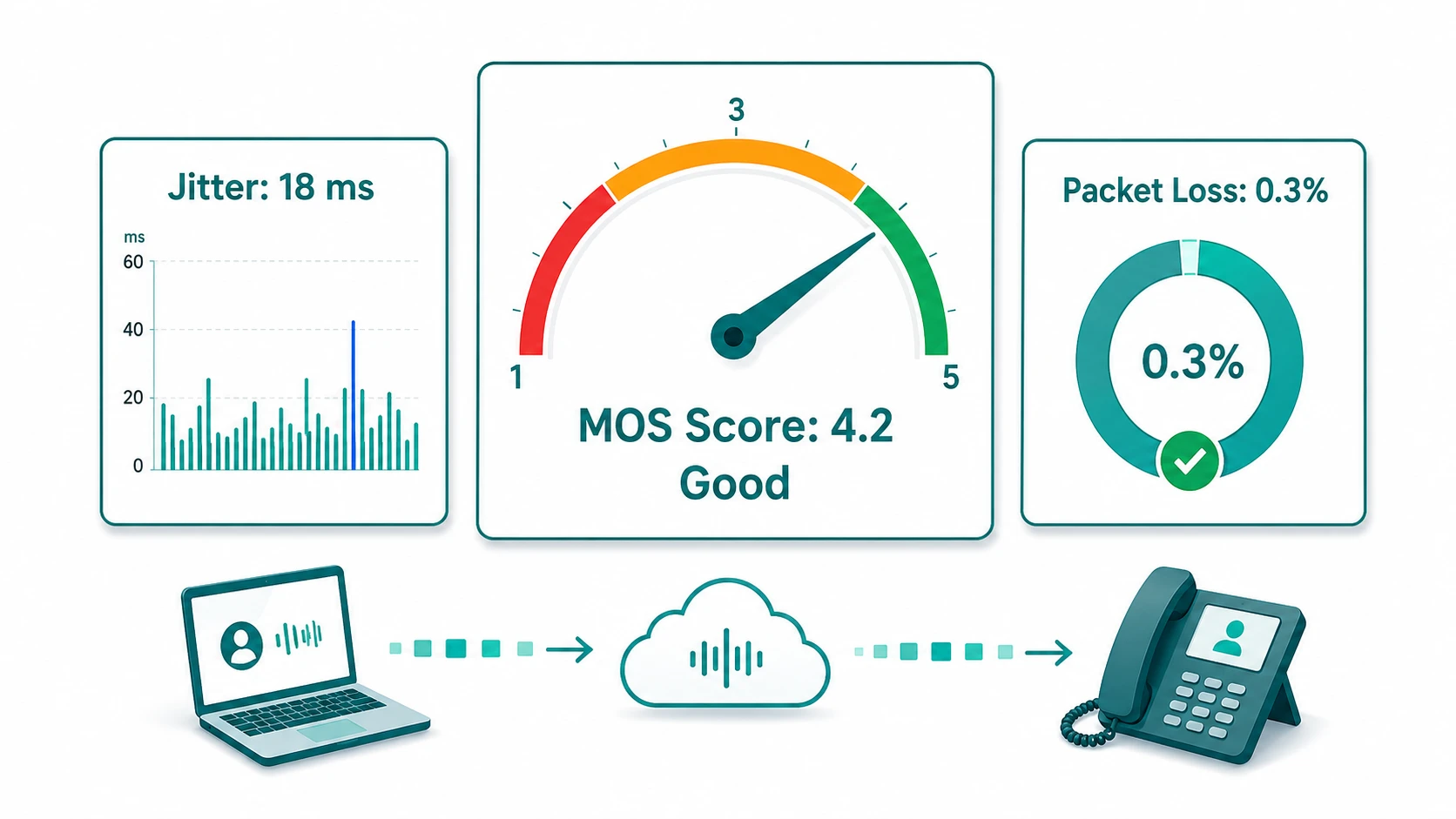
VoIP call quality is not a fixed property of a phone system — it is the net result of every network condition, codec decision, and infrastructure configuration that the audio stream passes through. Unlike traditional circuit-switched phone calls, which use a dedicated path between caller and receiver, VoIP converts audio to digital data packets that share the same IP network as email, web traffic, and everything else. When the network is well-configured and the path is clean, VoIP can sound as good as or better than PSTN. When it is not, the problems are specific and diagnosable: choppy audio, echo, one-way sound, delay, and dropped calls each have identifiable causes.
This article covers the four primary quality factors — latency, jitter, packet loss, and bandwidth — along with how codec selection affects the quality ceiling, what MOS scores actually measure, the common failure modes and their causes, and what network configuration changes typically address degraded quality.
MOS Score: Mean Opinion Score (MOS) is the ITU-T P.800 standard 1-to-5 scale for rating call quality, where 1 is bad and 5 is excellent. In practice, MOS is most commonly calculated using the ITU-T G.107 E-model algorithm — an objective measurement model rather than a panel of human listeners. A MOS of 3.6 or above is generally considered acceptable for voice calls; 4.0 and above is good. Most business VoIP implementations target a MOS of 3.6–4.2 depending on the codec in use.
Want to estimate the MOS-CQE for your own network conditions? Use the MOS Score Calculator — enter your one-way delay, jitter buffer size, codec, and packet loss to get an E-model estimate.
The Four Primary Quality Factors
1. Latency
Latency is the time it takes for audio data to travel from the sender to the receiver. In VoIP, this is typically measured as one-way delay — the time from when a packet is created at the microphone to when it plays back at the speaker on the other end.
ITU-T G.114 recommends one-way latency below 150 milliseconds for toll-quality voice calls. At this level, conversational turn-taking feels natural. As latency climbs toward and above 150 ms, callers begin to notice a slight delay in responses. Above approximately 400 ms one-way, conversations become genuinely difficult to conduct — both parties frequently talk over each other because neither can tell when the other has finished speaking.
Sources of latency in a VoIP path include:
- Propagation delay — the physical distance the data travels. Light-speed limits mean a round-trip between coasts adds roughly 30–40 ms. International calls add proportionally more.
- Processing delay — the time the codec takes to compress and decompress audio. Narrowband codecs like G.729 introduce slightly more processing delay than G.711; the difference is typically 5–10 ms.
- Queuing delay — time packets spend waiting in router buffers. In congested or improperly prioritized networks, VoIP packets can wait behind bulk data transfers. This is the most controllable source of latency within a business network.
- Jitter buffer delay — deliberate delay added by the jitter buffer to smooth out packet arrival variance. This is addressed in the jitter section below.
2. Jitter
Jitter is the variation in packet arrival times. VoIP audio is typically packetized in 20 ms chunks. Ideally, packets arrive at regular 20 ms intervals. In practice, network conditions cause packets to arrive in irregular bursts — a sequence might arrive at 10 ms, 35 ms, 12 ms, and 40 ms intervals even though they were sent at exactly 20 ms intervals.
Jitter itself does not directly cause audio quality degradation — the jitter buffer does. A jitter buffer deliberately delays playback to accumulate packets and then play them out smoothly at the correct pace. This buffer absorbs jitter variation but adds latency proportional to the buffer size. A larger jitter buffer handles more jitter variation but at the cost of more added delay. Tuning jitter buffer depth is a balance between smoothness and latency. What is a jitter buffer in VoIP explains how fixed and adaptive buffers work and how to tune them.
When jitter exceeds what the buffer can absorb, packets arrive out of order or not at all — causing choppy, robotic-sounding audio. A jitter measurement below 30 ms is generally acceptable for business voice; above that threshold, callers typically notice disruption depending on buffer configuration.
3. Packet Loss
Packet loss is the percentage of transmitted audio packets that never arrive at the destination. Voice is real-time audio — unlike a file download, lost packets cannot be simply retransmitted because the playback would already have passed the point where the missing data belongs.
Even modest packet loss causes perceptible quality problems. At 1–2% packet loss, callers typically notice brief audio gaps or clipping. At 5% or above, conversations become noticeably degraded. At 10% or above, voice quality is generally unacceptable for business calls.
Modern codecs handle packet loss differently. The Opus codec includes forward error correction (FEC) and packet loss concealment (PLC) — algorithms that reconstruct the likely audio content of lost packets based on context. This makes Opus more resilient to moderate packet loss than older codecs like G.711, which has no error concealment beyond interpolation. However, no codec fully compensates for high packet loss — it reduces the audible impact, not the underlying problem.
Common causes of packet loss include network congestion, faulty network hardware, misconfigured QoS, wireless interference (Wi-Fi VoIP calls are particularly vulnerable), and overloaded routers or switches.
4. Bandwidth
Each active VoIP call consumes a defined amount of bandwidth that depends on the codec in use. Bandwidth shortage — more calls than the network can carry — causes all three of the other quality problems: latency increases as packets queue up, jitter increases as packets compete for transmission slots, and packet loss increases as congested buffers drop packets.
The bandwidth required per call (including IP headers, RTP/UDP overhead, and the audio payload) varies significantly by codec:
- G.711 — approximately 87 kbps per call with standard 20 ms packetization and typical IP header overhead. Highest bandwidth consumption of common codecs.
- G.729 — approximately 26 kbps per call. Narrowband audio at 8 kbps, with significant compression. Useful in bandwidth-constrained environments; requires license for commercial use in some implementations.
- Opus — adaptive, ranging from approximately 6 to 510 kbps depending on configuration. For voice calls, typically configured at 20–32 kbps audio, making it very bandwidth-efficient while delivering wideband quality. No licensing fee.
- G.722 — approximately 80 kbps per call. Wideband audio (HD voice) at 64 kbps. Both calling endpoints must support G.722 for it to be negotiated.
For a business with 20 simultaneous calls using G.711, the VoIP traffic load is approximately 1.74 Mbps. This is manageable on any modern business internet connection, but must be provisioned with appropriate bandwidth headroom above baseline internet usage, and the VoIP traffic must be prioritized so it is not competing with bulk data transfers during peak usage.
Codec Selection and the Quality Ceiling
The codec determines the theoretical maximum quality of a call — the best the call can sound under ideal network conditions. A low-quality codec limits quality regardless of how clean the network path is. A high-quality codec cannot compensate for network problems, but it ensures that good network conditions produce good audio.
| Codec | Audio bandwidth | Approx. MOS ceiling | Key characteristics |
|---|---|---|---|
| G.711 | Narrowband (300–3400 Hz) | ~4.2–4.4 | Standard for PSTN interconnect, no license, high bandwidth |
| G.729 | Narrowband (300–3400 Hz) | ~3.9 | Low bandwidth, may require license, good for constrained links |
| Opus | Wideband and above (up to 20 kHz) | ~4.5 (wideband config) | Adaptive bitrate, FEC, no license, used in WebRTC |
| G.722 | Wideband (50–7000 Hz) | ~4.5 | HD voice, both endpoints must support, similar bandwidth to G.711 |
Codec negotiation is automatic in SIP-based systems: the two endpoints exchange capability lists and select the highest-quality codec they both support. If your phone system supports G.722 or Opus but the carrier or PSTN gateway only supports G.711, the call will use G.711 for the PSTN-connected leg. For more on how SIP handles this, see what is SIP trunking.
Common Quality Problems and Their Causes
Most VoIP quality complaints map to one of a small set of underlying problems:
Choppy or Robotic Audio
Choppy audio — frequent brief cuts in sound — typically indicates high jitter exceeding the jitter buffer's absorption capacity, or packet loss above 2–3%. Robotic-sounding audio (where speech sounds processed, compressed, or digitally distorted) often indicates packet loss with codec error concealment engaged, or CPU overload on a software-based phone client causing dropped audio frames during processing.
Diagnosis: measure jitter and packet loss with a network monitoring tool or through your phone system's call detail records. If both are within acceptable ranges, check CPU utilization on softphone workstations during calls.
Echo
Echo — hearing your own voice played back with a slight delay — is caused by acoustic or sidetone feedback. Acoustic echo occurs when the called party's speaker output is picked up by their microphone and transmitted back. It is most common with speakerphones or poor-quality headsets with insufficient sidetone management.
Network-induced echo can occur when latency is high enough that the audio feedback reaches the listener as a delayed copy of their own voice. Echo cancellation is a standard feature in VoIP systems but must be correctly configured and activated. Disabled or misconfigured echo cancellation is a common cause of persistent echo complaints on new VoIP deployments.
One-Way Audio
One-way audio — one party can hear the other but cannot be heard — is almost always a NAT traversal or firewall configuration issue. VoIP calls use two separate protocols: SIP for call signaling and RTP for the audio stream. Firewalls that allow the SIP signaling through but block the RTP media path produce one-way audio. Similarly, NAT devices that do not properly handle the RTP stream's source and destination ports cause the same symptom.
Remediation typically involves configuring STUN servers for NAT traversal, opening appropriate UDP port ranges in the firewall for RTP traffic (commonly 10000–20000), or disabling SIP ALG on the router — SIP ALG implementations frequently corrupt SIP packets rather than help, and most PBX vendors recommend disabling it. For a full breakdown of SDP private IP leakage, SIP ALG interference, and step-by-step fixes, see our guide on one-way audio in VoIP: causes and fixes.
High Latency and Perceptible Delay
If both parties notice a significant delay between speaking and being heard, the primary suspects are geographic distance to the SIP server or media relay, inadequate QoS causing VoIP packets to queue behind bulk data, and overly large jitter buffer settings adding unnecessary delay. Testing with a ping and traceroute to the VoIP server identifies whether the delay is in the network path or the local configuration.
Dropped Calls
Calls that disconnect unexpectedly without either party hanging up typically indicate SIP session timeout issues, network interruptions that break the signaling path, or SIP keepalive (OPTIONS) messages not being transmitted or acknowledged correctly. In some configurations, SIP Session Timers require periodic re-INVITE messages to maintain the session; if these are blocked by a firewall or timing out, the call drops at the session timer boundary.
Network Infrastructure Recommendations
The most effective interventions for improving VoIP quality are network-level changes that reduce jitter, packet loss, and queuing latency for voice traffic:
- QoS (Quality of Service) tagging — mark VoIP packets with DSCP EF (Expedited Forwarding) tag. Routers and switches that support QoS will prioritize these packets over lower-priority traffic, reducing queuing delay and packet loss under congestion. QoS must be configured throughout: the local network, the router, and ideally the ISP connection.
- Dedicated VLAN for voice — separating voice traffic onto its own VLAN isolates it from broadcast storms, large data transfers, and non-voice traffic that would otherwise compete for the same switch ports and uplink bandwidth.
- Adequate bandwidth headroom — provision internet bandwidth with significant headroom above baseline usage. Running an internet connection at 80–90% utilization consistently will cause VoIP quality problems. Sizing for peak usage plus 30–40% headroom is a common practical target.
- SD-WAN with voice-aware policies — SD-WAN platforms with application-aware routing can identify VoIP traffic in real time and route it over the lowest-latency, lowest-jitter available path, failing over to backup links before quality degrades. This is particularly relevant for multi-site businesses or organizations with high outbound call volume.
- Wired over wireless where possible — Wi-Fi introduces variable latency and jitter from wireless contention and interference. Agents who make significant call volume should be on wired ethernet connections when possible, or at minimum using Wi-Fi 6 with dedicated QoS configuration for voice. For offices deploying or upgrading wireless networks specifically to support VoIP, see the guide to commercial WiFi installation for site survey, AP placement, and QoS considerations.
Monitoring VoIP Quality
Quality problems that occur intermittently during peak hours or on specific call routes are difficult to diagnose without monitoring data. Most business VoIP platforms generate per-call quality metrics — MOS score estimates, jitter measurements, packet loss percentages, and call duration — in call detail records (CDRs).
Reviewing CDR quality data regularly allows you to identify patterns: calls to specific geographic destinations degrading, quality problems occurring at consistent times of day (correlating with internet congestion), or specific agents or office locations generating disproportionate quality complaints. Network monitoring tools that measure real-time jitter and packet loss on the network path to your SIP provider complement CDR analysis by capturing problems before they generate complaint volume.
For contact center environments where call quality directly affects customer satisfaction and agent performance, quality monitoring integrates with the broader set of operational metrics. See contact center analytics for the full picture of metrics worth tracking.
For a step-by-step diagnostic approach to UCaaS call quality problems specifically — scoping whether the issue affects one user or all, checking SIP registration, and isolating network vs platform — see the UCaaS troubleshooting guide.


