Misconfigured firewalls and NAT settings are among the most common causes of one-way audio, failed registrations, and calls that drop after a fixed interval. What makes VoIP firewall configuration genuinely harder than allowing a web application is that a single call uses two completely separate protocols — SIP for signaling and RTP for audio — and the firewall must handle both correctly, including a dynamic port range that is negotiated at call time and an address translation layer that can silently corrupt the call setup process.
This guide covers the underlying mechanics of SIP and RTP traffic, the NAT and SDP problem that causes most one-way audio, SIP ALG behavior and why disabling it is almost always the right move, firewall session timeouts, and a verification checklist to confirm your configuration is working end to end. The specific ports used in your environment must be confirmed with your SIP provider — the ranges discussed here are common defaults, but providers vary.
Why VoIP needs special firewall treatment:
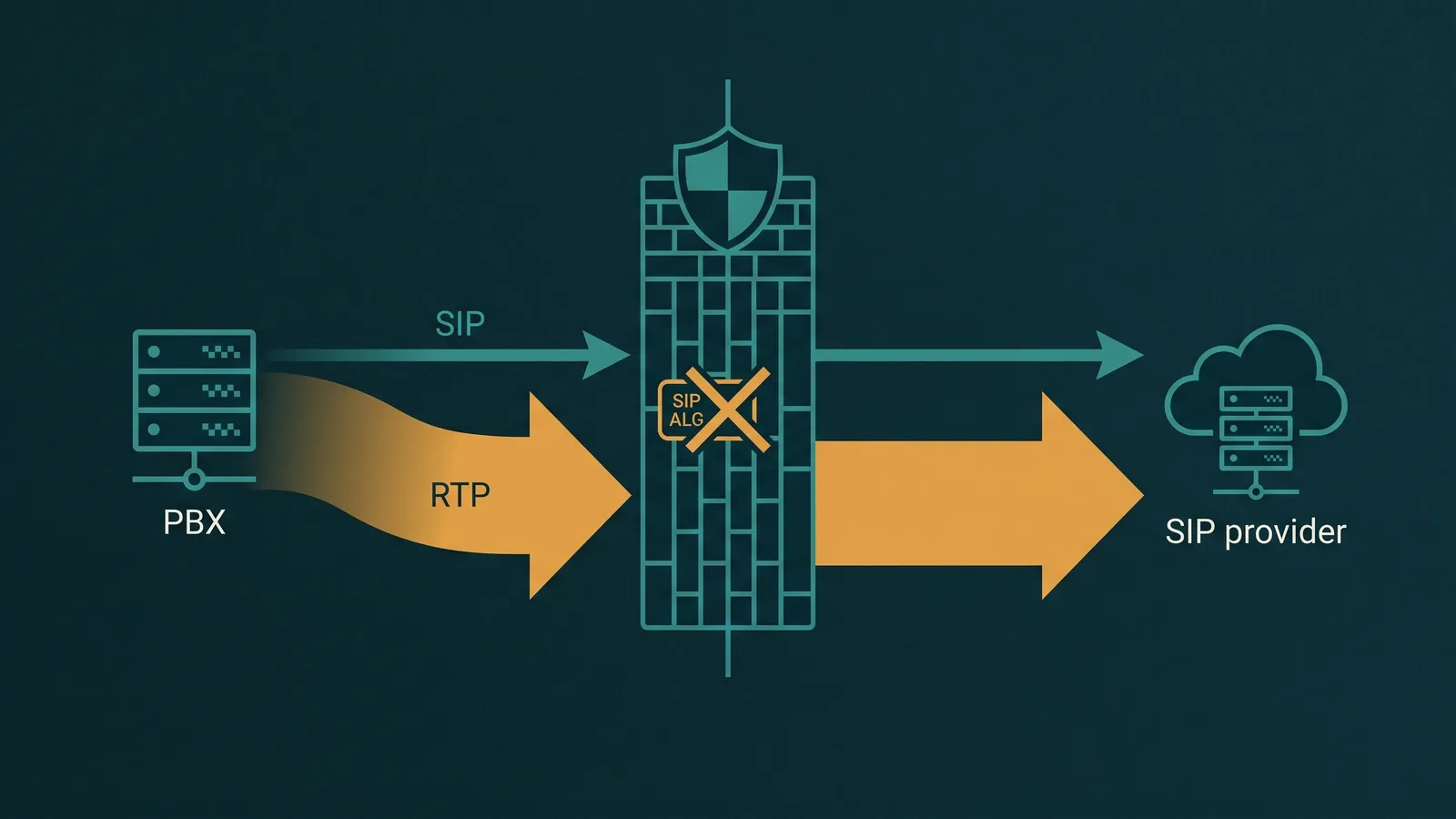
A VoIP call uses two separate protocols for two separate jobs. SIP (Session Initiation Protocol) handles signaling — the INVITE, the 200 OK, the BYE — on a known port, typically UDP/TCP 5060 or TLS 5061. RTP (Real-time Transport Protocol) carries the actual audio on a dynamically negotiated UDP port range. The RTP port and IP address for each call are embedded in the SDP body of SIP messages, not in the IP headers — so standard firewall NAT cannot see or fix them.
This two-protocol architecture means that getting SIP through the firewall is necessary but not sufficient. RTP must also be allowed, and the SDP body must contain the right (public) IP address for the far end to send audio back. Most VoIP problems blamed on "the carrier" or "the codec" are actually firewall or NAT configuration issues at the SIP/RTP boundary.
Why VoIP Is Different from Other Network Traffic
Allowing a web application through a firewall is straightforward: a browser opens a TCP connection to port 443, the firewall sees the outbound connection, and it allows the inbound responses. The protocol is one-directional in initiation and uses a fixed, well-known port.
VoIP breaks both of those assumptions. A single phone call involves:
- SIP signaling on a fixed port. REGISTER, INVITE, BYE, ACK, and OPTIONS messages travel over UDP or TCP on port 5060 (or TLS on 5061) between the PBX and the SIP provider. This part is predictable and easy to allow.
- RTP audio on a dynamic port range. Once the call is established, audio flows as UDP packets on a port range negotiated per-call in the SDP offer/answer. The range is configured on the PBX (commonly 10000–20000, or whatever the PBX administrator has set). Every call uses a different port pair from within that range. The firewall must allow the entire configured range — not just the ports used by the current call.
- RTCP alongside RTP. RTCP (RTP Control Protocol) carries quality statistics for each RTP stream. By convention, RTCP uses the port immediately above the RTP port for a given call — if RTP is on UDP 10000, RTCP is on UDP 10001. RTCP is not required for audio to flow, but some providers use it for quality monitoring.
- Bidirectional initiation. Inbound calls arrive as SIP INVITEs from the provider to the PBX — the firewall must allow unsolicited inbound SIP messages from the provider's IP ranges, not just responses to PBX-initiated requests. Most stateful firewalls can handle this with explicit inbound rules.
For the broader picture of how SIP trunks connect a business phone system to the phone network, see the SIP trunking guide.
SIP Traffic Requirements
SIP signaling is the simpler of the two protocols to configure because it uses a known port. The key requirements:
- SIP port. UDP 5060 is the most common SIP port for unencrypted signaling. TCP 5060 is used when ordered delivery is important or when the provider requires it. TLS 5061 is used for encrypted SIP (SIP over TLS, also called SIPS). Which transport and port your provider requires will be in their provisioning documentation — do not assume.
- Direction. Outbound: PBX to provider SIP server (registrar, proxy, or outbound proxy). Inbound: provider SIP server to PBX. Both directions are needed. For registration-based trunks, the PBX initiates registration and the provider routes inbound calls back to the registered Contact address.
- SIP messages that use this port. REGISTER (to authenticate with the provider), INVITE (to start a call), BYE (to end a call), ACK (to confirm call establishment), OPTIONS (keepalive and capabilities check). All of these use the same SIP port.
- Provider IP ranges. Tighten the source IP for inbound SIP to your provider's published IP ranges if they publish them. This reduces the surface area for SIP scanning attacks. See the guide on VoIP toll fraud prevention for more on why exposed SIP ports are targeted.
RTP Traffic Requirements
RTP carries the audio, and it is the layer most commonly misconfigured. Unlike SIP, you cannot simply open a fixed port — you must open the entire port range configured on your PBX or softswitch.
- RTP port range. RTP uses UDP on a range configured in the PBX — commonly 10000–20000, but the actual range is whatever your PBX administrator has set. Check your PBX's RTP settings to confirm the exact range before writing firewall rules. The firewall rules must match the PBX configuration precisely.
- Dynamic negotiation. The specific port pair for each call is negotiated in the SDP body of the SIP INVITE/200 OK exchange. There is no way to predict which port within the range a given call will use. The firewall must allow the entire configured range.
- RTCP port. RTCP uses the port immediately above each RTP port (RFC 3550 convention). If RTP is on 10000, RTCP is on 10001. If your firewall rules allow the full RTP range as a contiguous block, RTCP is implicitly included if the range includes the odd-numbered ports.
- Inbound RTP source. The source IP for inbound RTP is typically not the same as the source IP for SIP signaling — providers route media through separate media servers. If the provider publishes media IP ranges, use them. If not, allowing inbound UDP on the RTP range from any source is common practice, and is acceptable as long as the SIP signaling source is properly restricted.
If inbound RTP is blocked or the wrong port range is open, the call will connect (SIP succeeds) but audio will be one-way or completely absent. This is the most common symptom of an RTP firewall configuration problem.
NAT and the SDP Problem
Network Address Translation is where most VoIP firewall problems originate. The mechanism is straightforward in concept but has a specific failure mode that causes one-way audio and call failures.
When a PBX sits behind a NAT router (which is the case for most office deployments), its internal IP is a private address — 192.168.x.x, 10.x.x.x, or similar. When the PBX sends a SIP INVITE to the carrier, the SDP body inside the INVITE contains a connection line like c=IN IP4 192.168.1.50 — the PBX's private IP, along with the RTP port it wants to receive audio on.
The NAT router rewrites the IP headers of outbound packets — replacing the source address 192.168.1.50 with the public IP — but it does not rewrite the SDP body. The carrier receives a SIP message that appears to come from the public IP but contains an SDP connection line pointing to a private IP address that is unreachable from the internet. The carrier then tries to send RTP audio to 192.168.1.50 and either fails entirely or reaches the wrong host.
The result: the call connects (SIP signaling works fine), but audio is one-way or absent. The outbound RTP from the PBX may reach the carrier because the NAT router is tracking the outbound UDP session. But inbound RTP from the carrier goes to the private IP in the SDP and never arrives.
Solutions to the NAT/SDP Problem
- Configure the PBX external/NAT IP. Most PBX platforms have a setting labeled "external IP," "public IP," "NAT address," or similar. When set, the PBX uses this address in the SDP connection line instead of its local interface IP. The carrier receives the correct public address and can send RTP back to the right place. This is the most common and most reliable fix. The external IP must be updated if the public IP changes.
- STUN (RFC 5389). Some PBX platforms support STUN, which allows the PBX to discover its public IP automatically by querying a STUN server. The discovered public IP is then used in SDP. STUN is useful when the public IP is dynamic, but it introduces a dependency on an external STUN server being reachable and accurate.
- Session Border Controller (SBC). An SBC sits at the network edge between the PBX and the carrier. It re-originates SIP and RTP, replacing private addresses with its own public-facing IP in all SDP and signaling headers. SBCs provide the most complete and reliable NAT traversal, and also provide security, rate limiting, and media transcoding. They are standard in carrier and enterprise environments.
SIP ALG: The Most Misunderstood Firewall Feature
SIP ALG (Application Layer Gateway) is a feature found on most consumer routers and many small-business firewalls. It was designed specifically to solve the NAT/SDP problem described above: SIP ALG reads the SDP body inside SIP messages and rewrites the private IP addresses to the router's public IP.
In practice, SIP ALG does more harm than good in the vast majority of deployments. The problem is implementation quality: SIP ALG must correctly parse SIP messages — a complex, text-based protocol with many valid variations — and rewrite specific fields without corrupting others. Consumer router implementations routinely get this wrong. Common failures include:
- Corrupted Via, Contact, and Route headers. SIP ALG rewrites address fields that it should not touch, or fails to rewrite fields that it should. The resulting SIP message does not match what the PBX sent and cannot be correctly processed by the registrar or proxy.
- Registration succeeds but inbound calls fail. SIP ALG rewrites the Contact header during REGISTER, but then corrupts the Contact header in a way the provider cannot route inbound INVITEs back correctly.
- One-way audio after SIP ALG "fixes" the SDP. The ALG correctly rewrites the outbound SDP connection line, but corrupts the port, rewrites a field in the answer that should not change, or produces a malformed SDP that the far end cannot parse.
- Calls drop after 30 seconds. A specific and common symptom: the call connects, audio flows briefly, and then the call drops at approximately 30 seconds. This happens because the firewall session times out, the re-INVITE that SIP generates to refresh the session is corrupted by SIP ALG, and the call terminates. This 30-second drop pattern is one of the most reliable indicators of SIP ALG interference.
- Intermittent registration. Registration succeeds some of the time depending on message ordering, nonce handling, or which ALG code path is triggered — producing maddening intermittent failures.
The fix: disable SIP ALG on the router or firewall. Once disabled, let the PBX handle its own NAT traversal using the external IP setting or STUN. Most SIP providers list disabling SIP ALG as the first troubleshooting step for any SIP issue. It applies to virtually all consumer routers (Netgear, ASUS, TP-Link, Linksys), many SMB routers and firewalls, and some carrier-grade NAT implementations. The exact setting name and location varies by device — search for "SIP ALG" or "SIP helper" in the router's advanced settings, firewall settings, or application-level gateway settings.
If you are seeing one-way audio or calls dropping at the 30-second mark, SIP ALG should be your first suspect before investigating anything else.
Firewall Session Timeouts
Stateful firewalls track active sessions — for UDP traffic, this means maintaining a session table entry that maps the internal source and destination to an external port so that responses are forwarded correctly. UDP sessions have a timeout: if no packets are seen for a configured duration, the session entry is deleted and subsequent packets are dropped.
Consumer and SMB firewalls typically default to UDP session timeouts in the range of 30–300 seconds. This causes a specific VoIP failure mode:
- Calls on hold. When a call is placed on hold, the near end may stop sending RTP (or send it at a reduced rate). If the hold lasts longer than the firewall's UDP session timeout, the session entry for the RTP stream is deleted. When hold is released and RTP resumes, the firewall drops the inbound packets — resulting in one-way audio or a dropped call.
- Music on hold from the far end. If the far end places the call on hold and plays music on hold, the local PBX may stop sending RTP while the far end continues. If the far end RTP arrives after the session timeout, the firewall drops it.
- Silent calls. Some call scenarios involve extended periods of silence with no RTP (e.g., waiting for a response, conference dead air). If silence coincides with a session timeout, the RTP stream drops.
- SIP registration expiry. The SIP registration keepalive interval must be shorter than the firewall's UDP session timeout. If the firewall drops the UDP session for SIP before the PBX re-registers, inbound call routing fails. This is especially problematic with consumer routers set to 30-second UDP timeouts and PBX re-registration intervals set to 60+ seconds.
Fix: increase the UDP session timeout for VoIP traffic to at least 3600 seconds (1 hour). If the firewall allows per-rule timeouts, apply the extended timeout specifically to SIP and RTP traffic rather than globally. Alternatively, configure SIP OPTIONS keepalives on the PBX to send periodic traffic that keeps the session alive. Some PBX platforms support SIP Comfort Noise (CN) generation during silence to keep the RTP stream active.
Least-Privilege Firewall Rules for VoIP
A secure VoIP firewall configuration allows only the traffic required for SIP signaling and RTP audio to flow, and nothing else. The principle of least privilege applied to VoIP:
- Outbound SIP. Allow outbound UDP/TCP from the PBX IP to the provider's SIP server IP on the SIP port (confirm the exact port and transport with your provider). If the provider publishes a registrar IP and a separate outbound proxy IP, both may need to be allowed.
- Inbound SIP. Allow inbound UDP/TCP from the provider's SIP server IP range to the PBX on the same SIP port. Restrict the source to the provider's published IP ranges to prevent unauthorized SIP access from the internet.
- Outbound RTP. Allow outbound UDP from the PBX on the configured RTP range (e.g., 10000–20000) to any destination IP. The media server IP at the provider may differ from call to call — restricting by destination IP is only feasible if the provider publishes a stable media IP range.
- Inbound RTP. Allow inbound UDP on the configured RTP range to the PBX from any source IP, or from the provider's media IP range if published. "Any" is common and generally acceptable given that the port range is high and dynamically allocated per call.
- Block everything else. Deny all other inbound and outbound traffic to and from the PBX that is not covered by the above rules. In particular, do not allow general internet access from the PBX, management interfaces exposed to the internet, or unrestricted outbound UDP that could be used for SIP scanning or toll fraud amplification.
Always confirm the specific ports and IP ranges with your SIP provider's documentation before writing firewall rules. Different providers use different SIP ports, different RTP ranges, and different media server IP blocks. What is listed here as "common" is not universal.
Verification Checklist
Once you have configured the firewall and PBX settings, verify the configuration end to end before relying on it for production calls:
- Confirm SIP ALG is disabled. Log in to the router or firewall and verify the SIP ALG or SIP helper setting is off. On some devices, disabling it requires a firmware update or a CLI command — check device-specific documentation.
- Verify PBX external/NAT IP. In the PBX settings, confirm the external or NAT IP is set to the current public IP of the office internet connection. Verify this IP against the actual public IP (check via an external IP lookup from the PBX's network). If STUN is configured instead, verify the STUN server is reachable and the discovered IP is correct.
- Match RTP range in PBX and firewall. Open the PBX's RTP configuration and note the exact port range. Open the firewall rule for inbound and outbound RTP and confirm the ranges match exactly.
- Increase UDP session timeout. Verify the firewall's UDP session timeout for VoIP traffic is at least 3600 seconds. Note the current setting before changing it.
- Make a test call and put it on hold. Place a call to an external number and confirm audio flows both ways. Then place the call on hold for at least 60 seconds and confirm audio resumes correctly after taking it off hold. Hold-related audio drops are one of the clearest signs of a session timeout issue.
- Capture packets on both sides. Use a packet capture on the PBX's network interface to verify that RTP is flowing in both directions during a test call. Wireshark can decode RTP streams and display them. Absent bidirectional RTP in the capture confirms the problem is at the firewall or PBX level rather than the carrier.
- Test from outside the firewall. Have someone call in from a mobile phone or external network. Test an outbound call from the PBX to an external number. If internal-to-internal calls work but external calls have one-way audio, the issue is in the NAT/SDP layer. If neither works, the issue may be the SIP firewall rule.
- Test registration stability. Monitor the PBX registration status over a period of several hours. A registration that lapses and recovers is a sign of session timeout issues. Enable registration alerts or monitoring if the PBX supports it. See the companion guide on SIP trunk registration failure for registration-specific diagnostics.
Change Control for VoIP Firewall Rules
VoIP firewall rules are frequently casualties of security hardening exercises that close port ranges, restrict UDP traffic, or tighten outbound policies. A security review that correctly removes a broad "allow outbound UDP any" rule may inadvertently close the RTP range and break all audio without anyone connecting the change to the symptom.
- Document VoIP rules explicitly. Label firewall rules for VoIP with comments that explain what they are for, which PBX and which SIP provider they serve, and why the port range or source "any" is intentional. Without documentation, future administrators will not know these rules are load-bearing.
- Include VoIP testing in post-change validation. Any firewall change — even one seemingly unrelated to VoIP — should include a VoIP call test as part of the change validation checklist. A 30-second test call is sufficient to catch most regressions.
- Track the RTP port range as a configuration item. If the PBX RTP range is ever changed, the corresponding firewall rule must be updated at the same time. These two settings must stay in sync.
- Review after ISP changes. A new ISP or a change in public IP affects any hardcoded external IP in the PBX configuration and any IP-based SIP source restrictions in the firewall. Include a VoIP verification step in any ISP migration checklist.