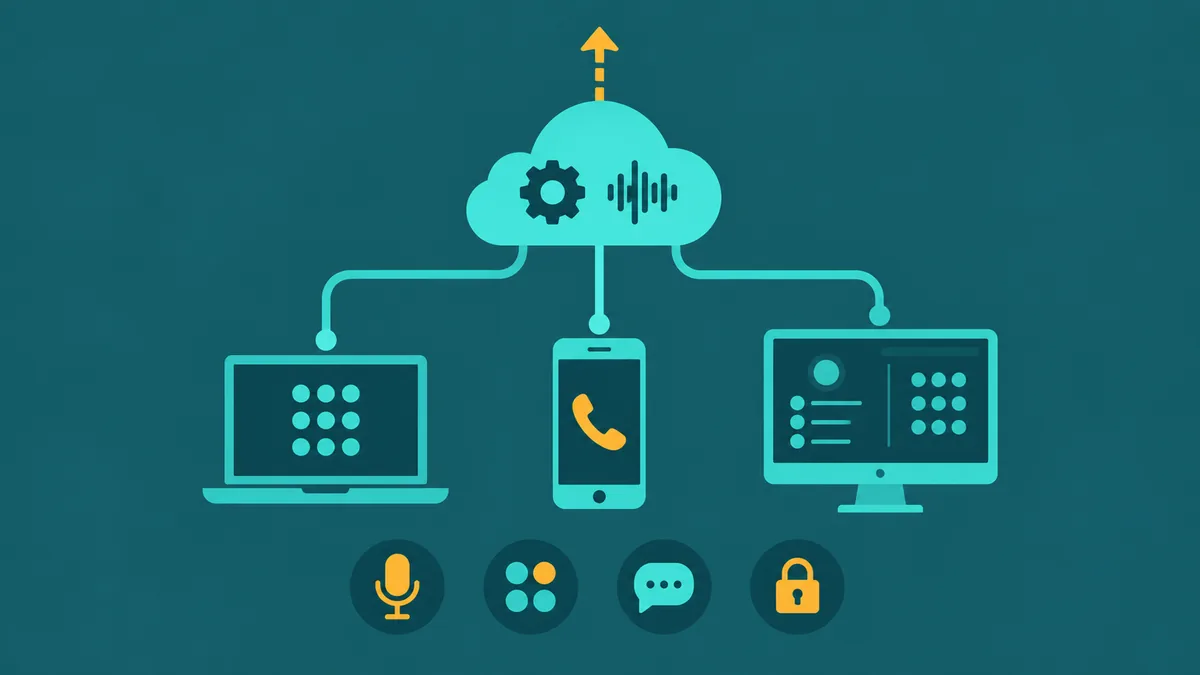
You've probably seen both acronyms while researching phone systems or contact center platforms. Vendors use them interchangeably. Marketing pages blur the line. And the features tables on their websites look surprisingly similar at first glance.
They are not the same thing. UCaaS and CCaaS solve different problems for different people inside an organization, and buying the wrong one — or assuming one replaces the other — is an expensive mistake that usually surfaces about six months post-deployment.
This article cuts straight to the distinction, shows you the feature differences in a single table, and gives you a practical decision framework so you can identify exactly which category (or combination) your situation calls for. For full definitions and deep-dives, see our UCaaS guide and CCaaS guide — this article is built for comparison and decision, not explanation from scratch.
The One-Sentence Distinction
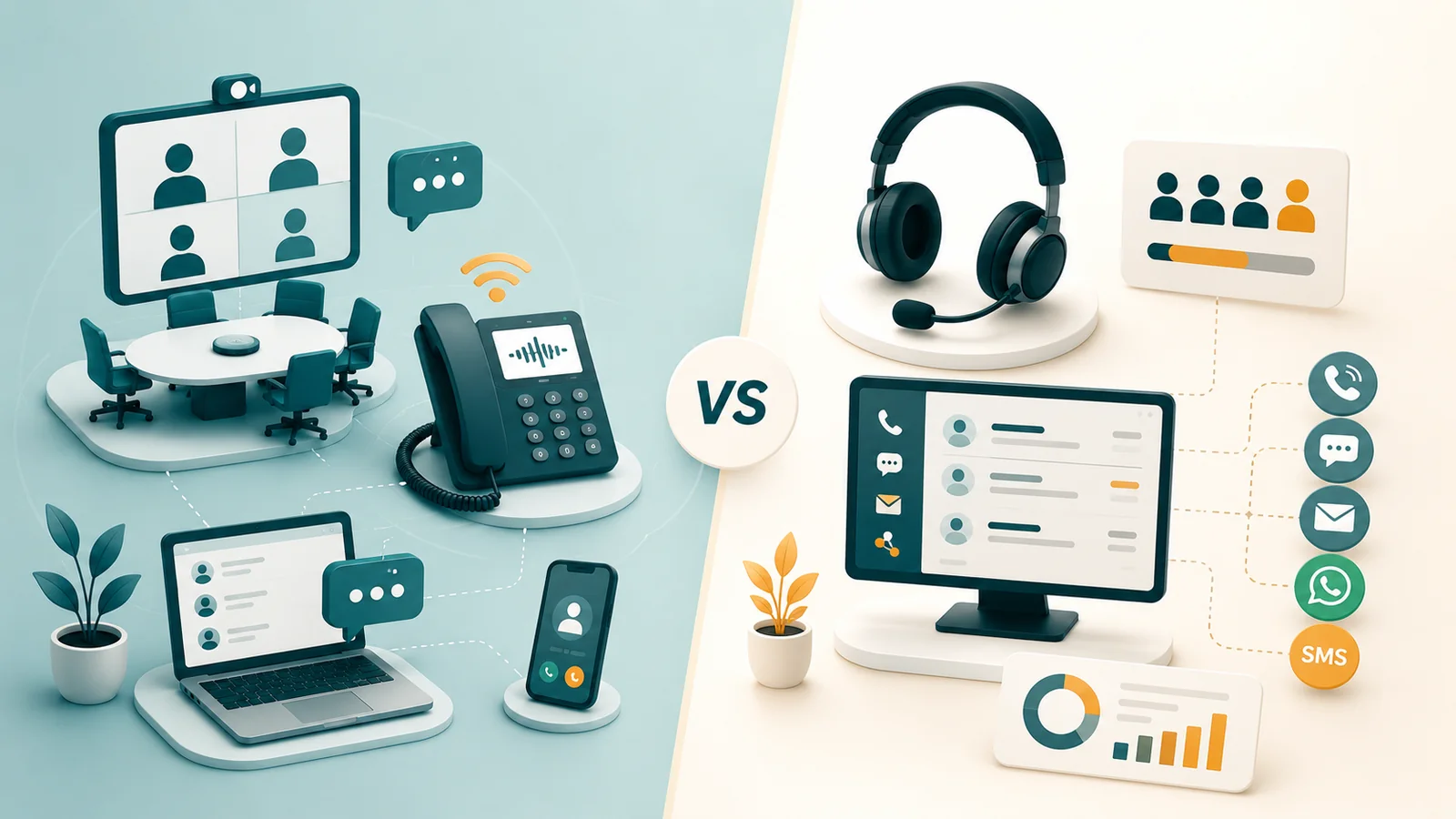
UCaaS is the communications layer for your employees — voice, video, messaging, and collaboration in one platform. CCaaS is the customer engagement layer for your contact center agents — routing, queuing, omnichannel handling, supervisor oversight, and analytics built specifically for managing customer interactions at scale.
UCaaS solves the question: how do employees communicate with each other and with the outside world? CCaaS solves the question: how does a dedicated team of agents handle high-volume inbound and outbound customer contacts efficiently?
UCaaS vs CCaaS — Full Feature Comparison
The table below covers every dimension that matters when evaluating which platform category you need. Read across a row to see where they differ. The columns describe typical UCaaS and CCaaS category capabilities — not every feature listed is available from every vendor. Verify specific capabilities with any provider you evaluate, including EaseDial.
| Dimension | UCaaS | CCaaS |
|---|---|---|
| Primary purpose | Employee collaboration and internal communication | External customer interaction management at scale |
| Primary users | All employees — sales, finance, HR, operations, remote workers | Contact center agents and supervisors |
| Call routing | Hunt groups, auto-attendant, basic call forwarding | ACD with skills-based routing, priority queuing, overflow logic |
| IVR | Basic DTMF auto-attendant (press 1 for sales, press 2 for support) | Multi-level IVR with speech recognition, NLP intent detection, back-end API integrations for self-service |
| Omnichannel | Voice, video, team chat, SMS — collaboration-oriented, not unified customer queue | Voice, chat, email, SMS, social, WhatsApp in a single unified queue with consistent routing logic |
| Supervisor tools | None | Silent listen, whisper coaching, barge, real-time wallboards, queue-depth monitoring |
| Analytics | Call logs, volume, duration per user | Agent KPIs (AHT, FCR, CSAT), queue analytics, interaction analytics, real-time and historical reports |
| Call recording | On-demand or always-on; available on mid/upper tiers | 100% recording standard; searchable transcripts; QA scoring workflows |
| Workforce management | Not included | Demand forecasting, schedule generation, real-time adherence monitoring |
| Outbound dialing | Manual outbound calling only | Preview, progressive, and predictive dialer for campaigns |
| CRM integration | Basic click-to-dial and screen pop; varies by vendor and tier | Deep CTI integration — screen pops on connect, auto-logging, embedded agent desktop inside CRM |
| AI capabilities | Meeting transcription, AI-generated summaries, voicemail transcription | Real-time agent assist, auto post-call summarization, sentiment analysis, AI voice agents, automated QA scoring |
| Quality management | Not included | AI or manual interaction scoring, calibration, coaching workflows |
| Typical price | $20–$50 per user / month (AI add-ons: $12–$39 extra) | $65–$250 per agent / month depending on tier and vendor |
| Deployment complexity | Low to moderate; self-serve setup common | Moderate to high; professional services often required for WFM, routing, CRM integration |
| Compliance features | E911 per-user registration, data residency, SOC 2 | PCI DSS (pause/resume recording), HIPAA BAA, call recording consent, GDPR right-to-erasure workflows |
How UCaaS Works — The Internal Communication Flow
A UCaaS call is straightforward. An employee opens a desktop or mobile app, dials a colleague's extension or an external number, and the UCaaS platform handles the rest: SIP signaling to the provider's proxy server, routing logic (internal extension lookup or PSTN egress via SIP trunk), and a secure SRTP media stream between endpoints. If the recipient is unavailable, the call forwards to mobile or goes to cloud voicemail with an email notification. The whole thing requires no on-premises hardware and works the same whether the employee is in the office or working remotely.
The same app handles video meetings, screen sharing, persistent team messaging, and business SMS. That consolidation — one subscription, one interface, one admin console — is the core value proposition. It replaces a legacy PBX, a separate video conferencing tool, and a team chat app.
For a deeper look at UCaaS architecture, feature tiers, and vendor comparison, see our UCaaS guide or our cloud phone system guide.
How CCaaS Works — The Customer Contact Flow
A CCaaS inbound contact follows a materially different path. The customer dials a business number (or initiates a chat). The contact arrives at the CCaaS platform, where an IVR greets them, captures intent via speech recognition, and attempts self-service against back-end systems. If the contact isn't resolved in self-service, it passes to the ACD — the routing engine that evaluates agent skills, availability, queue priority, and customer data from the CRM, then places the contact in the optimal queue.
The next available agent receives the contact alongside a CRM screen pop surfacing the customer's history. A supervisor monitors the queue in real time and can whisper coaching to the agent without the customer hearing. After the interaction, the platform triggers a post-call survey, stores the recording, auto-generates a summary, and feeds interaction data into analytics and workforce management forecasting.
None of those steps — ACD, skills-based routing, supervisor barge/whisper, real-time wallboards, post-call QA scoring, WFM forecasting — exist in a UCaaS platform. They are purpose-built for the contact center operating model.
For details on CCaaS architecture and capabilities, see our CCaaS guide or our cloud contact center guide.
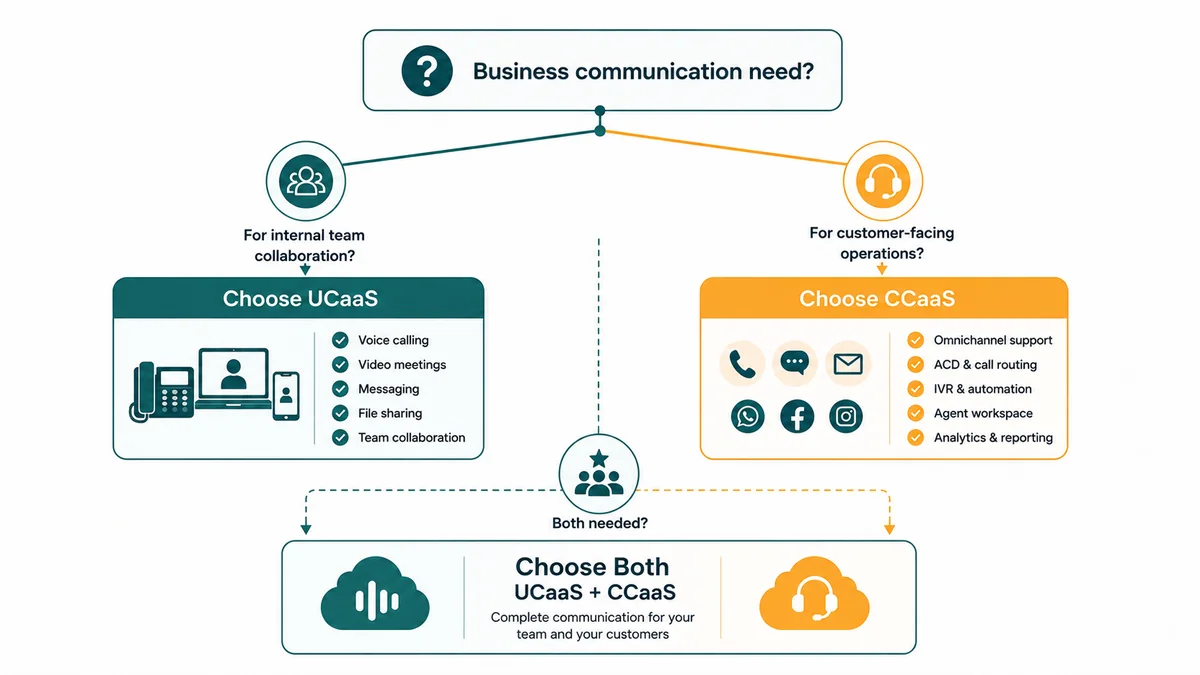
Do You Need UCaaS, CCaaS, or Both?
Work through these five questions in order. They map to the four most common outcomes.
Question 1: Does your team handle inbound customer calls in a queue?
If customers call your business and wait in a queue to be answered by an available agent, that is contact center traffic. A UCaaS auto-attendant can route a call to a department; it cannot manage a queue with priority logic, real-time visibility, or supervisor oversight. If you have five or more agents handling queued inbound contacts, you need CCaaS.
Question 2: Do you need supervisor oversight of agent interactions?
If a team leader needs to monitor live calls, coach agents without the customer hearing, or intervene in a difficult interaction, those capabilities — silent listen, whisper, barge — are CCaaS-only. UCaaS has no equivalent.
Question 3: Do agents handle customer contacts across more than one channel?
If your team handles customer emails, chat sessions, or social messages alongside phone calls, and you need those contacts routed through a single unified queue with consistent logic, that is omnichannel CCaaS. UCaaS includes team messaging, but it is not a unified customer queue.
Question 4: Do you run outbound calling campaigns?
Sales development teams, collections teams, and proactive service teams dialing lists at volume need a predictive or progressive dialer. That capability lives in CCaaS — and specifically in the dialer features of the CCaaS platform, not in UCaaS.
Question 5: Do non-agent employees also need a business phone, video, and messaging?
This is almost always yes. CCaaS is purpose-built for agents. Finance, HR, engineering, management, and field staff still need a UCaaS platform for their day-to-day communication. CCaaS does not replace UCaaS for non-agents — it complements it.
Decision outcomes
| Your situation | What you need |
|---|---|
| No dedicated customer-facing team; employees need calling, video, messaging | UCaaS only. Start with a cloud phone system and expand as needed. |
| 5+ agents handling queued inbound calls, outbound campaigns, or omnichannel contacts | CCaaS + UCaaS for non-agents. Agents need CCaaS tools; the rest of the org still needs UCaaS. |
| Fewer than 5 agents, simple inbound routing, no queue analytics needed | UCaaS with contact center add-on. Most UCaaS plans include basic call routing that may suffice at this scale. Reassess when you exceed five agents or need supervisor tools. |
| Both a customer service team and a broader employee base | Both — ideally from one vendor. Integrated UCaaS+CCaaS from a single platform eliminates integration complexity, siloed data, and dual billing. |
When Businesses Need Both — and Why Vendor Choice Matters
Most organizations with a contact center actually run both platforms. The contact center team (10% to 30% of headcount, typically) uses CCaaS. Everyone else uses UCaaS. The problem is procurement: IT often buys UCaaS independently while the contact center buys CCaaS from a different vendor. The result is two systems that don't share contact history, presence status, or analytics. When a customer escalates from the contact center to a subject-matter expert in engineering or finance, the handoff requires manual workarounds because the systems don't talk to each other.
Several vendors now offer UCaaS and CCaaS on a single platform — RingCentral (with RingCX), 8x8 (XCaaS), Zoom (Zoom Contact Center alongside Zoom Phone), Cisco (Webex Contact Center alongside Webex Calling), and Nextiva are the most established. EaseDial delivers both on one platform, with shared contact data, unified analytics, and a single admin console.
The alternative — best-of-breed from separate vendors — can work, but it requires API integration work, ongoing maintenance when either vendor updates their platform, and separate billing and support relationships. Organizations running siloed stacks report spending 20 to 30% more in total communications costs than those on a converged platform.
Gartner notes that the historical separation between UCaaS and CCaaS is dissolving at the vendor level. By 2028, Gartner projects 90% of organizations will rely on cloud platforms for enterprise telephony, and the leading cloud vendors are all moving toward unified communication and contact center offerings. For buyers, that means it's now possible to consolidate both under a single contract.
EaseDial Cloud Communications
UCaaS and CCaaS on one platform — one admin console, one bill, no integration headaches.
UCaaS vs CCaaS Pricing — What Each Platform Actually Costs
List prices rarely tell the full story. Here is what to budget for both platforms.
UCaaS pricing
| Tier | Typical monthly price | What's included |
|---|---|---|
| Entry | $15–$25 / user | Cloud PBX, unlimited calling, auto-attendant, basic voicemail, mobile app |
| Mid-tier | $25–$40 / user | Adds video meetings, team messaging, SMS, call recording, CRM integrations |
| Enterprise | $40–$65 / user | Adds advanced analytics, compliance recording, international calling, SSO |
| AI add-ons | $12–$39 / user (separate) | Meeting transcription, AI summaries, AI calling assistant — often not included in base price |
Real-world UCaaS bills climbed 15–30% between 2022 and 2026 despite flat list prices — driven primarily by AI add-on fees and regulatory surcharges. The FCC's Universal Service Fund (USF) contribution factor changes each quarter and appears as a line item on most UCaaS invoices — verify the current rate at fcc.gov when projecting annual spend. Budget accordingly.
CCaaS pricing
| Tier | Typical monthly price | What's included |
|---|---|---|
| Entry | $65–$100 / agent | ACD, basic IVR, call recording, standard reporting, email/chat routing |
| Mid-tier | $100–$175 / agent | Adds WFM, quality management, omnichannel, CRM integration, supervisor tools |
| Enterprise | $175–$250 / agent | Adds AI agent assist, speech analytics, custom reporting, advanced compliance |
| AI resolution pricing | $1.00–$2.50 per resolved contact | Outcome-based model emerging from some vendors for autonomous AI interactions |
Entry-level CCaaS from RingCentral RingCX starts around $65/agent/month; Genesys Cloud CX1 at approximately $75; Five9 entry-level Digital plan starts at $119 and Five9 Core at approximately $159. Watch for hidden costs: AI module fees, WFM licensing, recording storage, CRM connector licenses, professional services for implementation ($5,000 to $200,000+ for enterprise), and annual price escalators in multi-year contracts.
Our workforce management guide and contact center analytics guide cover contact center operating costs in depth.
Who Buys UCaaS — and Who Buys CCaaS
Understanding the buyer helps you assess which problem you're actually solving.
The UCaaS buyer: IT Director or CIO
The IT leader evaluating UCaaS is usually trying to consolidate a messy stack — a legacy on-premises PBX, a Zoom account, a Slack license, and personal mobile numbers all used for different things. Their KPIs are uptime, support ticket volume, cost per user, and number of vendors. Their frustration is managing multiple contracts and support relationships for tools that should be one platform. UCaaS solves this with a single subscription, a single admin console, and a single support relationship.
See our business phone system buyer's guide and SMB phone system guide for detailed evaluation frameworks.
The CCaaS buyer: CX Director or Operations Manager
The contact center leader evaluating CCaaS is trying to solve a different set of problems: agents can't see customer history when they answer a call, supervisors have no real-time visibility into queue performance, quality management relies on random call sampling, and the workforce is either understaffed at peak or overstaffed off-peak because scheduling is done in spreadsheets. Their KPIs are first contact resolution (FCR — industry benchmark: 70–75%), average handle time (AHT — benchmark: ~6 minutes), CSAT (benchmark: 75–84%), and cost per contact. UCaaS doesn't move those numbers. CCaaS is designed to.
For deeper coverage of contact center operations, see our guides on call routing, queue management, IVR systems, and omnichannel customer service.
Where Each Platform Falls Short
Vendor websites won't tell you this. Here is where each platform has real limits.
UCaaS limitations that matter
- Contact center ceiling. UCaaS call routing breaks down above five agents. No skills-based ACD, no supervisor barge/whisper, no queue analytics, no WFM. This ceiling is discovered six months after go-live — after agents, supervisors, and customers have experienced the gaps.
- Analytics are user-level, not operation-level. UCaaS reports tell you how many calls a user made. They don't tell you queue abandon rate, agent FCR, or CSAT. You cannot manage a contact center with UCaaS analytics.
- AI add-on costs inflate the real price. A $25/user/month plan becomes $45–$64/user/month once AI features and USF surcharges are added. The advertised price is rarely the billed price.
- No predictive dialer. Sales development teams and outbound operations cannot run dialer campaigns on UCaaS. See our dialer comparison guide for the right tool.
CCaaS limitations that matter
- Implementation complexity is real. Enterprise CCaaS deployments with WFM, custom routing, CRM integration, and compliance requirements typically take 3–6 months and require professional services. Budget for this before you sign.
- AI pricing is opaque. Genesys uses an AI Experience Token model, NICE uses module-based pricing, and some vendors charge per AI-resolved contact. Monthly spend can be difficult to predict before you have baseline volume data.
- Vendor lock-in risk is higher than UCaaS. Long-term contracts (two to three years is typical), proprietary call flow configuration tools, and closed recording formats make switching expensive. Evaluate API openness and data portability before committing.
- CCaaS does not replace UCaaS for non-agents. The 80–90% of employees who are not contact center agents still need a calling and collaboration platform. Plan for both.
Five Common Mistakes to Avoid
1. Buying UCaaS for a contact center operation. If your support or sales team has queued inbound calls and a supervisor, UCaaS will disappoint within months. The routing is adequate for simple call forwarding, not for queue management at scale.
2. Treating UCaaS and CCaaS as mutually exclusive. They serve different employee populations within the same organization. Most businesses with a contact center need both. Choosing one or the other usually means one population has the wrong tool.
3. Siloed procurement. IT buys UCaaS; the contact center buys CCaaS independently from a different vendor. Escalations from agent to subject-matter expert require manual workarounds. Presence, contact history, and analytics don't cross the vendor boundary without custom integration work.
4. Evaluating vendors on demo, not integration depth. A polished demo of a CRM integration can obscure the reality that the screen pop only works for inbound calls, auto-logging requires a paid add-on, and the connector is maintained by a third party. Ask to see the integration running live in a reference customer environment before you sign.
5. Ignoring total cost of ownership. List price per seat is a starting point, not a budget. Add AI add-ons, professional services, CRM connector licenses, WFM licensing, recording storage, USF surcharges, international calling overages, and annual price escalators. The real number is often 40–70% higher than the per-seat list price.
AI in UCaaS vs CCaaS — They Are Not the Same
Both categories now market "AI" prominently. The AI doing work in each platform is functionally different.
| AI capability | UCaaS | CCaaS |
|---|---|---|
| Meeting transcription | Yes — standard in major platforms (Teams Copilot, Zoom AI Companion) | Not applicable (no meeting use case) |
| Meeting summaries / action items | Yes — increasingly standard on mid-tier plans | Not applicable |
| Post-call summarization | Limited — voicemail transcription, some call notes | Yes — auto-generates structured call summary after every interaction; reduces after-call work 40–60% |
| Real-time agent assist | No | Yes — surfaces suggested responses, knowledge articles, next-best actions during live interactions |
| Sentiment analysis | No | Yes — monitors emotional tone in real time; supervisor alerts on distressed interactions |
| Automated QA scoring | No | Yes — AI reviews 100% of interactions against a scorecard; replaces 3–5% random sampling |
| AI voice agents (autonomous) | No | Yes — fully automated handling of routine inbound contacts without agent involvement; see our AI voice agent guide |
| Noise cancellation | Yes — standard in most platforms | Yes — standard in most platforms |
UCaaS AI improves employee productivity in meetings and calls. CCaaS AI improves agent performance and customer outcomes in real time. Gartner projects that agentic AI will autonomously resolve 80% of common customer service issues by 2029, driving a 30% reduction in operational costs. That projection is about CCaaS AI — not UCaaS. For a deeper look at where contact center AI is heading, see our AI in contact centers guide and our comparison of AI voice agents vs IVR.
Vendor Landscape — Who Offers What
Understanding which vendors operate in which category helps you shortlist before you start demos.
| Category | Leading vendors |
|---|---|
| UCaaS only | Microsoft Teams Phone, Zoom Phone, Dialpad, GoTo Connect |
| CCaaS only | NICE CXone, Genesys Cloud CX, Amazon Connect, Five9, Talkdesk |
| UCaaS + CCaaS on one platform | RingCentral (RingCX), 8x8 (XCaaS), Cisco Webex, Zoom (Zoom Contact Center + Phone), Nextiva, EaseDial |
| Developer / CPaaS | Twilio, Vonage APIs, Bandwidth, Sinch — API toolkits, not finished SaaS applications |
The 2025 Gartner Magic Quadrant for UCaaS named Microsoft, Cisco, RingCentral, and Zoom as Leaders. The 2025 Gartner Magic Quadrant for CCaaS named NICE (highest Ability to Execute), Genesys (Leader for 11 consecutive years), AWS, Five9, and Talkdesk as Leaders. If you need both categories, vendors in the third row above eliminate the integration complexity of combining a UCaaS Leader with a CCaaS Leader from separate contracts.
For security and compliance considerations across either platform, see our UCaaS security and compliance guide. For remote workforce scenarios specifically, see our remote business phone system guide.