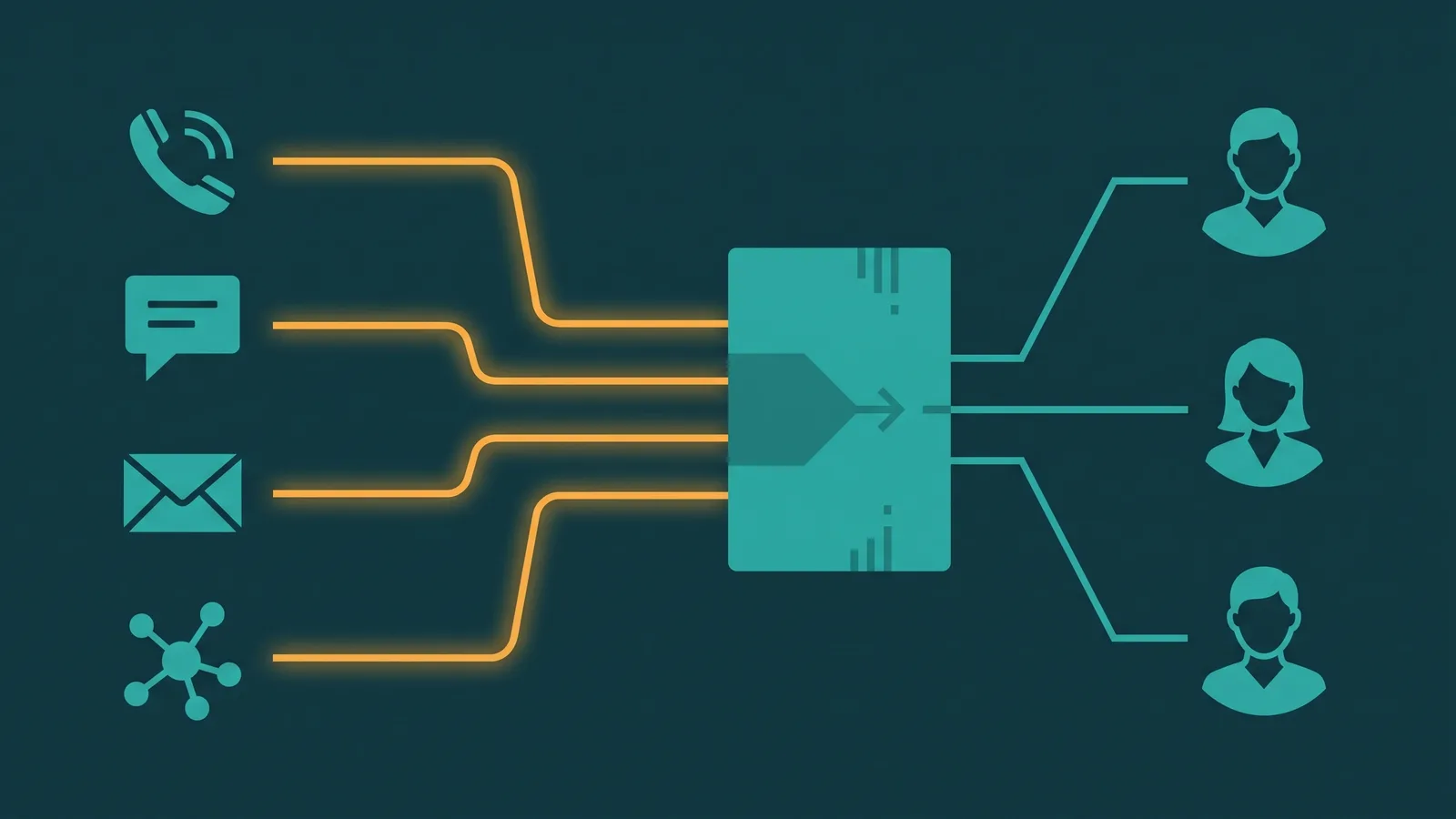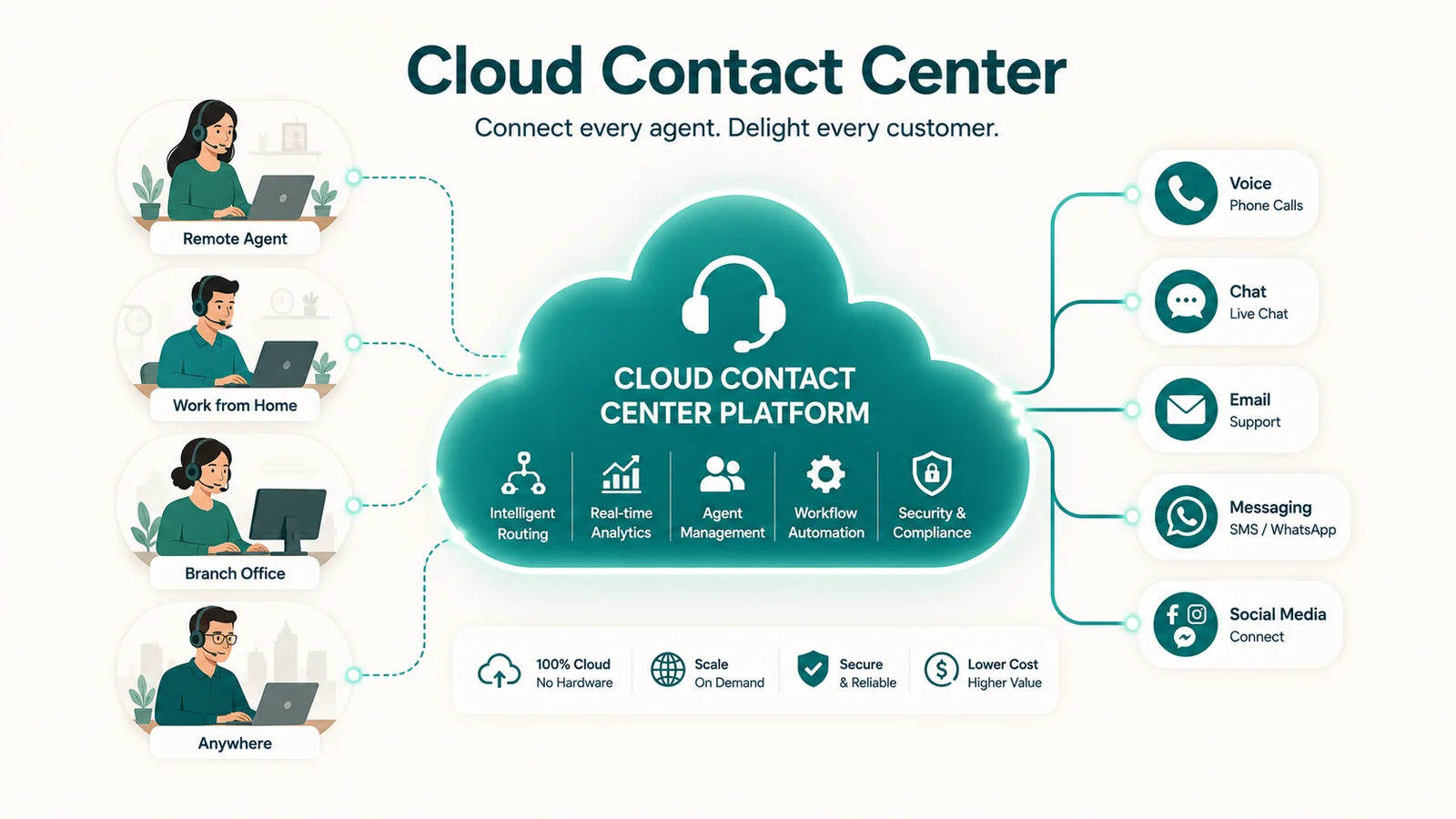
A cloud contact center is a customer service platform that a vendor hosts and businesses use over the internet. It handles voice and often other channels, such as chat, email and SMS, from one system, and agents can sign in from any internet-connected device. Most businesses move to one when a phone system alone can no longer track calls, channels and agent work.
Most businesses reach a point where a phone system alone isn't enough. Calls are missed, context is lost between channels, supervisors have no visibility into what's happening, and every new agent seat means a call to IT. A cloud contact center is the answer to that problem — but the term gets applied to everything from a basic cloud-hosted call queue to a sophisticated AI-powered platform handling millions of contacts a month.
For the broader story on the CCaaS delivery model, see our CCaaS guide. This article focuses on the contact center technology itself.
Cloud contact center, defined: A customer service platform hosted on remote servers and delivered over the internet, enabling businesses to handle inbound and outbound interactions across voice, email, chat, SMS, and social media without on-site hardware. Agents access the system from any internet-connected device. The vendor maintains all infrastructure, and the platform is purchased as a monthly subscription per agent seat — a model formally called CCaaS (Contact Center as a Service).
What makes it different from a call center or a phone system
A traditional call center is a physical operation: hardware on-site, agents tied to desk phones, calls routed through a PBX or on-premise ACD. Expanding by 20 seats means buying equipment, waiting weeks for provisioning, and involving IT throughout. Replacing it means a capital project.
A cloud phone system moves voice to the internet but remains primarily a communication tool for employees — it handles calls in and out, voicemail, transfers. It is not designed around the operational demands of a customer-facing team: there's no skills-based routing, no unified agent desktop, no real-time supervisor dashboard, no workforce management.
A cloud contact center sits above both. It is purpose-built for customer interactions at scale — managing queues, routing contacts intelligently, giving supervisors live visibility, and integrating with CRM systems so agents always have context. New seats are provisioned in hours. The vendor handles infrastructure. Features like AI quality scoring and omnichannel routing arrive as software updates, not hardware upgrades.
The distinction between a "cloud call center" and a "cloud contact center" matters too. A cloud call center handles voice. A cloud contact center handles voice, email, web chat, SMS, WhatsApp, social media messages, and video — all through the same routing engine and agent desktop, with customer context preserved across every channel.
How a cloud contact center works
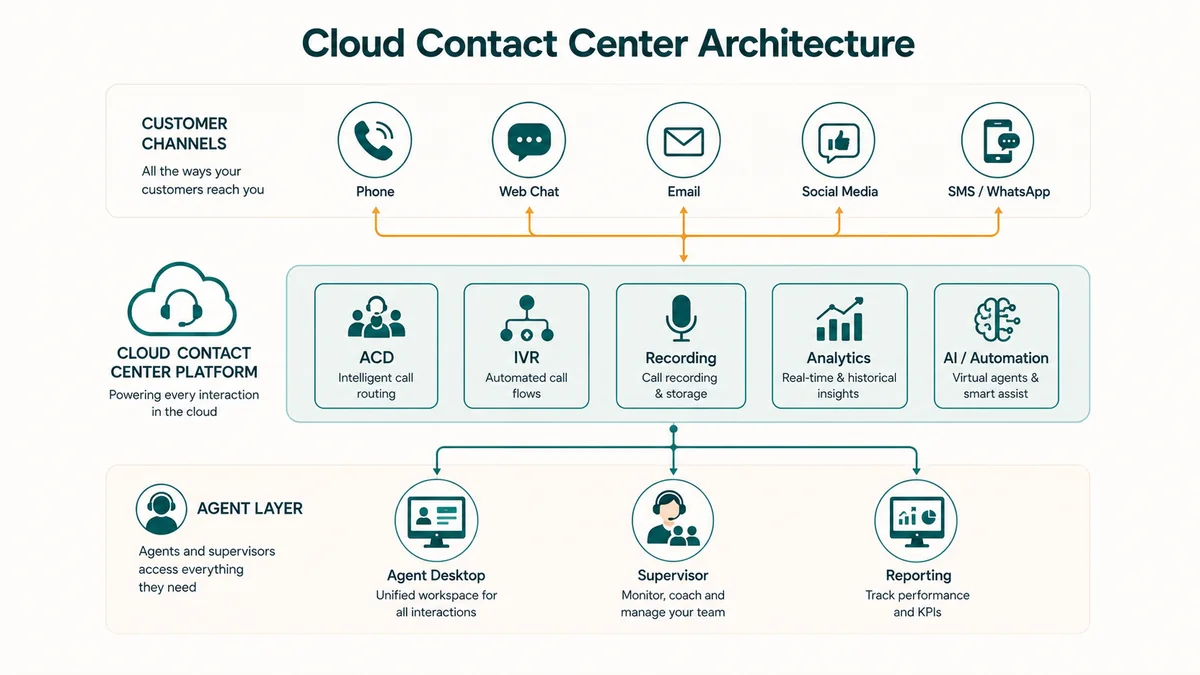
Understanding the technology makes vendor evaluation much easier. There are four layers, and knowing which one a vendor manages versus which one you configure is important.
The four-layer architecture
Infrastructure layer. The vendor's data centers — servers, networking, storage, power, and redundancy. The customer never touches this. Geo-redundant architecture with automatic failover is what makes a 99.9% or 99.99% uptime SLA possible.
Communication layer. This is how voice actually travels. Cloud contact centers use VoIP (Voice over IP): voice is digitized, compressed using codecs like G.711 or Opus, broken into data packets, and transmitted over the internet. SIP (Session Initiation Protocol) is the signaling layer that sets up, manages, and tears down voice and video sessions. SIP trunks replace analog telephone lines, connecting the platform to the PSTN so customers can dial from any phone. WebRTC (Web Real-Time Communication) lets agents use voice directly in a browser without a hardware phone or downloaded software — just a headset.
Application layer. The software that does the work: Automatic Call Distribution (ACD), IVR, omnichannel routing, the agent desktop, supervisor console, call recording, analytics, workforce management, and AI modules. This is where most vendor differentiation lives.
Integration layer. REST APIs, webhooks, and pre-built connectors to CRM platforms (Salesforce, HubSpot, Zoho), ticketing systems (Zendesk, ServiceNow), and business intelligence tools. The quality of this layer determines whether your contact center operates as a connected system or a silo.
How a contact flows through the system
From first contact to logged resolution, here is the path a customer interaction takes:
- Customer initiates contact (phone call, web chat, SMS, email, or social message)
- Contact reaches the cloud platform via PSTN/SIP trunk or direct IP connection
- IVR or conversational AI greets the customer and collects intent
- Self-service resolution is attempted — well-designed IVR deflects 20-40% of contacts
- If unresolved, ACD evaluates routing rules: agent skills, availability, customer priority, AI-predicted match
- CRM lookup retrieves the customer record and queues a screen pop for the receiving agent
- Interaction is assigned to the best-available agent (or queued with estimated wait time)
- Agent receives the interaction on the unified desktop with full customer history visible
- AI agent assist surfaces knowledge articles, compliance prompts, and next-best-action suggestions in real time
- Agent resolves the issue, or transfers with full context preserved
- Interaction ends — AI auto-generates a call summary and updates the CRM record
- Recording stored, analytics processed, workforce management adherence logged
- AI quality scoring evaluates the interaction against defined criteria
What ACD and IVR actually do
The ACD (Automatic Call Distributor) is the routing brain. The ACD and other routing terms are defined in the EaseDial glossary. It evaluates multiple variables simultaneously — agent availability, skill tags (language, product expertise, certification level), customer priority (account value, VIP status, predicted churn risk), queue depth, and historical data — and routes each contact to the most qualified available agent. AI-enhanced ACDs add predictive routing: ML models match customers to agents whose profiles have historically produced better outcomes for that customer type.
IVR (Interactive Voice Response) is the self-service layer before the agent. Traditional IVR uses touch-tone menus. Modern conversational IVR uses speech recognition and natural language processing to understand open-ended requests — "I need to update my billing address" rather than "Press 3 for account changes." This matters because a well-designed self-service layer reduces agent workload and improves customer experience simultaneously. For a deeper look, see our IVR system guide.
Key components of a cloud contact center
| Component | What it does |
|---|---|
| ACD | Routes incoming contacts to the right agent based on skills, availability, and priority rules |
| IVR | Handles self-service intent collection and routine requests before routing to a live agent |
| Omnichannel routing engine | Manages a unified queue across voice, email, chat, SMS, and social — with context preserved across channel switches |
| Agent desktop | Unified interface showing all channels, customer history, AI suggestions, and CRM data in a single view |
| CRM integration | Screen pop showing full customer record at the moment a contact is answered; bidirectional data sync |
| Call recording | Captures and stores interactions for QA, compliance, and agent coaching; encrypted at rest and in transit |
| Analytics and dashboards | Real-time queue depth, agent status, SLA adherence; historical reporting and custom KPI tracking |
| Workforce management (WFM) | Forecasting, scheduling, intraday management, and adherence tracking — built-in or integrated with specialist tools |
| Supervisor console | Live monitoring with silent listen, whisper-to-agent, and barge capabilities; real-time wallboard view |
| Outbound dialing | Preview, progressive, and predictive dialing modes for sales and outreach campaigns |
Cloud contact center vs. on-premise: what actually differs
| Dimension | Cloud contact center | On-premise contact center |
|---|---|---|
| Infrastructure | Vendor-managed remote servers | Customer-owned on-site hardware |
| Deployment time | Days to weeks | 2–6 months |
| Upfront cost | Low — subscription model, no hardware | High — servers, PBX, licenses, cabling |
| Ongoing cost | Predictable per-agent monthly OpEx | IT staff, maintenance, hardware refresh every 5–7 years |
| 5-year TCO | 30–50% lower for equivalent capability (Infobip, 2025) | Higher, especially when hardware refresh cycles are included |
| Scalability | New seats in hours; elastic for seasonal spikes | Hardware-bound; weeks to months for expansion |
| Remote agents | Native — browser and headset is sufficient | Requires VPN, remote access configuration, hardware |
| Feature updates | Automatic, continuous — no IT deployment required | Manual IT project per update cycle |
| AI capabilities | Native, subscription-based — included in platform tiers | Expensive third-party add-ons; integration complexity |
| Data control | Shared-responsibility model; vendor secures infrastructure | Full control; full responsibility |
| When it makes sense | Most new deployments and migrations | Recent major CapEx investment; strict data sovereignty; highly specialized customization needs |
67% of contact centers now run on cloud platforms, up from 45% in 2020. On-premise still makes sense in specific cases — a regulated government agency that recently made a major infrastructure investment, or an organization with strict data sovereignty requirements that a vendor's multi-tenant infrastructure cannot satisfy. For most other organizations, the economics and operational flexibility of cloud win the comparison.
What AI actually does in a cloud contact center today
AI in contact centers is a topic surrounded by vendor claims that don't always match reality. Here is what is actually available and being used at scale in 2025–2026:
Conversational AI virtual agents handle routine contacts fully without a human: account lookups, appointment scheduling, password resets, payment collection. Gartner estimates these handle roughly 10% of interactions fully as of 2026, up from under 2% in 2022. Vendors routinely claim higher rates — the right question is what percentage of interactions your specific contact types actually resolve without escalation.
Real-time agent assist is where AI delivers the clearest, most consistent value today. During a live call, AI retrieves relevant knowledge base articles, surfaces compliance scripts, and suggests next-best actions — displayed to the agent without the agent needing to search. This reduces handle time and error rates without changing the customer experience at all.
Auto-summarization generates structured post-call notes and populates the CRM automatically after each interaction. This saves 3–5 minutes per interaction in wrap time. At 200 contacts per day across a 50-agent team, that's meaningful.
Sentiment analysis detects customer frustration from voice tone and word patterns in real time, alerting supervisors when a call is trending toward escalation before it actually does.
AI quality scoring evaluates 100% of recorded interactions against defined criteria. Manual QA sampling covers 1–3% of contacts. The difference in coaching coverage is significant.
AI in contact centers goes deep on the role AI plays across the contact center.
Omnichannel versus multichannel — why the distinction matters
Many contact center platforms claim to be omnichannel. Not all of them are. The practical test: if a customer starts a chat, abandons it, and calls back 10 minutes later, does the agent see the chat transcript when the call connects? If not, the platform is multichannel — separate queues per channel, no shared context.
True omnichannel routing uses a single unified queue. Contacts from all channels — voice, email, chat, SMS, WhatsApp, social media — flow through the same routing engine, carry the same customer context, and can be transferred between channels without the customer repeating themselves. Agents see the full conversation history regardless of which channel a customer used.
This matters because customers don't think in channels. They think in problems. A customer who emailed yesterday and calls today expects you to know both. For how routing logic works across channels, see our call routing guide and omnichannel customer service article.
EaseDial Contact Center
Voice, chat, SMS, and AI routing in one platform — no hardware, no IT project
Operational implications of the cloud model
Cost reductions from cloud are concrete: VoIP-based platforms eliminate analog line charges, elastic scaling eliminates hardware procurement for seasonal peaks, and automatic software updates eliminate IT deployment cycles. Over a five-year horizon, cloud CCaaS delivers 30–50% lower total cost of ownership compared to on-premise equivalents (Infobip, 2025).
Deployment speed is measurably different. A cloud contact center can be operational in days to weeks. An on-premise implementation typically takes 2–6 months for equivalent capability. For a business that needs to stand up a new customer service team or respond quickly, that timeline difference is material.
Remote work support is also genuinely different with cloud. An agent needs a browser, a headset, and a reliable internet connection — no VPN tunneling, no desk phone, no physical location dependency. This opens hiring to any geography and makes business continuity simpler.
Limitations and risks worth knowing before you buy
Cloud contact centers have real constraints. The most fundamental is internet dependency. VoIP quality degrades when packet loss exceeds 1%, jitter exceeds 30ms, or round-trip latency exceeds 150ms. A vendor's 99.9% uptime SLA covers their infrastructure — not your ISP, not your internal network, and not the SIP carrier connecting you to the PSTN. The full reliability chain includes every link, and each one can fail independently.
Total cost of ownership is consistently higher than advertised prices suggest. The per-agent subscription is the floor, not the ceiling. Professional services for implementation ($5,000–$50,000+), custom CRM integration development, AI feature add-ons priced separately from the base license, premium support tiers, and training costs all add up. Request a 3-year TCO model that includes every line item, not just the headline price.
Migration is more complex than vendors typically describe. Number porting takes 2–4 weeks. Data migration requires CRM record cleaning before you move. Compliance configuration — call recording consent rules, PCI pause-and-resume for payment calls, HIPAA access controls — must be set up correctly before go-live. 64% of businesses report that switching CCaaS providers was more challenging than they expected (NobleBiz, 2025). Plan for 4–12 weeks minimum.
Vendor lock-in is a real risk. Proprietary data formats, closed recording storage, custom IVR scripts that must be rebuilt from scratch on a new platform, and long-term contracts with auto-renewal clauses all increase the cost of leaving. Before signing, confirm: what does data portability look like at contract end? What does your call recording export process look like? Is the API open and documented?
Security operates on a shared-responsibility model. The vendor secures the infrastructure; you are responsible for access controls, MFA configuration, data retention policies, and third-party integration permissions. Gartner found that 99% of cloud security breaches through 2025 were caused by customer-side misconfiguration, not vendor infrastructure failure.
Deployment scenarios by company size and industry
Cloud contact centers are not one-size-fits-all — what makes sense for a 15-agent e-commerce brand is different from what a 500-agent financial services firm needs.
Small and mid-size businesses (1–100 agents)
A 15-agent e-commerce operation handling order inquiries, returns, and shipping questions across phone and chat can scale to 40 agents for peak season in 48 hours, then return to 15 — impossible with on-premise hardware. Healthcare clinics managing appointment scheduling and prescription routing benefit from automated IVR that handles routine requests without agent time. SaaS companies running distributed support teams across time zones get a fully remote-native platform without VPN overhead.
For SMBs evaluating whether they need a full contact center or a cloud phone system, see our SMB phone system guide.
Mid-market (100–500 agents)
Financial services firms routing calls by product type — mortgages, investments, fraud alerts — with compliance recording for every interaction. Insurance companies integrating the contact center with Salesforce to surface full policy context at call answer. Regional banks migrating from Avaya on-premise to cloud and enabling 60% of agents to work from home within 90 days of go-live.
Enterprise (500+ agents)
Global operations across 15+ countries on a single platform with regional data residency. BPOs managing multiple client brands with separate routing, reporting, and branding per client. Large retailers handling 10x normal volume during peak season through cloud elasticity without a single hardware purchase.
Regulated industries
Healthcare deployments require HIPAA compliance: the vendor must sign a Business Associate Agreement (BAA), and single-tenant (dedicated-instance) deployments are often preferred for the additional control they provide. Financial services require PCI DSS Level 1 certification and recording pause-and-resume for card number capture. Government deployments frequently require FedRAMP authorization — verify each vendor's current authorization status directly with the vendor or at marketplace.fedramp.gov, as authorization scope changes over time.
What to evaluate when choosing a platform
Ten dimensions worth examining before signing anything:
- SLA and published reliability record. Minimum 99.9% uptime for most contact centers; 99.99% for enterprise. Ask for incident history, not just marketing SLAs. Confirm the SLA covers the full service, not just the infrastructure layer.
- True omnichannel or multichannel? Test context persistence across a live channel switch during the demo. Ask directly: is there a single unified queue or separate queues per channel?
- AI architecture — native or bolted on? AI features built into the routing engine and agent desktop outperform third-party integrations retrofitted onto legacy platforms. Ask directly: where does the AI model run, and is it trained on your interaction data?
- CRM integration depth. Pre-built connector to your CRM (Salesforce, HubSpot, Zoho). Screen pop latency under 2 seconds. Bidirectional sync — not just read-only display. Open API documentation.
- Full pricing including add-ons. Request a 3-year TCO model including implementation, integration, training, AI features, PSTN minutes, and support tier. The advertised per-agent price is always the floor.
- Compliance certifications relevant to your industry. SOC 2 Type II audit report (third-party, not a marketing badge). PCI DSS Level 1 if handling payments. HIPAA BAA willingness for healthcare. FedRAMP authorization for government.
- Support quality. 24/7 live support (not just ticket submission). P1 critical SLA for response time. Dedicated customer success manager for enterprise accounts.
- Number porting process. Ask how many porting failures they've had in the past quarter, and what the escalation path is when porting goes wrong. Porting support quality varies dramatically across vendors.
- Analytics and export capability. Real-time dashboards with configurable KPIs. Historical reporting. API or native connector to your BI tooling. You own your data — confirm what data portability looks like.
- Contract terms and exit provisions. Seat reduction flexibility in off-peak periods. Data portability at contract end. Auto-renewal notice periods. Termination fee structure.
For a detailed look at the software platforms that power cloud contact centers — feature comparisons, key capabilities, and what to look for — see our contact center software guide and call center software guide.
For a deeper look at the vendor landscape, Gartner's 2025 Magic Quadrant for CCaaS named NICE, Genesys, AWS (Amazon Connect), Five9, and Talkdesk as Leaders. Each has distinct strengths: NICE leads on strategy score; Genesys on current platform capability; Amazon Connect on consumption pricing for developer-led teams; Five9 and Talkdesk on regulated-industry vertical packaging. Vendor selection should start with your own requirements, not the quadrant position.
Trends shaping cloud contact centers in 2025–2026
Agentic AI moving from pilot to production. Gartner projects that AI will autonomously resolve 80% of common service issues by 2029. That is a long-range target, not today's reality — but the direction is established. The gap between current automation (~10% of contacts) and that projection will close through incremental improvements to AI reliability and fallback design.
AI-to-AI interactions becoming a real design challenge. Customers are beginning to use their own AI assistants — ChatGPT, Copilot — to interact with company IVRs and chatbots on their behalf. This changes what good self-service design means. Flows optimized for human callers handle machine callers poorly.
UCaaS and CCaaS converging. RingCentral, Cisco, Zoom, and Microsoft are integrating contact center capabilities into their unified communications platforms. For mid-market buyers, this creates a real option: one platform for internal communications and customer-facing operations, rather than two separate vendor relationships. For more, see our UCaaS vs. CCaaS comparison.
Synthetic voice fraud becoming a contact center security problem. One in three US consumers encountered AI-generated voice fraud in Q4 2024. Contact centers are deploying voice biometric verification and synthetic voice detection to counter social engineering using cloned voices.
AI quality scoring replacing manual sampling. The shift from evaluating 1–3% of interactions manually to scoring 100% automatically is underway at most leading platforms. The coaching coverage improvement is significant, particularly for compliance in regulated industries.