
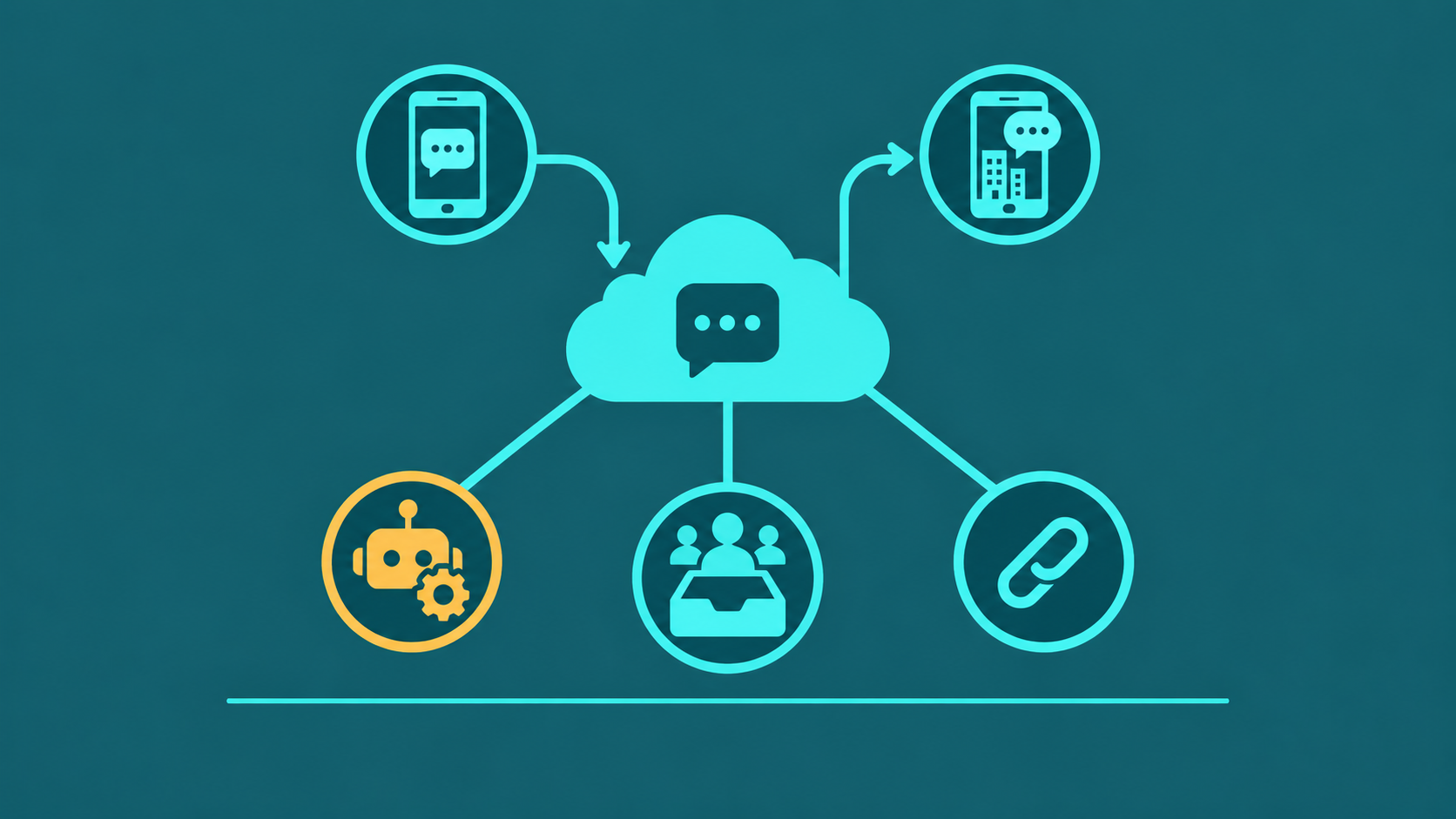
An SMS answering service routes incoming text messages to agents or automated workflows — handling customer inquiries, appointment confirmations, and support tickets without requiring a phone call. As consumer preference for text-based communication has grown, businesses across healthcare, retail, service trades, and real estate have adopted SMS answering services to capture leads and resolve issues faster than voice-only support allows.
This guide covers how SMS answering services work, how they compare to voice answering services, key features to evaluate, and real-world use cases by industry.
An SMS answering service routes incoming text messages to a shared team inbox, an automated bot, or a combination of both — enabling businesses to respond to customer texts at scale without a dedicated human operator on every message.
What Is an SMS Answering Service?
An SMS answering service is a platform or managed service that receives inbound text messages sent to a business phone number and handles them through automated replies, live agent routing, or a hybrid of both. It differs from a voice answering service in the medium: instead of a human agent answering phone calls, the service manages written text exchanges.
Unlike a traditional answering service — where a human answers every call and relays messages — an SMS answering service can triage and resolve a large share of incoming messages automatically using keyword triggers and pre-built responses. Messages that require human attention are escalated to an agent in a shared inbox, where any available team member can respond.
The key distinction from a basic business texting tool is the answering layer: routing logic, auto-reply rules, availability hours, and escalation paths that ensure every inbound message receives a timely response rather than sitting unread in a single employee's inbox.
How SMS Answering Services Work
When a customer texts a business number, the SMS answering service platform receives the message and evaluates it against configured routing rules. The workflow typically follows three stages:
- Inbound routing. The platform identifies the sending number, looks up whether that contact exists in a connected CRM, and routes the message to the appropriate queue — by department, keyword, or time of day. A text to a healthcare line at 2 a.m. might route to an after-hours auto-reply; the same message at 9 a.m. routes to the front desk queue.
- Auto-reply and keyword triggers. Many inbound messages contain predictable intents — appointment confirmations, hours of operation requests, pricing inquiries. Auto-reply rules match keywords or phrases and send an immediate response without agent involvement. This handles 30–60% of inbound volume in most deployments, depending on message type.
- Shared inbox and agent handling. Messages that do not match an auto-reply rule — or that require a human judgment call — appear in a shared team inbox. Any agent with access can claim and respond to the conversation. The shared inbox prevents duplicate replies and gives supervisors visibility into response times and volume.
Most platforms integrate with business phone systems, so the same number that receives voice calls also receives texts — giving customers a single point of contact regardless of how they choose to reach the business.
SMS vs Voice Answering: When Each Makes Sense
SMS and voice answering are not mutually exclusive — most businesses benefit from both. The choice of which channel handles a given scenario depends on urgency, complexity, and the customer's context.
| Scenario | SMS Answering | Voice Answering |
|---|---|---|
| Appointment confirmations and reminders | Ideal — automated, scalable, low agent cost | Possible but slower and agent-intensive |
| Complex billing or account disputes | Works for initial triage; may escalate to voice | Preferred for nuanced back-and-forth |
| After-hours inquiries | Captures lead, sends auto-reply, queues for morning | Requires on-call staff or answering service contract |
| Order status and shipping updates | Ideal — high volume, templated responses | Inefficient at scale |
| Emergency or urgent safety issues | Not recommended as sole channel | Required — real-time human response essential |
The practical takeaway: SMS answering excels at high-volume, repeatable message types where a fast written response is sufficient. Voice answering remains the right channel for urgent, emotionally charged, or legally sensitive conversations where tone and real-time responsiveness matter.
Key Features to Look For
Not all SMS answering platforms are equivalent. These seven features separate capable platforms from basic business texting tools:
- Shared team inbox. All inbound texts arrive in a single workspace visible to the whole team — or to the assigned department. Agents can claim conversations, leave internal notes, and hand off threads without losing context. Without a shared inbox, SMS answering becomes dependent on individual phone ownership, which creates gaps when employees are out.
- Auto-reply and keyword triggers. The platform should allow rule-based auto-replies keyed to specific words or phrases (e.g., "hours," "appointment," "cancel"). Triggers should be configurable by time of day and day of week, so after-hours rules differ from business-hours rules without manual switching.
- CRM integration. When an inbound text arrives from a known contact, the agent should see that contact's history — open tickets, recent purchases, appointment records. Platforms that integrate with Salesforce, HubSpot, or practice management software eliminate the need to switch between tabs to find context.
- Opt-out compliance. TCPA and carrier regulations require that any opt-out request — typically the word "STOP" — be honored immediately and automatically. The platform must suppress that number from future outbound messages and log the opt-out for compliance records. Manual opt-out management is not compliant at scale.
- MMS support. Customers frequently send photos — of a damaged product, a prescription label, a property they want to sell. A platform that handles only SMS text strings will drop or reject MMS messages, creating a frustrating experience. MMS support lets agents receive and respond to images inline in the same inbox.
- Analytics and response time tracking. Supervisors need visibility into inbound message volume, median first-response time, messages handled by auto-reply versus agent, and thread resolution time. These metrics identify staffing gaps and measure the impact of new auto-reply rules.
- API access. For businesses that want to trigger SMS messages programmatically — appointment reminders sent from a scheduling system, order updates sent from an e-commerce platform — API access allows the SMS answering service to act as the delivery layer for messages generated by other systems. Without API access, all message initiation must happen manually inside the platform.
Use Cases by Industry
SMS answering services have proven ROI across several industries where appointment-based or transaction-based communication drives high inbound volume:
- Healthcare and medical practices. Appointment reminder and confirmation workflows via SMS reduce no-show rates by 20–40% in documented deployments. Patients reply "YES" or "NO" to confirm or cancel, and the system updates the scheduling platform automatically. Practices also use SMS to notify patients of lab results availability, prescription readiness, and telehealth links — all without tying up phone staff.
- Retail and e-commerce. Order status updates, shipping notifications, and return initiation workflows are all strong SMS use cases. A customer who texts "WHERE IS MY ORDER" and receives an automated reply with a tracking link in under 30 seconds has a materially better experience than one who waits on hold. Return workflows — where a customer texts to initiate a return and receives a label link — reduce inbound call volume without adding headcount.
- Service businesses (HVAC, plumbing, pest control). Service businesses use SMS answering to confirm technician arrival windows, send "tech is on the way" alerts, and collect post-service satisfaction replies. Customers prefer a text confirmation over a phone call they may miss. Dispatchers use the shared inbox to manage schedule changes and reschedules via SMS without playing phone tag.
- Real estate. Agents and brokerages receive inbound texts from listing signs, online ads, and portals. An SMS answering service can auto-reply with property details, showing availability, and agent contact information for the first response — even if the listing agent is in a showing. Leads captured via SMS are less likely to go cold than voicemail inquiries that may sit unanswered for hours.
SMS opt-in consent and compliance
Sending text messages to customers is subject to the Telephone Consumer Protection Act (TCPA) and carrier regulations that require businesses to obtain consent before sending messages — not just to honor opt-out requests when they arrive. The compliance obligation runs in both directions: how you collect consent before sending, and how you process opt-outs when they come in.
What opt-in consent requires
Under TCPA, businesses must obtain express written consent before sending marketing or promotional SMS messages to customers. Express written consent requires a clear disclosure at the time of sign-up that the customer is agreeing to receive text messages from your business, the types of messages they will receive, how frequently they can expect to hear from you, and that message and data rates may apply. The disclosure must also include how to opt out. Consent obtained verbally, through general terms-of-service acceptance, or pre-checked boxes does not meet the express written consent standard for marketing messages.
Transactional messages — appointment reminders, order confirmations, delivery notifications, and responses to customer-initiated inquiries — have a lower threshold. Prior express consent (which can be established when a customer provides their number in a business context) is generally sufficient for these message types. The distinction matters: a customer who texts your business to ask a question has implicitly consented to receive a reply, but has not consented to receive future promotional messages.
Confirm the specific consent requirements applicable to your message types with qualified legal counsel — TCPA interpretations vary, state laws (notably California, Florida, and Texas) may impose additional requirements, and the FCC updates its rules periodically.
10DLC registration
Since 2023, businesses sending A2P (Application-to-Person) SMS from standard 10-digit phone numbers are required to register their brand and messaging campaigns through The Campaign Registry (TCR), a process known as 10DLC registration. Unregistered 10DLC messages are filtered by major carriers — AT&T, Verizon, and T-Mobile — before they reach recipients. Registration requires submitting your business entity details, the type of messages you send (marketing, account notifications, customer care), and the consent mechanism used to collect opt-ins.
Most business VoIP providers handle the 10DLC registration process on behalf of their customers or guide them through it as part of SMS service activation. If your provider does not proactively address 10DLC registration, ask specifically whether your messages are registered — unregistered traffic will be filtered even if your consent practices are impeccable.
Opt-in record-keeping
TCPA compliance depends on being able to demonstrate that consent was obtained. Keep records of when each number opted in, through which channel (web form, in-person sign-up, SMS keyword opt-in), the specific disclosure shown at the time of consent, and the IP address or form submission ID where applicable. If your SMS platform does not automatically log opt-in events with timestamps, maintain that record separately. In a TCPA dispute, the burden of demonstrating that consent was obtained falls on the business, not the complainant.
Opt-out processing
Any message containing "STOP," "UNSUBSCRIBE," "CANCEL," "END," or "QUIT" must be processed immediately and automatically. The number must be suppressed from all future outbound messages and the opt-out logged. Sending a subsequent message to a number that has opted out — even a transactional message — is a TCPA violation. Your SMS platform should handle this suppression automatically; if you maintain a separate marketing list or CRM, ensure the opt-out syncs to those systems as well. See the VoIP text messaging guide for more on how A2P SMS operates on a business phone number.


