
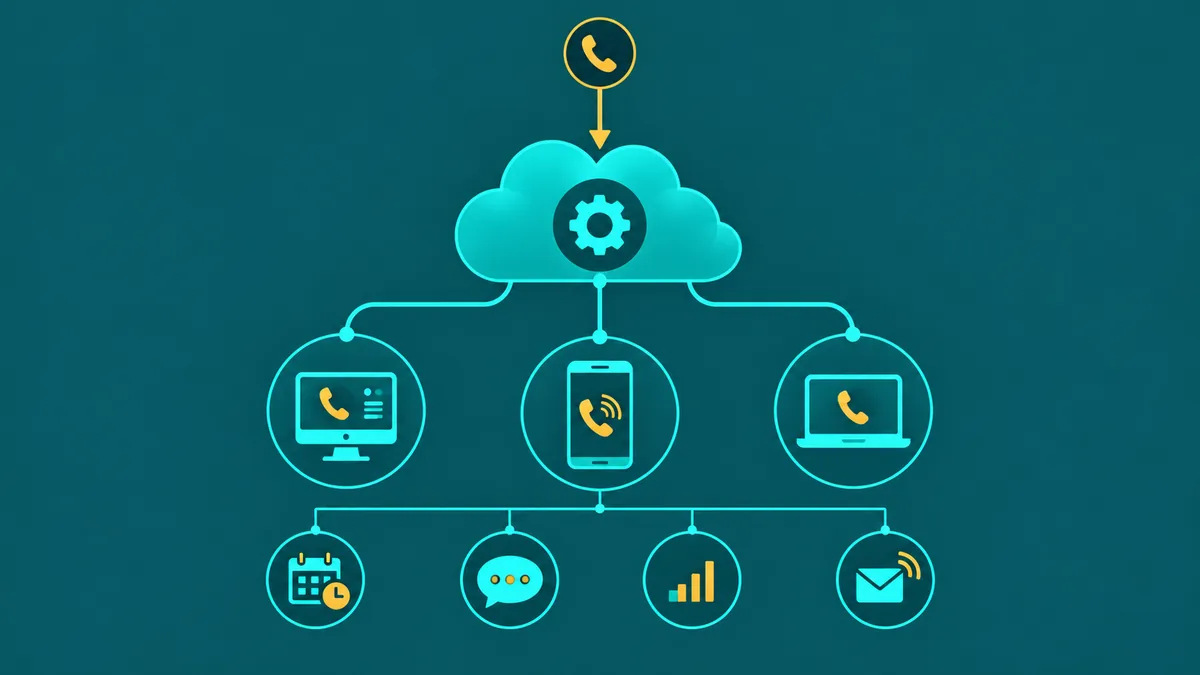
This guide covers what virtual phone systems are and how they work — features, architecture, cost, and how to choose. For a step-by-step deployment guide covering network configuration, device policy, and E911 setup for distributed teams specifically, see Remote Business Phone System Setup. For the provider-managed infrastructure angle (SLAs, data center redundancy, managed ops), see Hosted VoIP: How It Works, Key Features & What to Look For. For VoIP technology fundamentals, see Business VoIP: How It Works, Features, Costs & When to Switch.
A virtual phone system gives your business a complete, professional phone presence — extensions, auto-attendant, voicemail, call forwarding, SMS, and call recording — without a single piece of on-site hardware. Calls route over the internet to a cloud-hosted switching platform and reach employees on desktop softphones, mobile apps, or traditional desk phones through an IP adapter. The result is a phone system that scales in minutes, works for distributed teams, and delivers enterprise-grade features at a fraction of the cost of a traditional PBX.
Virtual phone systems are now the dominant choice for small and mid-size businesses setting up phone infrastructure for the first time, and increasingly the replacement choice for companies retiring aging on-premise PBX hardware. Understanding exactly what a virtual phone system is, how it differs from a basic VoIP line or a traditional PBX, and what features to expect at different price points will help you make the right choice before you commit.
For how EaseDial handles this, see cloud business phone system.
What is a virtual phone system
A virtual phone system is a cloud-hosted business phone platform that replaces traditional physical PBX hardware with software managed by a third-party provider. Where a traditional PBX is a rack-mounted appliance installed in your office closet that physically routes calls between extensions and connects to the phone network via copper circuits or PRI lines, a virtual phone system runs on the provider's servers in geographically redundant data centers and is managed entirely through a web portal.
The "virtual" in virtual phone system refers to the fact that the infrastructure is not physically present at your location. Your phone numbers, extensions, IVR menus, call routing rules, voicemail boxes, and call recording storage all live in the cloud. Your employees access the system through softphone apps on their computers or smartphones, or through IP desk phones that connect to the cloud platform over your internet connection using SIP (Session Initiation Protocol).
This is distinct from a basic VoIP line — which provides a single phone number with inbound and outbound calling but no PBX features — and from a traditional on-premise PBX, which provides PBX features but requires physical hardware, maintenance contracts, and a technician to make changes.
What is a virtual phone system? A virtual phone system is a cloud-hosted business phone platform that provides PBX features — extensions, auto-attendant, call queues, voicemail, call recording, and SMS — without requiring on-site hardware. Calls route over the internet using SIP to a provider-managed platform accessible from any device via softphone apps or IP desk phones. Unlike a basic VoIP line, a virtual phone system includes the full switching and routing layer, giving businesses a complete phone system experience managed from a web portal. For more background on the underlying technology, see our cloud phone system guide.
For EaseDial's cloud business phone, see cloud business phone.
How virtual phone systems work
Three technology layers combine to deliver the virtual phone system experience: SIP signaling, cloud PBX switching, and the softphone or app layer that employees interact with.
SIP (Session Initiation Protocol) is the standard that manages call setup and teardown. When an employee makes a call, their softphone app sends a SIP INVITE message to the cloud PBX over the internet. The cloud PBX processes the routing rules — checking whether to connect to an internal extension, route through an IVR, or place the call outbound through the public telephone network — and instructs the endpoints to establish a media stream. SIP handles the signaling; it does not carry the voice audio itself.
The cloud PBX is the software switching layer at the heart of the virtual phone system. It manages the entire call routing logic: which extension rings when a specific number is called, how IVR menus behave, how call queues distribute incoming calls to available agents, what happens when no one answers, and where calls go outside business hours. The cloud PBX also manages voicemail boxes, call recording storage, and the configuration of all system features. Because it runs in the cloud, all of this can be configured and modified through a web portal — no technician visit required.
RTP (Real-time Transport Protocol) carries the actual voice audio once a call is connected. Voice is digitized by your device's microphone, compressed using an audio codec (typically G.711 for high quality or G.729 for bandwidth efficiency), and sent as a stream of UDP packets directly between the two endpoints or through the provider's media relay servers. SRTP (Secure RTP) adds encryption to the audio stream to prevent interception.
The softphone or app layer is what employees experience. Desktop softphones (available for Windows and macOS) and mobile apps (iOS and Android) register with the cloud PBX over the internet, presenting as full extensions. Inbound calls ring the app; employees make outbound calls using the app's dialpad. Most virtual phone system apps include features like call transfer, conference calling, voicemail playback, and call history — eliminating the need for physical desk phones in most environments.
Virtual phone system vs business VoIP — is there a difference?
The terms are often used interchangeably, but they describe slightly different scopes of what a product does.
| Dimension | Virtual Phone System | Business VoIP (basic) |
|---|---|---|
| PBX switching layer | Included — cloud-hosted, provider-managed | Not always included; may be just a calling line |
| Extensions | Yes — multiple users, each with their own extension | Varies; basic plans often one number per line |
| Auto-attendant / IVR | Standard feature | Add-on or higher tier only |
| Call queues | Included in most plans | Often not included |
| Hardware required | No — apps and softphones only; IP phones optional | No — but may be limited to ATA adapter |
| Admin portal | Web-based admin with full system configuration | Varies; may be limited settings page |
In practice, most providers marketing "business VoIP" today are selling what would qualify as a virtual phone system — a complete cloud PBX with extensions, IVR, and apps. The distinction matters most when evaluating lower-cost options that market themselves as "VoIP" but are actually providing basic calling lines without the PBX layer. If the provider does not clearly describe multi-user extensions, an admin portal with call routing configuration, and an auto-attendant, it is a calling line, not a virtual phone system.
Key features to expect
A virtual phone system should include these capabilities at a minimum. Feature depth and configuration granularity vary by provider and tier.
Auto-attendant. Answers inbound calls automatically with a greeting and routes callers to the right destination via keypad menu. A capable auto-attendant supports multiple levels of menus, custom greetings by time of day, and separate handling for after-hours calls. Basic virtual phone system plans typically limit menu depth; higher tiers add speech recognition and IVR-grade database integration.
Extensions. Each user gets their own extension — a short number (e.g., 101, 102) that colleagues can dial internally and that appears as a distinct destination in call routing rules. Extensions should be assignable to users, softphones, mobile apps, and IP desk phones interchangeably.
Call forwarding. Redirect inbound calls to another extension, an external number, voicemail, or a call queue based on rules (number busy, no answer, time of day, caller ID). Call forwarding is essential for businesses with mobile workers, after-hours coverage, and multi-location teams.
Voicemail-to-email. When a caller leaves a voicemail, the audio file is delivered as an email attachment to the extension owner — optionally with a text transcription. Voicemail-to-email eliminates the need to call in to a voicemail system and ensures messages are accessible from any device. Our business phone service guide covers the full feature set in depth.
Call recording. Automatic or on-demand recording of inbound and outbound calls, stored in the cloud and accessible from the admin portal. Essential for quality assurance, training, dispute resolution, and compliance in regulated industries.
Business SMS. Two-way text messaging on your business phone numbers. In the US, business SMS requires 10DLC registration for reliable delivery on standard long-code numbers. SMS should be accessible from the desktop and mobile app on the same number used for voice calls.
Mobile apps. iOS and Android applications that register as full PBX extensions — placing and receiving calls, accessing voicemail, transferring calls, and viewing call history. App quality (call stability on cellular data, push notification reliability, battery consumption) varies significantly between providers and is one of the most important factors for mobile-first teams.
Conference calling. Built-in audio conferencing allowing multiple internal and external participants to join a bridge. Look for virtual phone systems that provide dedicated conference bridge numbers rather than requiring a separate conferencing service.
Who needs a virtual phone system
Virtual phone systems are not a one-size-fits-all answer, but they are the right answer for a wide range of business situations.
Small businesses. A five-person team with no existing phone infrastructure gets a professional auto-attendant, individual extensions, voicemail, and mobile app access for $15–$25 per user per month — with no hardware purchase, no installation visit, and no telephony expertise required. The same team on a traditional PBX would spend thousands upfront and pay ongoing maintenance contracts.
Remote and hybrid teams. When employees work from different locations — home offices, coworking spaces, client sites — a virtual phone system ensures every team member has the same phone system experience regardless of location. Calls to the main business number route to the right person's app wherever they are; internal extensions work across locations; call transfers happen cleanly between remote employees.
Startups. New businesses need a professional phone presence immediately, without capital investment in hardware. A virtual phone system can be provisioned in hours, with phone numbers active and call routing configured the same day.
Multi-location businesses. A business with offices in three cities traditionally required PBX hardware and separate carrier circuits at each location, plus inter-office trunking. A virtual phone system treats all locations as a single system — internal calls between locations are free, shared call queues span locations, and one admin manages the entire system from a single web portal.
What virtual phone systems cost
Most virtual phone system providers price on a per-user per-month basis, typically in tiered plans. Entry plans ($15–$25/user/month) include unlimited domestic calling, basic auto-attendant, extensions, voicemail-to-email, and mobile apps. Mid-tier plans ($25–$40/user/month) add call recording, advanced IVR, analytics dashboards, and CRM integrations. Premium plans ($40–$65/user/month) add AI features, deeper contact center capabilities, and dedicated support.
Beyond the base seat price, include: regulatory fees and taxes (15–25% above the base rate), E911 fees per location, phone number rental (typically $1–$5/month per additional number beyond the included allocation), toll-free number charges, and international calling rates if your business makes international calls. Request a fully-loaded sample invoice before comparing plans across providers.
Per-minute pricing is available from wholesale-oriented providers and can significantly reduce costs for businesses with very high outbound call volume — contact centers and dialer-heavy sales teams in particular. On a per-minute model, there is no seat license; you pay for the minutes used at a rate typically between $0.005 and $0.025 per minute depending on destination and volume.
How to evaluate virtual phone system providers
Virtual phone systems are marketed with nearly identical feature lists, but the depth of those features — and the quality of the experience in practice — varies substantially. These are the dimensions that matter most when comparing providers.
Feature depth vs. feature lists
Most providers list the same features: auto-attendant, call recording, voicemail, mobile apps, CRM integration. What differs is how those features actually work. An auto-attendant that supports only two menu levels is meaningfully different from one that supports unlimited nesting with time-of-day routing and custom audio per menu. Call recording that stores 30 days is different from one with configurable retention and searchable transcripts. Request a live demo that walks through your specific call flow — not a standard tour — so you can see how features behave in practice rather than just confirming they exist.
Mobile app quality
For remote and hybrid teams, the mobile app is the phone system. Mobile app quality is frequently glossed over in feature comparisons and frequently responsible for post-purchase disappointment. Key things to test before committing: call stability on LTE and weak Wi-Fi, push notification reliability (does the app ring on an incoming call when it has been in the background for 10 minutes?), battery consumption, and whether call transfers work from mobile as cleanly as from the desktop. Most providers offer trial periods — use them specifically to test mobile on your actual devices and network conditions.
Number porting process
Every provider claims to support number porting, but the process and timeline vary. Ask specifically: what documentation is required, what is the typical timeline for a standard geographic number, what is the process if a port fails or is rejected, and whether temporary numbers are provided during the porting period so you can configure and test before cutover. For businesses with complex number inventories — vanity numbers, toll-free numbers, multi-line accounts — verify portability explicitly before signing, not after. For a detailed overview of how porting works, see our business phone number porting guide.
Contract terms and seat flexibility
Annual contracts are common and typically offer lower per-seat rates than month-to-month. Before committing, confirm: what happens if you need to add seats mid-term, what is the process for reducing seats if headcount decreases, and whether there are minimum seat count requirements. For growing businesses, seat flexibility often matters more than the rate discount — a contract that locks you into a seat floor you exceed in three months works well; one that penalizes headcount reductions does not.
Support model
Phone system issues — a misconfigured call flow, an audio quality problem, a porting rejection — affect business operations directly. Understand the support model before you sign: is phone support included at your tier, what are the support hours, and what is the escalation path for a complete outage? Provider support quality is difficult to verify in advance, but responsiveness during the sales and trial process is a reasonable proxy — a provider that responds slowly pre-sale is unlikely to improve post-sale.


