
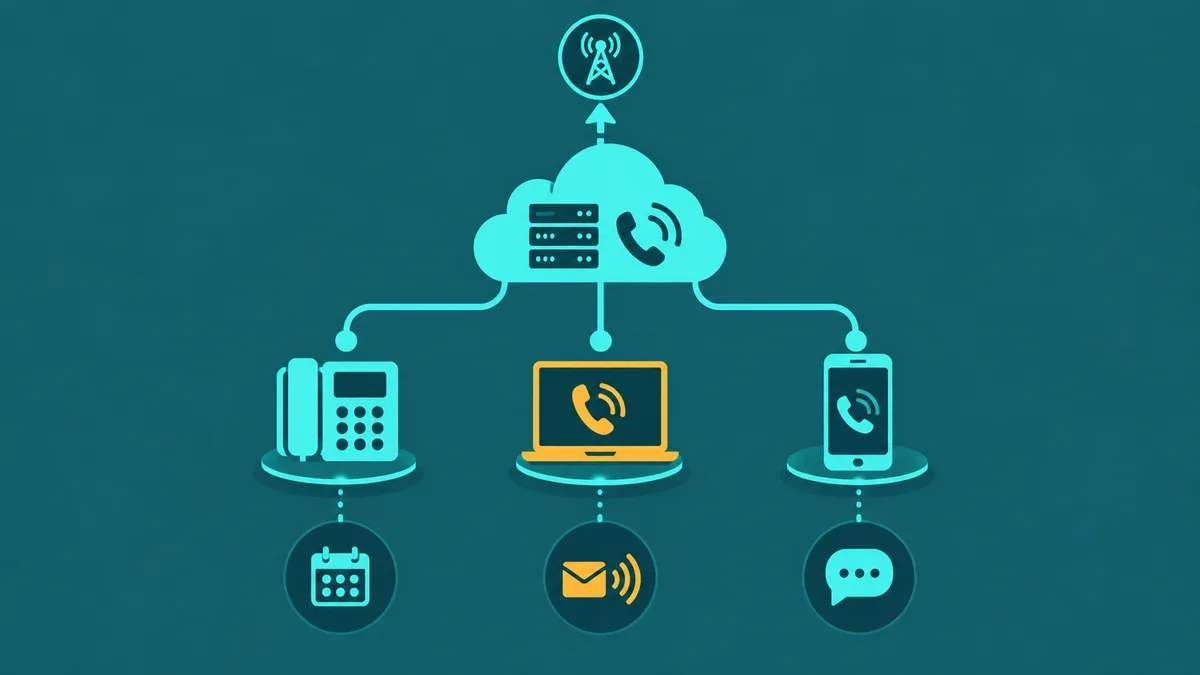
Small businesses switch to VoIP phone systems for three reasons that compound on each other: cost, flexibility, and remote work capability. A traditional landline forces you to pay per line, lease physical hardware, and absorb a technician visit every time you need a change. A VoIP phone system for small business eliminates all three constraints — you pay per user or per minute, the PBX runs in the cloud, and adding a remote employee takes minutes instead of weeks.
The cost gap between traditional phone service and business VoIP has widened significantly. A small business paying per analog line for service with no call recording, no IVR, and no integration with any business tool faces significantly higher costs than a comparable hosted VoIP plan — which typically bundles auto-attendant, voicemail-to-email, mobile apps, and call recording, with pricing that varies by provider and seat count.
A VoIP phone system for small business replaces traditional phone lines with internet-based calling — giving teams a full PBX feature set (auto-attendant, call queues, voicemail-to-email) at a fraction of the cost of legacy hardware.
For how EaseDial handles this, see cloud business phone system.
Why small businesses switch to VoIP
Cost is the most visible driver, but it is rarely the only one. Small business owners who have switched from legacy phone systems cite three persistent advantages:
- Lower monthly cost. Hosted VoIP eliminates per-line carrier fees, replaces on-premise PBX hardware with a cloud subscription, and bundles features — IVR, call recording, voicemail-to-email — that would cost thousands to add to a traditional system.
- Flexibility to change fast. Adding a user, changing a call flow, or updating a business hours greeting takes minutes in a web portal. There is no waiting on a carrier or scheduling a technician.
- Remote and hybrid work support. Every employee gets a softphone app that works on their laptop or smartphone. Calls ring to a desk phone in the office and a mobile app simultaneously. A team with employees across three states operates under one unified phone system with a single main number.
The remote work factor became decisive for many small businesses after 2020. A phone system where calls only work at a physical desk is a structural constraint on how you can hire and operate. A cloud VoIP system removes that constraint entirely.
For EaseDial's cloud business phone, see cloud business phone.
What features small businesses actually need
Business VoIP providers often lead with feature counts. A 50-feature list is marketing; the features a small business uses day-to-day are a much shorter list. Here is what actually matters versus what is typically excess.
| Feature | Why It Matters for Small Business |
|---|---|
| Auto-attendant | Routes callers to the right person or department without a dedicated receptionist. Ensures calls are never unanswered during business hours. |
| Voicemail-to-email | Delivers voicemail audio and transcripts directly to your inbox. No calling in to check messages; nothing falls through the cracks. |
| Mobile app / softphone | Lets employees make and receive business calls from anywhere on any device. Essential for remote workers and field employees. |
| Call recording | Captures call audio for training, dispute resolution, and quality review. Many small businesses in healthcare, legal, and financial services require it for compliance. |
| Business SMS | Enables texting from the business number rather than personal phones. Customers increasingly prefer SMS for appointment confirmations and follow-ups. |
| Integrations | Connects the phone system to CRM, helpdesk, or calendar tools. Click-to-dial and call logging reduce manual data entry and improve follow-up. |
Enterprise features that most small businesses do not need at launch: skills-based routing across large agent pools, complex omnichannel queuing, AI workforce management, and multi-tier IVR trees with database lookups. These add cost and configuration complexity. Start with the core feature set and add complexity only when the operation demands it.
When evaluating small business VoIP providers, ask specifically about SRTP (Secure RTP) for media encryption and TLS for SIP signaling encryption. Not all small business VoIP plans enable encryption by default — for businesses handling sensitive conversations (legal, healthcare, financial), verify that both are available and enabled on your plan before committing.
Setup requirements
A VoIP phone system for small business has three technical prerequisites. None of them are difficult, but neglecting them is the most common cause of poor call quality.
Internet connection quality
Each simultaneous VoIP call uses approximately 80–100 Kbps of upload and download bandwidth when using the G.711 codec. A 10-person office with up to 8 simultaneous calls needs roughly 800 Kbps–1 Mbps dedicated to voice traffic — small in absolute terms, but the connection must be stable. The variables that matter more than raw speed are latency (under 150 ms round-trip), jitter (under 30 ms), and packet loss (under 1%). A high-speed connection with high jitter produces choppy audio. Ask your ISP for a business-class connection with a QoS SLA, not a residential plan.
Router and QoS settings
Quality of Service (QoS) configuration on your router prioritizes voice traffic over other internet activity. Without QoS, a large file upload or a video stream from one workstation can degrade call quality for everyone. Most business-grade routers (Cisco, Ubiquiti, Meraki, Fortinet) support DSCP marking for VoIP traffic. Your VoIP provider should supply the DSCP values and recommended QoS settings for your specific router platform. If your current router is a consumer-grade unit, replacing it with a business-class router before deploying VoIP is a worthwhile investment.
Hardware options
Cloud VoIP is hardware-optional, but many small businesses prefer a physical desk phone for reception or conference rooms. The main options are:
- Softphone app only. Employees use a desktop or mobile app. Zero hardware cost. Works well for distributed and remote teams.
- SIP desk phones. IP phones from Yealink, Poly (formerly Polycom), or Cisco provisioned directly by your VoIP provider. Available for purchase outright or on a monthly rental plan — costs vary by model and provider.
- Analog Telephone Adapter (ATA). Connects existing analog phones to the VoIP platform. Lower cost than replacing phones; useful if you have quality analog handsets already.
What VoIP costs for small businesses
Hosted VoIP for small business is typically priced per user per month, with costs varying by provider and the features included at each tier:
- Entry / basic tier: Includes unlimited calling, auto-attendant, voicemail-to-email, and mobile app. Limited integrations; call recording may be a paid add-on.
- Standard / professional tier: Adds call recording, video conferencing, business SMS, CRM integrations, and analytics. Pricing varies by provider and seat count.
- Advanced / enterprise tier: Adds advanced call center features, AI transcription, supervisor tools, and priority support. Costs depend on feature set and provider.
Most small businesses with under 20 employees find the standard tier covers everything they need. Watch for add-on fees that inflate the base rate: number porting fees, additional DID numbers, international calling rates (typically per-minute beyond the domestic plan), and overage fees on plans that advertise "unlimited" but impose a concurrent call limit.
Businesses with high outbound call volume — sales teams, appointment-based services — should evaluate per-minute wholesale pricing rather than flat-seat plans. At high volume, per-minute rates can be significantly cheaper than unlimited per-seat pricing. For a full side-by-side provider comparison specifically for small businesses, see the guide to best business phone systems for small business.
5 questions to ask before choosing a provider
- What happens to inbound calls if my internet goes down? Providers should offer automatic failover to a mobile number, a backup SIP trunk, or a forwarding rule. Ask what the failover behavior is and whether it requires manual intervention.
- Can I port my existing phone numbers, and how long does it take? Porting timelines vary by carrier and documentation completeness — confirm the expected timeline with your provider. A provider who cannot give you a clear porting timeline and process document for your current carrier is a risk.
- Is call recording included at my plan tier, and where is it stored? Some providers include recording but charge separately for storage above a threshold. Know the retention limit, where recordings are stored (and whether you can export them), and what happens if you cancel.
- What integrations are available at my price tier? CRM and helpdesk integrations (Salesforce, HubSpot, Zendesk) are often gated to higher tiers. Confirm that the integration you need is available at the tier you plan to purchase.
- What are the contract terms and cancellation conditions? Monthly plans offer flexibility but cost more than annual commitments. Understand what happens if you need to cancel mid-term: early termination fees range from one month's cost to the remainder of the contract.


