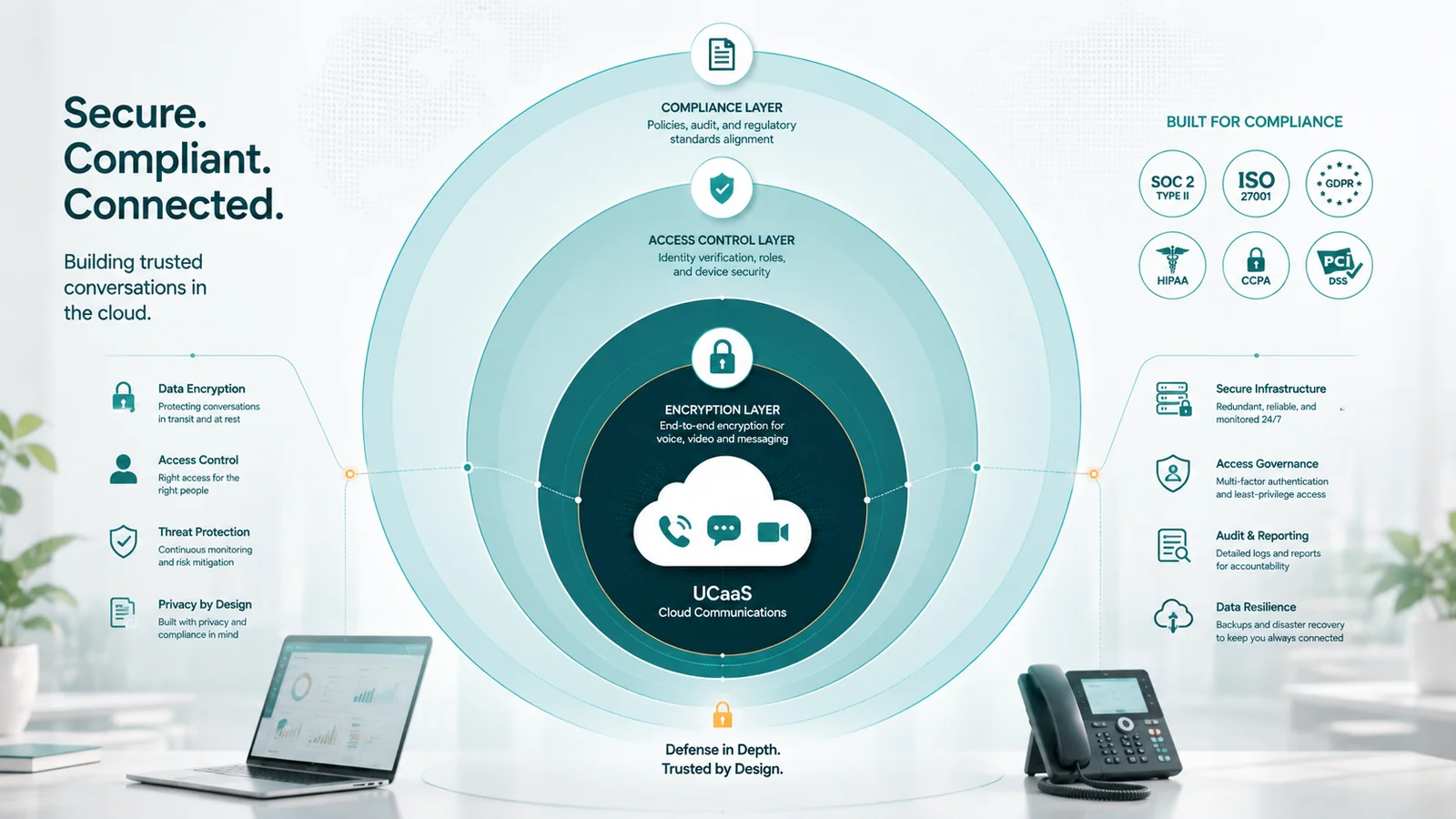
UCaaS security refers to the technical controls, administrative policies, and contractual commitments that protect voice calls, video meetings, messages, and call recordings transmitted through a cloud communications platform. Compliance refers to the specific regulatory frameworks — HIPAA, GDPR, PCI DSS, SOC 2, and others — that impose legal or contractual requirements on how that data is handled.
Cloud phone systems introduce a security surface that on-premises PBX hardware did not. Calls, voicemails, and meeting recordings that once lived on a server in your building now live in a provider's data center, travel over public internet infrastructure, and are accessible from employee devices anywhere in the world. This guide covers what UCaaS security controls actually exist, what the major compliance frameworks require, and where vendor responsibility ends and yours begins.
UCaaS security: core technical controls
Encryption in transit
Voice calls on a UCaaS platform travel as SIP signaling and RTP media. Secure UCaaS platforms use TLS to encrypt SIP signaling and SRTP to encrypt the media stream. Without both, calls can be intercepted on the network path between your office and the provider's data center. Ask whether the provider encrypts both signaling and media by default or only as an optional feature.
Encryption at rest
Voicemail recordings, call recordings, and message archives stored on the provider's servers should be encrypted at rest. AES-256 is the standard algorithm. Ask for documentation confirming call recordings and voicemails are encrypted at rest — these are the files most likely to be targeted in a storage breach.
Access controls and authentication
Strong UCaaS platforms support multi-factor authentication (MFA) for all users, role-based access controls (RBAC), single sign-on (SSO) via SAML 2.0 or OIDC, and session timeout policies. If the platform allows admin access with only a username and password and no MFA, that is a significant exposure point.
Audit logs
A UCaaS platform should log admin actions, authentication events, and call data. Ask how long logs are retained and whether they can be exported to a SIEM or log management system.
Data residency
If your business operates in the EU or handles data subject to local residency requirements, ask specifically where the provider stores recordings, voicemails, and message archives. Some providers offer regional data residency as a paid feature; others don't offer it at all.
Compliance frameworks that apply to UCaaS
HIPAA (healthcare)
If your organization is a covered entity under HIPAA and your UCaaS platform transmits or stores protected health information (PHI) — which includes patient call recordings and voicemails — the provider must sign a Business Associate Agreement (BAA). A BAA is a legal contract, not a feature. Without a BAA, using a standard UCaaS platform for PHI creates direct HIPAA liability. "HIPAA-ready" in marketing copy is not a BAA. Ask whether the provider will sign a BAA and what configuration changes are required for HIPAA-compliant use.
GDPR (EU data protection)
If you handle calls involving EU residents, GDPR applies to the personal data generated (call logs, recordings, contact information). Key requirements include consent for recording, data retention limits, the right to erasure, and Data Processing Agreements (DPAs) with providers. Ask for the provider's DPA and confirm their cross-border transfer mechanism if data will be stored in US-based data centers.
PCI DSS (payment card industry)
If your contact center takes payment card numbers over the phone, PCI DSS applies. The relevant requirements: call recordings containing card numbers must be stored with strict access controls or not stored at all — organizations handling payment card information should design their recording and payment workflows so sensitive card data is not unnecessarily captured or retained in call recordings. Pause-and-resume recording — stopping the recording while the caller reads card details and resuming afterward — is one implementation technique that addresses this. Ask whether the provider supports pause-and-resume recording via API, and evaluate your specific architecture against PCI DSS requirements with qualified guidance.
SOC 2
SOC 2 Type II is an independent audit of a provider's security controls tested over at least 6 months. For a UCaaS platform handling your business communications, a current SOC 2 Type II report is a reasonable baseline. Ask for the report itself, not just a claim of SOC 2 compliance.
FCC E911 requirements
The FCC's Kari's Law requires 911 to be dialable without pressing an access code first, and RAY BAUM's Act requires that dispatchable location information be transmitted with 911 calls. For remote workers using a softphone from multiple locations, E911 compliance requires each user to keep their registered address current. Build a policy requiring address updates when employees change work locations. The E911 for remote workers guide covers dispatchable location requirements and per-user address setup in detail.
EaseDial Security
Questions about UCaaS security for your industry? Talk to EaseDial about your requirements.
Shared responsibility model
| Layer | Vendor responsibility | Your responsibility |
|---|---|---|
| Platform infrastructure | Data center security, server patching, DDoS protection | N/A |
| Encryption | Providing TLS, SRTP, AES-256 at rest | Enabling and not disabling those features |
| Authentication | MFA options, SSO integration | Enforcing MFA policy, managing SSO |
| Access controls | RBAC framework, admin permission tiers | Assigning roles correctly, offboarding employees promptly |
| Call recordings | Encrypted storage, retention controls | Access policies, retention settings, recording consent |
| E911 | Transmitting location data to PSAP | Registering and updating addresses for all users |
Security questions to ask a UCaaS vendor
- Is TLS used for SIP signaling and SRTP for media by default?
- Are call recordings and voicemails encrypted at rest? With what algorithm?
- Do you support SAML 2.0 SSO and enforce MFA for all users?
- What audit log events do you capture, how long are they retained, and can they be exported?
- What data residency options exist for recordings and voicemails?
- Will you sign a Business Associate Agreement (BAA) for healthcare customers?
- Do you have a current SOC 2 Type II report?
- Does your platform support pause-and-resume recording for PCI compliance?
- What is your breach notification process?
Common security gaps in UCaaS deployments
Weak SIP credentials on desk phones
Physical SIP phones provisioned with default or weak SIP passwords are a common entry point. All SIP device credentials should be strong, unique, and stored in a provisioning system.
Over-permissioned admin accounts
UCaaS admin accounts that can access all call recordings without secondary approval are a significant insider threat surface. Scope admin roles to what each administrator actually needs.
Failure to offboard departed employees promptly
A former employee whose UCaaS account is still active can access voicemail, call logs, and recordings. Integrate UCaaS offboarding into your standard HR departure process with a maximum 24-hour window.
Frequently asked questions
Ongoing security responsibilities
UCaaS security is not a feature you turn on — it is a shared set of controls that requires configuration on your side and verification of commitments on the vendor's side. Get specific answers before selecting a provider. After deployment, treat security as an ongoing discipline: enforce MFA, offboard promptly, keep E911 addresses current, and review access controls when roles change.
If your business operates in healthcare, finance, or the EU, the compliance documents (BAA, DPA, SOC 2 report) need to be in place before the platform goes live. See the complete UCaaS guide for a broader look at how UCaaS platforms work and how to evaluate providers.