An agent answers a phone call. The caller is frustrated and mentions they sent a Facebook message two days ago with the same question. The agent has no idea — there is no record in front of them, no cross-channel history, no context from the Facebook message. The caller has to start from the beginning. That scenario plays out thousands of times a day in contact centers that handle multiple channels through separate tools.
An omnichannel inbox is the tool designed to eliminate that gap. This article explains what an omnichannel inbox actually is as a product — how it works, what it consolidates, how agents use it, and how it differs from related concepts like a unified inbox or a ticketing system. For the broader strategic picture of omnichannel customer service as an organizational approach, see the companion article on omnichannel customer service.
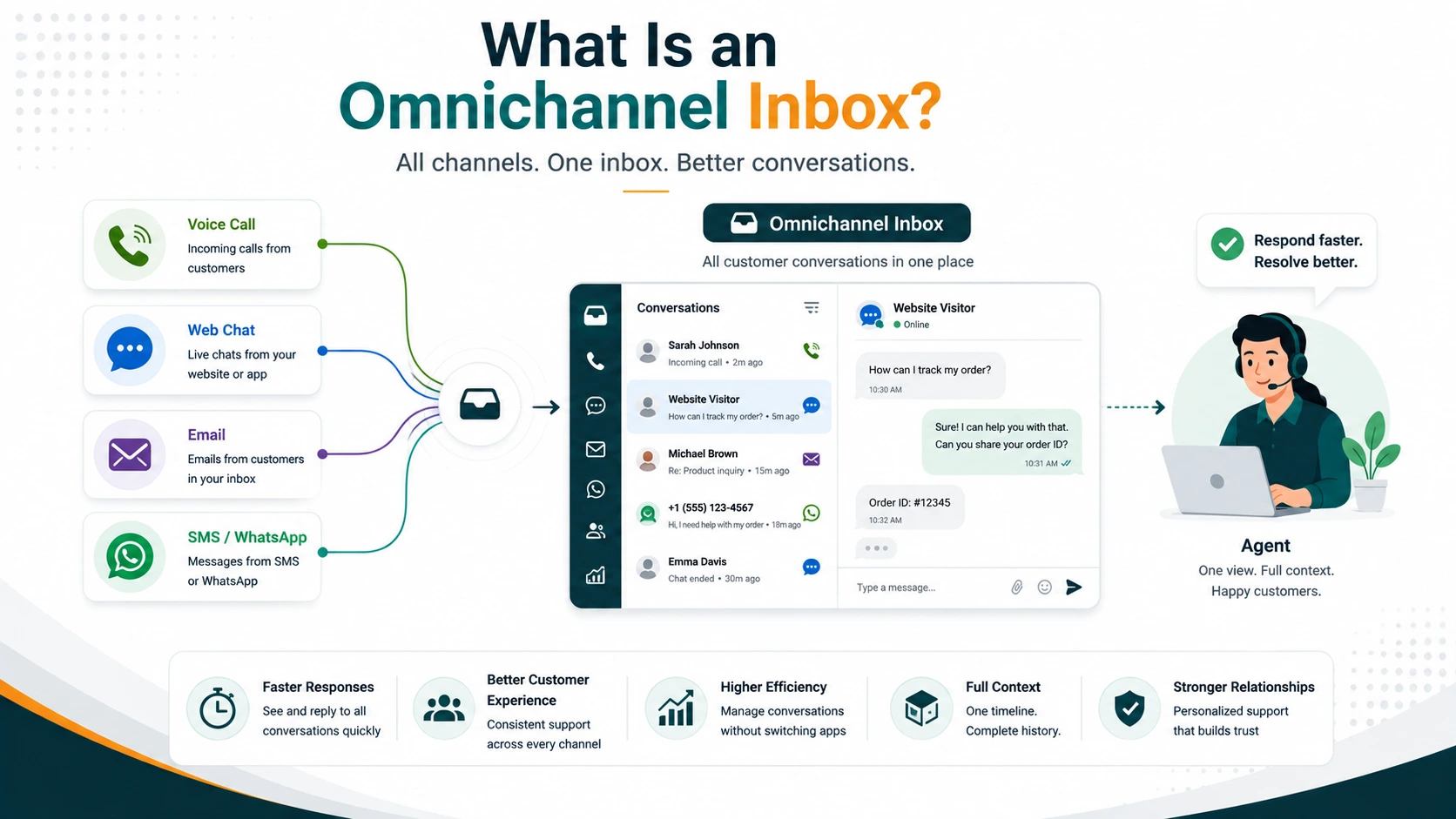
What is an omnichannel inbox? An omnichannel inbox is a single agent interface that consolidates incoming customer conversations from multiple channels — SMS, web chat, WhatsApp, email, Facebook Messenger, Instagram, Telegram, and more — and maintains a continuous, shared customer history across all of them. The agent sees every prior interaction regardless of which channel it happened on. When a customer switches channels, the history follows them.
The Problem an Omnichannel Inbox Solves
Without an omnichannel inbox, a contact center handling multiple channels runs a fragmented operation. The phone team uses an ACD and CRM. The email team works from an inbox. The social team manages messages from a separate platform. The chat team has its own tool. Agents may be switching between four to seven separate applications to handle different channels throughout their shift.
The consequences compound at the customer level. A customer who sent a chat message yesterday and calls in today is treated as a fresh contact. The phone agent has no record of the chat conversation, no context for what was already discussed, and no idea whether a resolution was promised. The customer repeats everything. That experience — having to re-explain the situation on every channel — is one of the most consistent sources of customer frustration across industries.
The agent experience is also worse. Constantly switching applications increases cognitive load, slows handle time, and creates errors when agents must manually reconcile information across systems. A single workspace eliminates that friction.
Multichannel, Unified Inbox, and Omnichannel: Three Distinct Concepts
These three terms are often used interchangeably, but they describe meaningfully different things. Understanding the distinction helps when evaluating platforms.
| Type | Channel coverage | Shared customer history | Cross-channel context |
|---|---|---|---|
| Multichannel | Multiple channels, each in its own tool | No — each channel has its own data store | None — agents switch apps to check other channels |
| Unified inbox | Multiple channels displayed in one interface | Partial — messages visible together but history may be incomplete | Limited — removes app-switching but may not share customer context fully |
| Omnichannel inbox | Multiple channels in one interface | Yes — all channels write to and read from a shared customer record | Full — channel switch preserves full history; routing understands channel context |
A unified inbox removes the app-switching problem — agents no longer need to open separate tools to see different channels. But if the underlying data is not shared across channels, the agent still sees siloed histories. An omnichannel inbox is a unified inbox plus a shared customer data layer plus routing intelligence that understands channel context. If a customer called in 10 minutes ago and then switches to chat, the chat interface shows the call history — including what was discussed — so the conversation continues without repetition.
What an Omnichannel Inbox Consolidates
The channels an omnichannel inbox brings together typically include a combination of the following, depending on the platform:
- SMS and MMS — two-way text messaging and multimedia messages from customer phone numbers
- Website / live chat — real-time chat initiated from a widget embedded in your website or product
- Email — inbound email routed into the agent workspace rather than a separate inbox
- WhatsApp — via the WhatsApp Business API, allowing two-way messaging with customers who use WhatsApp as their primary messaging app
- Facebook Messenger — direct messages received through your Facebook business page
- Instagram Direct — DMs from your Instagram business profile
- Telegram — messages via a connected Telegram bot or channel
- Fax — inbound fax (relevant in healthcare and legal verticals where fax is still in use)
- Voice call history — while voice calls themselves are handled through the phone system, the call record, recording, and transcript can appear in the same customer timeline as digital conversations
EaseDial's omnichannel inbox covers SMS, MMS, fax, website chat, WhatsApp, Telegram, Instagram, and Facebook — all accessible from the same agent workspace as voice calls, so every conversation type appears in the unified customer timeline.
How an Omnichannel Inbox Works Technically
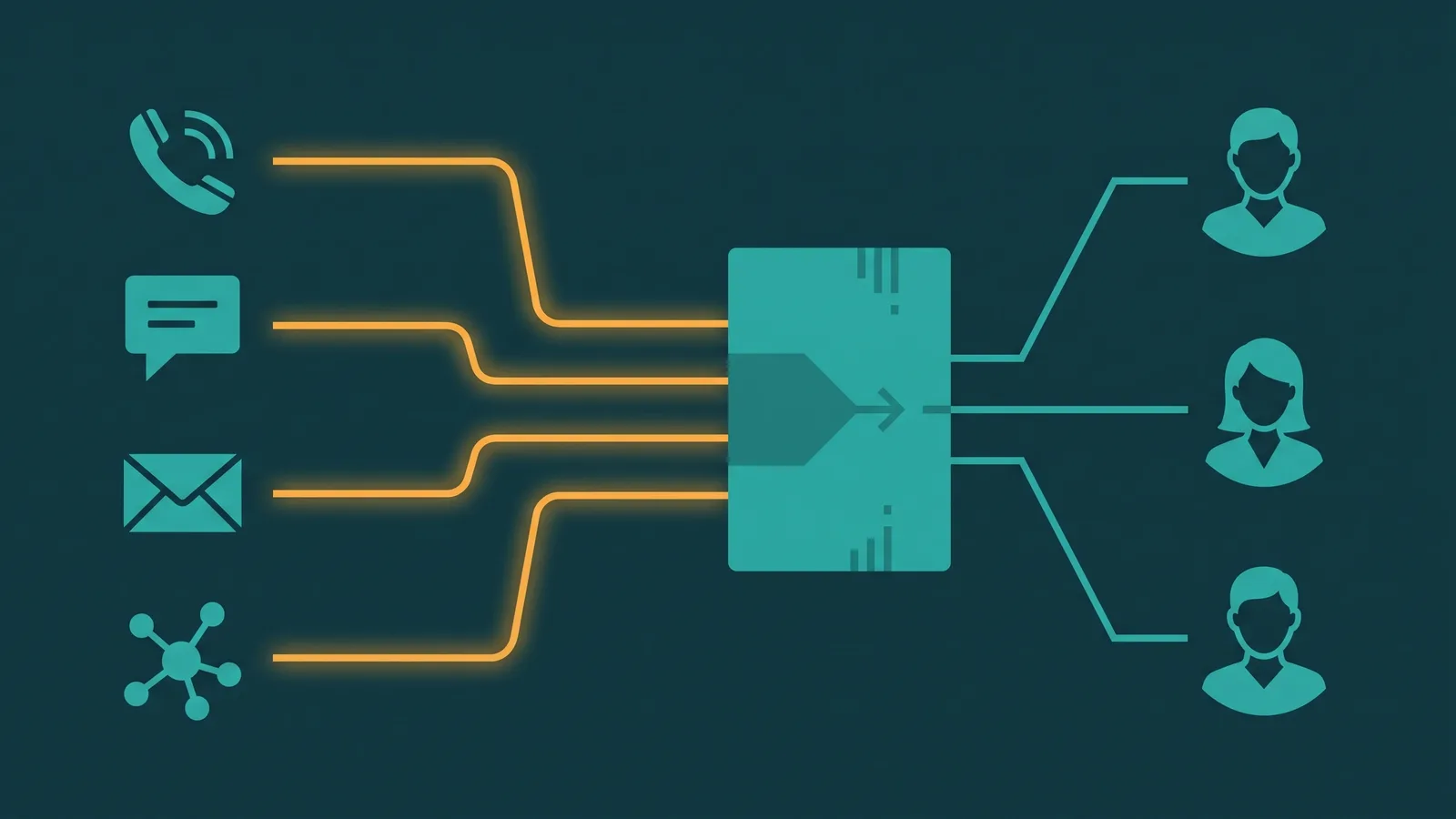
Each channel connects to the inbox through a native integration or API connection. When a message arrives — whether it is a WhatsApp text, a web chat initiation, or an SMS — the platform performs identity resolution: it matches the incoming contact (phone number, email address, social profile ID) to an existing customer record in the shared data layer or CRM.
Once the customer is identified, the platform retrieves their full conversation history across all channels and surfaces it in the agent workspace alongside the incoming message. The agent sees: every prior conversation across every channel, which channel each interaction happened on, timestamps, which agent handled it previously, and what the outcome was.
The incoming conversation is then routed to the appropriate agent or queue based on configured rules — channel type, topic, agent skill, team assignment, or availability. The agent responds to the customer from within the same interface, regardless of which channel the customer used.
Conversation Context and Customer History
The shared customer timeline is what makes an omnichannel inbox genuinely useful rather than just visually consolidated. When a customer contacts you for the fourth time about the same issue, the agent handling the conversation needs to know: what was already tried, what was promised, and whether anything has changed. Without shared history, that context is absent and the customer bears the burden of re-explaining.
Practically, the timeline shows agents the sequence of all prior interactions: the WhatsApp message last Tuesday, the phone call on Friday, the follow-up email over the weekend. Each entry shows the channel, the timestamp, the agent who handled it, and a summary or transcript of what was discussed.
Agent handoffs benefit significantly. When an agent ends their shift or a conversation is transferred, the incoming agent picks up with full context. They do not need to ask the customer to re-explain, and they do not need to call the previous agent to find out what was discussed.
AI summaries accelerate this further. Rather than reading through a long conversation history, an AI summary surfaces the key points — what the customer's issue is, what was already attempted, and what the customer was promised — in a few sentences. This is particularly valuable for complex cases that have spanned multiple interactions over days or weeks.
Routing in an Omnichannel Inbox
Routing in an omnichannel context is more sophisticated than a simple queue. Conversations route to agents based on a combination of factors:
Channel. Some teams or agents specialize in specific channels. A social media team may handle Instagram and Facebook Messenger, while a separate team handles SMS and voice. Channel-based routing ensures conversations reach the right team.
Skill-based routing. Routing can match conversations to agents with specific skills — language proficiency, product expertise, or channel experience. A French-speaking agent can handle WhatsApp messages from French-speaking customers and incoming phone calls from the same segment, with routing treating both as requiring the same language skill. See the call routing guide for a detailed breakdown of how skill-based routing works.
Business hours routing. Different channels may have different staffing coverage. Business hours rules can route conversations arriving outside staffed hours to an automated response, a bot, or a queue with an expected response time — configured per channel.
Load balancing. Across agents handling the same channel or team, routing distributes conversation load — by round robin, by current workload, by longest idle, or by other configurable strategies.
Priority routing. High-priority customers or escalated conversations can jump the queue based on configured rules, ensuring that customer tier, open case severity, or SLA urgency is factored into routing decisions. For a deep dive into how routing engines distribute conversations across channels, skills, and priority tiers, see the omnichannel routing guide.
What Agents Can Do from an Omnichannel Inbox
The omnichannel inbox is the agent's primary workspace for digital channel interactions. From within it, agents can:
- Read and respond to messages across all connected channels from a single interface, without switching applications
- See full customer history — every prior conversation across every channel, with channel labels, timestamps, and agent attribution
- Transfer conversations to other agents or teams with the full conversation history preserved, so the receiving agent has complete context without asking the customer to repeat
- Switch channels — respond via SMS to a customer who originally contacted via web chat, or move a chat conversation to voice without losing the history thread
- Handle multiple conversations simultaneously — digital channels (chat, SMS, WhatsApp) allow an agent to handle several conversations at once, unlike voice calls which require full attention for the duration. Most platforms configure a maximum concurrent conversation limit per agent
- Add internal notes visible to other agents but not the customer, providing context for handoffs or escalations
- Access the customer record — CRM-integrated inboxes surface the customer's account details alongside the conversation, so agents do not need to search for the customer separately
EaseDial
SMS, MMS, WhatsApp, Telegram, Instagram, Facebook, fax, and website chat — all in one inbox.
Omnichannel Inbox vs. Email Inbox vs. Ticketing System
Each of these tools serves a different purpose, and they are often complementary rather than mutually exclusive.
Email inbox. A standard email inbox handles one channel. It has no concept of the same customer's SMS message or phone call. It is optimized for email workflows: threading, folders, labels. It is not designed for real-time channel diversity or cross-channel customer history.
Ticketing system. A ticketing system converts communications into trackable tickets with status, priority, assignee, and resolution workflow. It is strong for structured support operations that need clear accountability — who owns this issue, what is its status, when was it resolved. Ticketing systems often support multiple channels by accepting input from email, web forms, and sometimes chat. However, they are optimized for asynchronous structured workflows, not real-time multi-channel conversations. A ticketing system is generally weaker on real-time channel diversity and native handling of synchronous channels like live chat or WhatsApp.
Omnichannel inbox. Optimized for real-time multi-channel conversation handling with shared customer context. Its strength is the agent experience in high-volume, multi-channel environments where customers switch channels and agents need full history. It is not a ticket tracker — it does not typically provide the structured resolution workflow and audit trail that a ticketing system does. Many organizations use both: an omnichannel inbox for real-time agent interactions and a ticketing or CRM system as the record of customer history that feeds back into the inbox.
| Tool | Best for | Limitation |
|---|---|---|
| Email inbox | Email-only teams; asynchronous communication | Single channel; no real-time capability; no cross-channel history |
| Ticketing system | Structured support workflows; issue tracking; resolution accountability | Not optimized for real-time channels; weaker on live chat, WhatsApp, SMS at scale |
| Omnichannel inbox | High-volume real-time multi-channel environments; full cross-channel history | Not a ticket tracker; resolution workflow tracking requires CRM or ticketing integration |
Key Metrics for an Omnichannel Inbox
An omnichannel inbox generates metrics at both the channel level and the cross-channel journey level. The channel-level metrics are the standard starting point, but journey-level metrics reveal the most actionable insights.
- First response time per channel — how quickly an agent responds to a new conversation on each channel. Expectations differ significantly: live chat customers expect responses in seconds; email customers expect hours.
- Resolution time per channel — how long from conversation start to resolution, measured per channel. Useful for identifying where bottlenecks or capability gaps exist.
- Channel volume distribution — what percentage of total conversations arrive on each channel. Tracks channel adoption trends and informs staffing decisions.
- CSAT by channel — customer satisfaction scores broken down by channel. Differences between channels often reveal where the experience is weakest.
- Agent handle time — time spent actively working on a conversation, per channel. Digital channels allow concurrent handling, so agent handle time per conversation is a more useful efficiency metric than it is for voice.
- Conversation abandonment rate — conversations where the customer stopped responding before resolution. High abandonment often signals slow response times or friction in the channel experience.
- Channel switch rate — how often a customer uses one channel to initiate contact and then moves to a different channel before resolution. High switch rates may indicate that a channel is not meeting customer needs.
For a comprehensive framework on contact center metrics and how to interpret them, the contact center analytics guide covers what to measure and why.
What to Look for When Evaluating Omnichannel Inbox Platforms
Platform selection matters significantly because the channel coverage, routing quality, and CRM integration depth vary considerably across vendors.
Native vs. third-party channel integrations. Native integrations (channels built directly into the platform by the vendor) are more reliable than third-party integrations patched on via middleware. Ask vendors which channels are native and which require a third-party connector. Third-party connectors introduce latency, additional failure points, and dependencies on a third party's uptime and pricing.
CRM integration quality. Does the inbox write conversation history back to your CRM automatically after each interaction? Does the screen pop with customer data arrive before the agent takes the conversation? Can the CRM update trigger routing decisions (for example, high-value customers routed to a senior queue)? A read-only CRM connection is significantly less useful than a bi-directional sync.
Routing intelligence. Does the platform support skill-based routing across channels? Can you configure routing rules per channel, per team, and per time of day? Can routing factor in the customer's history — for example, routing a customer who escalated last week to a senior agent?
Real-time monitoring and supervisor tools. Can supervisors see active conversations across all channels in real time? Can they join or monitor conversations? Do they have a dashboard showing queue depth, agent availability, and first response time across channels? For a contact center operating at scale, supervisor visibility is not optional.
AI capabilities. Does the platform provide AI-generated conversation summaries that agents can use for faster context-reading on handoffs? Are there suggested responses or next-best-action prompts to reduce handle time? Does sentiment detection flag conversations that are escalating negatively before the customer explicitly asks for a supervisor? AI in the inbox is discussed in depth in the AI in contact centers guide.
Scalability and concurrent conversation handling. What is the maximum number of concurrent conversations the platform can handle per agent? What are the limits on total concurrent conversations across the team? These numbers matter significantly for high-volume operations.