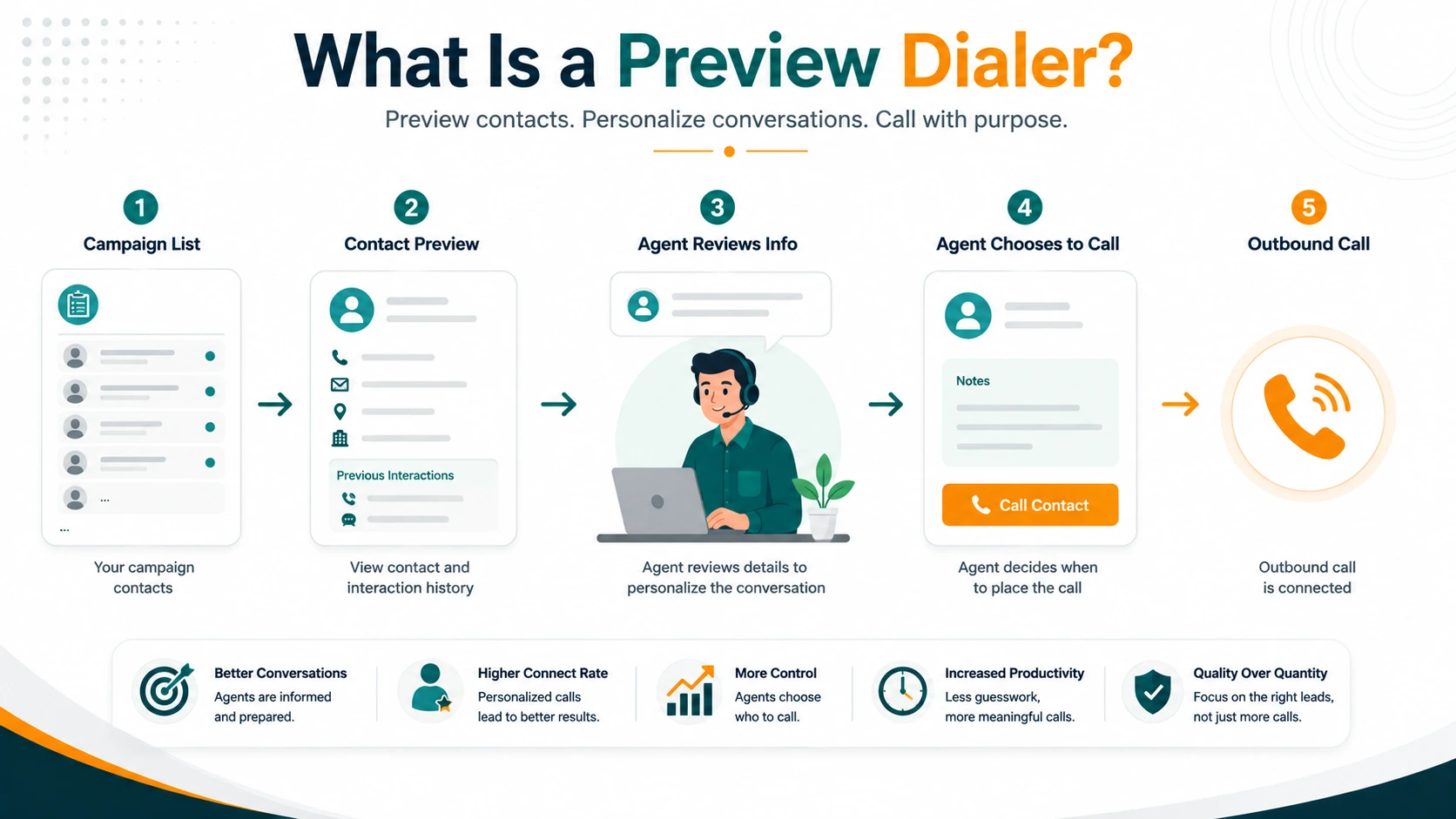
A preview dialer shows the agent a contact record before placing any call. The agent reviews the name, account history, prior interaction notes, and any other available context — then initiates the call themselves by clicking a Dial button. The system does not place the call automatically. The agent does.
That single distinction — agent-initiated rather than system-initiated dialing — has significant implications for how preview dialing works operationally, what compliance profile it carries, and which use cases it serves better than progressive or predictive modes. This article covers all of those dimensions.
Definition: A preview dialer is an outbound calling system that presents a contact record to the agent before any call is placed. The agent reviews the record — contact details, account history, previous interactions — and then deliberately initiates the outbound call. No call is placed by the system without an explicit agent action. This agent-initiated design eliminates the predictive-pacing mechanism responsible for most abandoned calls and gives agents full context before they speak.
How a Preview Dialer Works
The preview dialing sequence has a clear order:
- The campaign is configured with a contact list and assigned agents. The list contains phone numbers and, where available, associated account or lead information pulled from a CRM.
- When the agent is available and ready, the system presents the next contact record — not a ringing call, but a screen showing the contact's details. Prior call history, notes from previous agents, account status, and any relevant context are displayed.
- The agent reads the record, prepares mentally for the conversation — what to say, what objections to expect, what the customer's situation is — and clicks Dial when ready.
- The system places the outbound call. The agent hears ringing and is already on the line when the contact picks up.
- The conversation happens. The agent has the record visible throughout the call and can update notes in real time.
- After the call, the agent logs a disposition and the system presents the next record.
Skip timers
Most preview dialers include a configurable skip timer: the agent has a defined number of seconds to review the record before the system either automatically initiates the call or advances to the next record. Skip timers are an operational control tool, not a feature every campaign needs.
Without any skip timer, agents can linger on records indefinitely — reading slowly, taking side tasks, or deliberately avoiding contacts they find difficult. This reduces campaign throughput significantly. With a skip timer, agents have a bounded window to prepare, after which the campaign advances. The optimal timer duration depends on the complexity of the contact data and the nature of the interaction — a healthcare appointment reminder needs less review time than a complex B2B renewal conversation.
Skip timers also affect how agents interact with records. If agents are allowed to skip records, they may cherry-pick — bypassing contacts that seem difficult and selecting those most likely to convert quickly. Some operations disable skip entirely; others track skip rates as a coaching metric.
Why Preview Dialing Matters: The Context Advantage
The fundamental case for preview dialing is that context improves conversations. An agent who knows that a customer purchased three months ago, called support twice about billing, and was marked "likely to churn" by the last agent can open the call very differently than an agent who sees only a name and phone number.
This matters most in situations where:
- The called party's relationship with the organization is complex or has history the agent should know.
- The conversation topic is sensitive — healthcare, legal, financial services, insurance.
- The agent needs to reference specific account details early in the call to establish credibility.
- The call requires preparation — specific pricing, a particular script, a renewal timeline.
- The prospect or customer would be annoyed or confused by an agent who clearly knows nothing about them.
In contrast, on a cold prospecting list where every record is equally unknown and the script is largely standardized, the context advantage of preview shrinks considerably. That's where progressive or predictive mode becomes more appropriate.
Preview vs Progressive vs Predictive: The Short Version
| Property | Preview | Progressive | Predictive |
|---|---|---|---|
| Who initiates the call | Agent (after record review) | System (when agent becomes free) | System (ahead of agent availability) |
| Abandoned calls | Minimized by design (no pacing engine) | Minimized by design (no pacing engine) | Inherent; must stay under 3% |
| Pre-call context | Full record review before call | Screen pop at connect (no review time) | Screen pop at connect (no review time) |
| Agent talk time / hr | ~20–28 min | ~30–40 min | ~40–50 min |
| Best for | High-value, context-sensitive calls | Moderate-volume, zero-abandon required | High-volume cold outreach at scale |
For a complete technical comparison of all three modes, see predictive vs progressive vs preview dialers.
Compliance Profile of Preview Dialing
Preview dialing has a substantially lower regulatory exposure than predictive dialing in outbound telemarketing contexts — for one structural reason: a human being deliberately initiates each call.
TCPA and ATDS classification
Under the Supreme Court's ruling in Facebook v. Duguid (2021), an Automatic Telephone Dialing System (ATDS) under the federal TCPA requires the capacity to use a random or sequential number generator to produce or store numbers to dial. A preview dialer, where an agent manually clicks Dial after reviewing a record, almost certainly does not meet this definition. The agent's deliberate action is the triggering event; the system does not dial automatically.
This distinction matters for calling mobile phones. Under the federal TCPA, ATDS calls to mobile numbers without prior express written consent carry statutory damages of $500 to $1,500 per call. If your dialer does not qualify as an ATDS, those consent requirements apply differently. Preview dialing's agent-initiated architecture is one reason some regulated industries prefer it specifically for mobile outreach.
Important: state laws vary. Some states apply broader definitions of automated dialing that may or may not capture a preview dialer regardless of who clicks Dial. Do not rely on federal ATDS analysis alone when calling mobile numbers in states such as Florida or California. Get qualified legal counsel for your specific program and calling destinations.
Preview dialing does not automatically create legal compliance
Using a preview dialer does not automatically satisfy consent requirements, DNC obligations, or any other legal requirement. The dialer type changes the regulatory analysis in certain respects, but:
- DNC scrubbing is still required before calling in telemarketing contexts.
- State calling-hours restrictions still apply.
- Prior consent requirements — where applicable — still apply regardless of dialer type.
- DNC requests received during calls must still be honored immediately.
Preview dialing simplifies some compliance dimensions. It does not eliminate them.
Benefits of Preview Dialing
Designed to minimize pacing-related abandoned calls
Because a preview dialer waits for affirmative agent action before placing a call, it avoids the predictive-pacing mechanism responsible for many abandoned calls. There is no system-initiated over-dialing and no scenario where calls are placed ahead of agent availability.
Highest quality conversations
Agents who have read a contact record before speaking are more relevant, less likely to say something factually wrong about the account, and better equipped to handle objections or questions. For sales organizations where conversion depends on how the first 30 seconds of a call go, the preparation window is valuable.
Works with teams of any size
Like progressive, preview has no minimum team size. A single agent can run a preview campaign effectively. The economics of preview dialing scale differently from predictive — because each agent controls their own dial rate, a small high-value team can work through a list methodically without any of the statistical complexity predictive requires.
Supports complex callback management
When callbacks need to be managed — specific agents calling specific contacts at agreed times — preview dialing handles this naturally. The agent sees the callback note, reviews the prior conversation, and calls at the scheduled time. Predictive and progressive dialers are optimized for list-based sequential calling, not individual callback scheduling.
Limitations of Preview Dialing
Lowest throughput of the three auto-dialing modes
Preview dialing is the slowest of the three. The review period — even if short — adds time between calls that progressive and predictive do not have. Over a full day of dialing, the difference in calls attempted per agent is meaningful. For campaigns where volume is the primary driver and context matters little, preview's throughput disadvantage is a real cost.
Cherry-picking without controls
Without a skip timer and management oversight, agents using preview dialers tend to select favorable-looking records and skip unfamiliar or difficult ones. This reduces list penetration and introduces selection bias into campaign results — the easy calls get made first, the difficult ones accumulate. Skip rate tracking and manager review of skip patterns are important controls in preview campaigns.
Dependent on CRM data quality
Preview dialing is only as valuable as the data shown in the preview. If the CRM is poorly maintained — missing history, outdated notes, no context — the review period provides little value and the throughput cost is incurred for nothing. Preview dialing works best when contact records are actually informative.
When Preview Dialing Is the Right Choice
- High-value B2B or enterprise sales. When each deal has significant revenue potential and first-impression quality affects close rates, the context preview provides justifies the throughput trade-off.
- Healthcare and insurance outreach. Patient calls, Medicare enrollment, Scope of Appointment requirements in insurance — contexts where personalized preparation matters and the regulatory environment rewards deliberate agent-initiated calls.
- Complex callback follow-up. When specific agents need to follow up with specific contacts at agreed times with full awareness of the prior conversation.
- Compliance-sensitive operations. Where the combination of minimal pacing-related abandonment and agent-initiated dialing provides a simpler regulatory profile than predictive or progressive for specific call types and jurisdictions.
- Small specialized teams. A team of 3–5 highly specialized sales people calling a short, curated list of high-value prospects benefits more from context than from throughput optimization.
EaseDial's Preview Dialer
EaseDial's campaign dialer includes preview mode alongside progressive and predictive. Preview campaigns in EaseDial display the contact record before the agent dials, support configurable skip timers, log dispositions after each call, and track per-agent and per-campaign metrics. The same DNC scrubbing tools available for predictive and progressive campaigns apply to preview mode — lists are scrubbed against the national registry and internal DNC lists before any calls are placed.
EaseDial
Preview, progressive, and predictive dialing with built-in DNC compliance and full campaign reporting.