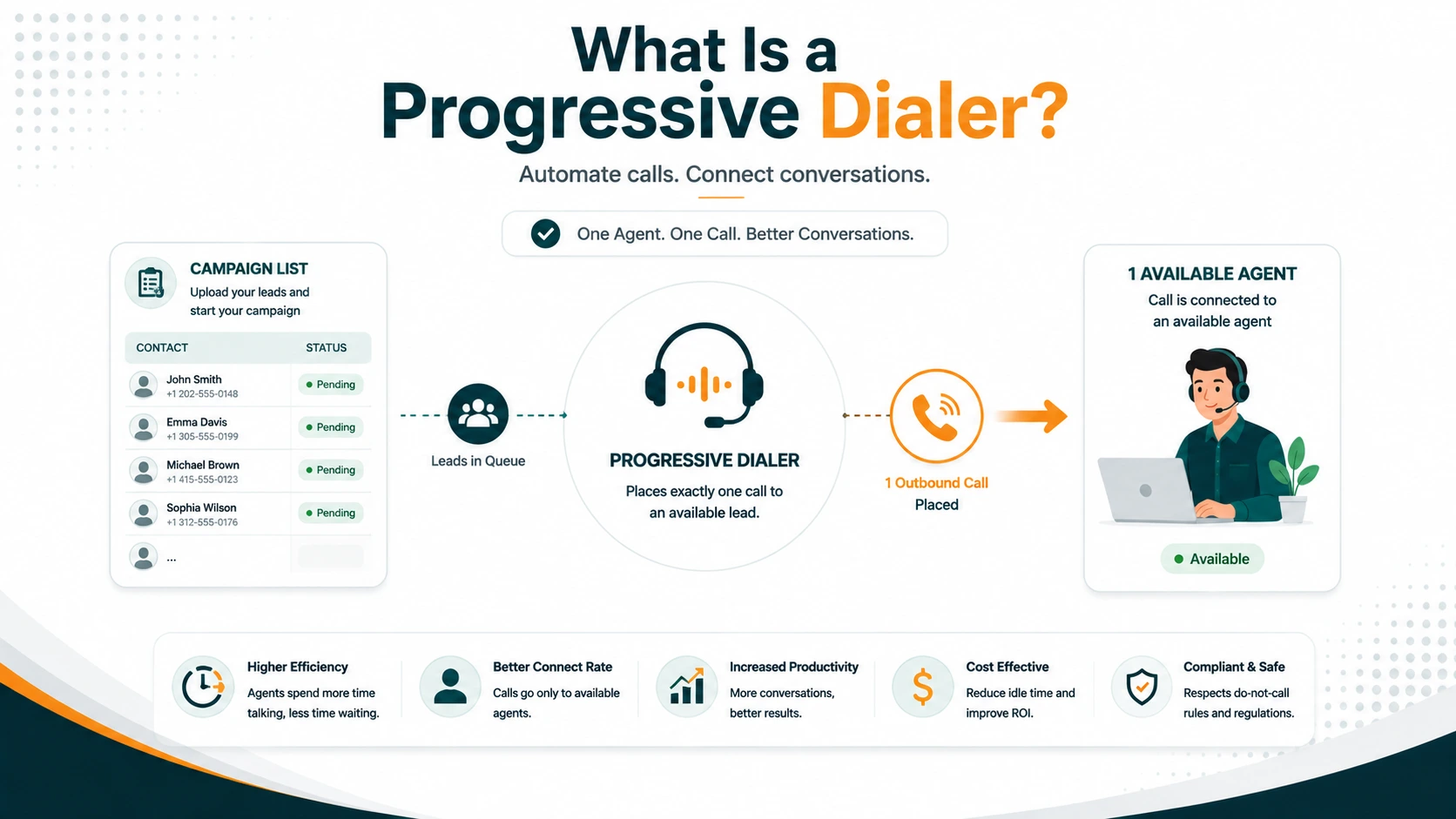
A progressive dialer dials exactly one phone number per available agent. The moment an agent finishes a call and becomes free, the system places the next dial automatically — no agent action required. Unlike a predictive dialer, it never places a call unless there is a confirmed-available agent ready to take it. The result is a clean, continuous flow of outbound calls with zero abandoned calls by design.
This article covers how progressive dialing actually works, how it differs from predictive and preview modes, what kinds of campaigns it suits best, and its practical limitations. If you want a full three-way comparison of all dialer modes, that is covered separately in the companion article: predictive vs progressive vs preview dialers.
Definition: A progressive dialer is an outbound calling system that automatically places one call per available agent as soon as that agent becomes free. The dialer does not place a call ahead of agent availability — every dial is tied to a confirmed ready agent — which means answered calls always connect to a live person and abandoned calls are effectively zero by architectural design.
How a Progressive Dialer Works
The core mechanism is a trigger-on-availability loop. Each agent in the campaign has a tracked availability state. When an agent's state transitions from "on call" to "available" — immediately after hanging up and completing any wrap-up — the dialer fires a single outbound call to the next number in the campaign list assigned to that agent slot.
The call goes through the carrier, rings the contact's phone, and passes through AMD (Answering Machine Detection) if configured. AMD classifies the answered call as either a live human or a voicemail system:
- If the answer is a live human: the call is connected to the waiting agent immediately. The agent's phone rings and the conversation begins.
- If the answer is a voicemail: the system either drops a pre-recorded message (a voicemail drop), terminates the call, or logs the outcome and moves to the next number — depending on campaign configuration.
- If the number is not answered, busy, or disconnected: the system logs the outcome and, once the no-answer timeout passes, the agent's availability state is reasserted and the next dial triggers.
This loop repeats continuously until the campaign list is exhausted, the campaign is paused, or agents log off.
The agent-availability invariant
The defining technical property of a progressive dialer is that the dial-to-agent ratio never exceeds 1:1. For every call placed, there is exactly one available agent assigned to receive it. Calls are never placed to "get ahead" of agent availability the way a predictive dialer does. This invariant is what produces zero abandonment: there is no scenario in which a live person answers and finds no agent, because no call was ever placed without one.
Campaign list and agent assignment
Progressive dialer campaigns are configured with a contact list — either uploaded as a CSV or pulled from a CRM integration — and one or more assigned agents. The dialer maintains a pointer through the list and advances it as calls are completed and dispositioned. Agents may be assigned to the same list (sharing a pool) or separate lists (each working their own segment).
Because each agent triggers their own dial cycle independently, a five-agent progressive campaign generates up to five simultaneous outbound calls at peak — not because the dialer is trying to create multiple live connections per agent, but because all five agents may become available around the same time and each gets their own dial.
Dispositions
After each call — whether it connected to a live person, hit voicemail, or went unanswered — the agent logs a disposition: the outcome of the interaction. Common dispositions include:
- Connected / Spoke with contact
- Voicemail left
- No answer
- Callback requested (with scheduled time)
- Not interested
- Wrong number
- DNC request — must be added to the internal DNC list immediately
- Sale / appointment / conversion
Dispositions feed campaign reporting and determine whether a contact is attempted again, when, and by which agent. DNC requests received during a progressive campaign must be honored immediately — the number is suppressed from all future dials within that organization. This is a legal requirement, not a configuration option.
Progressive vs Predictive: The Core Difference
The distinction is fundamental: progressive dials reactively (one call, one available agent, always), while predictive dials proactively (multiple calls per available agent, ahead of actual availability, accepting some abandoned calls to maximize talk time).
| Factor | Progressive | Predictive |
|---|---|---|
| Dial ratio | 1:1 (one call per available agent) | 2:1 to 5:1+ (algorithm-controlled) |
| Abandoned calls | Effectively zero by design | Inherent; must be managed under 3% |
| Agent talk time per hour | ~30–40 min | ~40–50 min |
| Minimum agent count | Works with 1+ | Generally 7–10+ for stable pacing (varies by platform and campaign) |
| FTC TSR abandon cap | Not a practical concern | Active compliance obligation |
| Best list types | Warm leads, moderate volume, any quality | Cold, high-volume, lower ASR |
| Operational complexity | Low | High — requires real-time monitoring |
What is a predictive dialer and the compliance guide cover predictive pacing mechanics and the regulatory obligations it triggers in full.
Progressive vs Preview: The Key Distinction
Both progressive and preview modes maintain zero abandoned calls. The difference is in who controls the dial trigger and what happens before the call.
In a preview dialer, the system presents the contact record to the agent — name, number, account history, prior call notes — and waits for the agent to click a Dial button. The agent reviews the information, prepares, and initiates the call deliberately. This adds preparation time per call but gives the agent context before they speak.
In a progressive dialer, the system dials automatically when the agent becomes available. The agent doesn't see a record review screen before the call connects — the call is already in progress by the time the agent is notified. Some progressive implementations show a screen pop with contact details as the call connects, but the agent doesn't get quiet review time before speaking.
Progressive is faster per call cycle than preview. Preview produces better-prepared agents. For high-value or sensitive interactions where context matters — healthcare calls, financial services, complex sales — preview is often worth the throughput trade-off. See what is a preview dialer for the full breakdown of when preview dialing is the better choice.
Benefits of Progressive Dialing
Zero abandoned calls
This is the most significant operational advantage over predictive. Because progressive never dials without a ready agent, there is no scenario where a live person answers and finds no one on the line. This eliminates the primary compliance concern associated with outbound auto-dialing in telemarketing contexts (the FTC TSR 3% abandoned-call cap) and improves the called party's experience.
Works at any team size
Progressive dialing works reliably with one agent or one hundred. There is no statistical minimum team size requirement. Small outbound teams — 2 to 7 agents — that cannot run predictive compliantly can use progressive and still eliminate the manual dialing labor that predictive is designed to avoid.
Substantially better talk time than manual dialing
Manual dialing — typing or clicking numbers individually, waiting through rings, navigating voicemails by hand — consumes significant agent time without producing conversations. Progressive eliminates that entirely. Agents spend time waiting for the auto-dial to connect, not dialing themselves. The efficiency gain over manual dialing is real and substantial, even if it is less than predictive's maximum.
Lower compliance overhead
Progressive campaigns do not require real-time abandonment rate monitoring dashboards, FTC TSR safe harbor calculations, or the tight operational control that predictive demands. DNC scrubbing is still required before calling — that obligation applies to any telemarketing outreach regardless of dialer type — but the ongoing campaign management is simpler.
Scales down without degradation
A predictive dialer running on a small team produces erratic behavior — the pacing algorithm's assumptions break down below seven or eight agents, and the abandon rate becomes difficult to control. A progressive dialer has no such minimum. Its performance at three agents is identical in character to its performance at thirty.
Limitations of Progressive Dialing
Lower peak talk time than predictive
The throughput ceiling of progressive dialing is lower than predictive because the system never starts the next dial until the current agent is free. On lists with moderate answer rates (15–25% ASR), agents spend some time waiting for the dial to connect, ring, and either answer or not-answer before the cycle resets. Predictive collapses this idle time by dialing ahead. For very large campaigns with 15+ agents and a low-ASR cold list, predictive's efficiency advantage is measurable in hours of agent time per day.
No pacing algorithm advantages
Progressive doesn't use a pacing algorithm because it doesn't need one. But this also means it can't adapt to real-time conditions the way predictive can. It doesn't adjust dial ratios based on current ASR, shrink or grow dial bursts based on team size changes, or rebalance when agents log on or off mid-campaign. The system simply reacts to each individual agent's availability state independently.
AMD behavior is the same as predictive
Progressive dials still go through AMD (Answering Machine Detection) to filter voicemails before connecting agents. The same accuracy limitations apply — false positives (a live person classified as voicemail) result in a dropped call from the called party's perspective. Because progressive never generates abandoned calls from over-dialing, AMD false positives represent the primary call experience problem to manage. AMD sensitivity calibration remains important.
When Progressive Dialing Is the Right Choice
- Small to medium outbound teams (2–14 agents). Teams under seven or eight agents that cannot run predictive compliantly get the bulk of progressive's efficiency benefit without predictive's compliance complexity.
- Warm lead campaigns. When list quality is higher — warm inbound-generated leads, recent opt-ins, known contacts — the efficiency gap between progressive and predictive narrows. Progressive's zero-abandonment property matters more when the called party's experience affects conversion.
- Compliance-sensitive verticals. Healthcare, financial services, and other regulated industries where even occasional abandoned calls create regulatory or relationship risk. Progressive's zero-abandon architecture eliminates the risk category entirely.
- Moderate campaign volumes. Progressive handles thousands of calls per day per agent comfortably. Where it begins to fall short is at very large scale with cold lists — 50,000+ numbers with large agent teams — where the cumulative efficiency gap versus predictive translates into significant missed throughput.
- Operations without real-time monitoring infrastructure. Progressive campaigns don't require a supervisor watching abandonment dashboards during campaign execution. If your operation doesn't have that capacity, progressive removes the obligation.
EaseDial's Progressive Dialer
EaseDial's campaign dialer includes progressive mode alongside predictive and preview. Progressive campaigns support contact list upload, CRM-based list integration, AMD configuration, outcome disposition logging, DNC scrubbing against national and internal lists, and campaign reporting including connect rates, dispositions, and per-agent activity.
Supervisors have real-time visibility into active progressive campaigns — which agents are dialing, which are in conversation, call outcomes as they happen — through the same analytics dashboard used for inbound queues. Progressive mode campaigns share agent availability state with inbound queues, so agents can be available for both progressive outbound and inbound calls in a blended configuration.
EaseDial
Progressive, predictive, and preview dialing with built-in DNC tools and real-time campaign reporting.