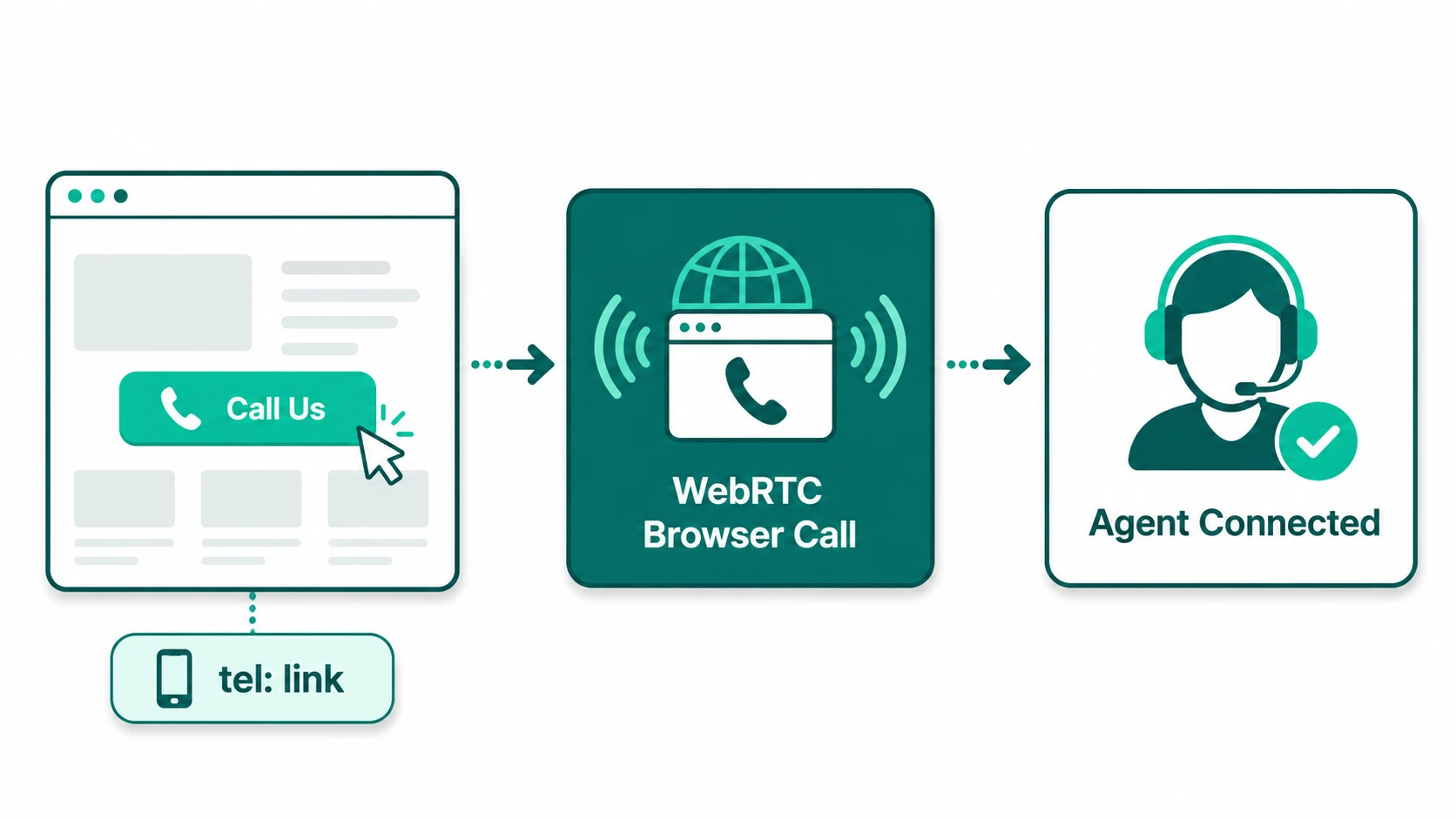
Asking a website visitor to manually dial a phone number introduces friction at the exact moment they are most ready to engage. They have to memorize the number, switch apps on mobile, or copy-paste it into a dialer — small actions that reduce the chance the call actually happens. Click-to-call eliminates that friction by turning a phone number into an action: the visitor clicks a button and is immediately connected.
The implementation behind that button varies considerably — from a simple HTML link that hands off to a mobile device's native dialer, to a full WebRTC browser call that routes through your phone system, tracks the source page, logs to your CRM, and queues to the next available agent. Understanding the difference between these approaches matters because the right choice depends on your infrastructure, your users' devices, and what you need to do with the call data afterward.
Click-to-Call: Technology that enables a user to initiate a telephone call by clicking a button, link, or widget on a website, app, or digital ad — rather than manually entering a phone number into a dialer. The underlying mechanism can be an HTML tel: link that triggers the device's native dialer, or a WebRTC-based system that establishes a browser-native voice connection through a cloud phone platform. Both achieve the same goal — reducing friction between intent and connection — but differ significantly in capability and implementation complexity.
The Two Main Implementation Approaches
Option 1: tel: Link (Native Dialer Handoff)
The simplest implementation is an HTML anchor tag using the tel: URI scheme:
On mobile browsers, tapping this link launches the device's native phone dialer with the number pre-filled — one additional tap connects the call. This is effectively zero implementation cost beyond adding the link to your HTML, and it works reliably on all modern smartphones without any JavaScript or backend infrastructure.
The limitations are significant for desktop users. On desktop browsers, clicking a tel: link only works if the user has a native dialer application configured — such as Skype, FaceTime Audio on Mac, or a softphone application. For desktop users without a configured dialer, the link typically does nothing or prompts them to choose an application they may not have. This makes tel: links most effective as a mobile-optimized feature.
Beyond device compatibility, the tel: link approach provides no call tracking data unless you implement dynamic number insertion separately, no routing capabilities, and no integration with your phone system's queuing or CRM.
Option 2: WebRTC-Based Click-to-Call
WebRTC (Web Real-Time Communication) is a W3C and IETF standard that enables browsers to establish real-time audio and video connections without plugins. When a user clicks a WebRTC-based call button on a website:
- The browser requests microphone access from the user (a one-time permission prompt).
- A JavaScript SDK — provided by the phone platform — establishes an encrypted connection from the browser to the phone platform's media server.
- The phone platform routes the call into your existing call routing logic: IVR, queue, specific agent, or ring group, depending on configuration.
- The call appears to the agent as a normal inbound call. Audio streams in both directions through the browser and the agent's phone client simultaneously.
This approach works on both desktop and mobile browsers without requiring any native dialer. It also exposes call routing, queuing, recording, analytics, and CRM integration capabilities that the tel: link approach cannot provide. The trade-off is implementation complexity: WebRTC click-to-call requires a JavaScript SDK integration, a compatible phone platform, and potentially backend configuration for call routing rules specific to web-originated calls.
WebRTC media is encrypted using SRTP (Secure Real-time Transport Protocol) and DTLS (Datagram Transport Layer Security) as specified in RFC 8827 — the security architecture for WebRTC. Calls established through WebRTC are therefore encrypted in transit by default, which is a meaningful security improvement over unencrypted SIP/RTP in some configurations. For more on how call quality factors apply to WebRTC calls, see VoIP call quality — the same jitter, latency, and packet loss considerations apply, routed through the user's browser and network.
Where Click-to-Call Drives the Most Value
Click-to-call is not equally useful on every page and in every context. It delivers the most value where the visitor's intent is high, the purchase or service decision is complex or high-stakes, and the cost of losing the visitor is significant.
High-Intent Pages
A visitor on your pricing page, contact page, or a specific product page is exhibiting stronger intent than someone reading a blog post. Placing a prominent click-to-call button on high-intent pages captures that intent at its peak. A visitor who has just reviewed pricing and has a question is far more likely to call than one who has to navigate back to your contact page and manually dial.
Mobile Traffic with Complex Products
For mobile visitors, even a simple tel: link reduces the friction of calling substantially — especially on product or service pages where the decision involves questions that are faster to ask verbally than to type. Healthcare, financial services, legal services, home improvement, and automotive are all categories where mobile callers have genuine questions that are easier to answer on a call.
Digital Ad Call Extensions
Google Ads supports call assets (formerly call extensions) that display a phone number directly in the ad and allow mobile users to call without visiting the landing page. This is a form of click-to-call that occurs before the website visit. These calls typically require separate call tracking configuration to attribute properly.
Healthcare and Financial Services
In regulated industries where customers have specific, sensitive questions — appointment scheduling, coverage verification, account status, loan eligibility — verbal communication is often preferred or required. Click-to-call on appointment booking pages, insurance quote pages, or account management areas serves these high-stakes, relationship-intensive interactions efficiently. Note that industries with regulatory call requirements (HIPAA, FINRA, etc.) should confirm that their click-to-call implementation and call recording configuration meets applicable requirements — consult legal counsel for your specific situation.
Call Tracking and Attribution
One of the significant advantages of WebRTC-based click-to-call over simple tel: links is the ability to capture call attribution data: which page the call originated from, which campaign or ad drove the visitor, and what happened on the call.
Many implementations use Dynamic Number Insertion (DNI) — a technique where different phone numbers are displayed to different visitors based on their traffic source. A visitor arriving from a Google Ads campaign sees one number; an organic search visitor sees a different number; a direct visitor sees a third. Each number routes to the same destination but is tracked separately, allowing you to attribute phone calls to specific campaigns in the same way you attribute web conversions.
DNI is typically a separate capability layered on top of the click-to-call widget. It requires a pool of trackable phone numbers (virtual numbers assigned to different sources) and a JavaScript snippet that swaps the displayed number based on session parameters. See what is a virtual phone number for how the underlying number provisioning works.
Beyond attribution, WebRTC-based click-to-call implementations can pass contextual metadata with each call: the page URL, the visitor's session ID, UTM parameters from their original traffic source, or any other data available in the browser session. This data can be surfaced to the agent on their screen when the call connects — giving them context about what the caller was looking at before calling, reducing the need for the caller to explain their situation from scratch.
Routing Click-to-Call Through Your Phone System
A WebRTC call arriving through a click-to-call widget can be routed through the same call routing logic as any other inbound call. This means it can enter a call queue, trigger an IVR, route to a specific agent based on the page or product being viewed, or follow any other routing rule your phone system supports.
A practical example: a prospective customer lands on a software pricing page, reads the enterprise tier description, and clicks "Talk to Sales." A WebRTC call initiates in the browser, routes to the sales queue with priority based on the page source, and connects to the next available account executive. The agent's screen shows the caller's source page, the product tier they were viewing, and any form data they submitted. The call is recorded, transcribed, and logged to the CRM automatically.
This level of integration requires a phone platform that supports WebRTC and has SDK documentation for embedding. The specific capabilities available — call routing rules, CRM integrations, recording, analytics — depend on your platform. Configuration is typically done through the platform's admin interface rather than requiring custom backend development.
Implementation Considerations
| Factor | tel: link | WebRTC widget |
|---|---|---|
| Implementation effort | Minimal — one HTML tag | Moderate — SDK integration, routing configuration |
| Desktop support | Only with configured native dialer | Full browser support, no native dialer needed |
| Call tracking | Requires separate DNI solution | Built-in — pass any session metadata |
| Queue / routing integration | Not available — routes same as any dialed call | Full routing control via phone platform |
| Call quality dependence | Depends on user's mobile carrier | Depends on user's internet connection and browser |
WebRTC call quality is subject to the same network conditions as any VoIP call — the user's internet connection, browser performance, and microphone quality all affect the experience. A user on a poor Wi-Fi connection or a congested network may experience audio degradation. For most office and home internet connections, WebRTC call quality is comparable to a regular phone call, but it is not immune to the factors covered in VoIP call quality.