
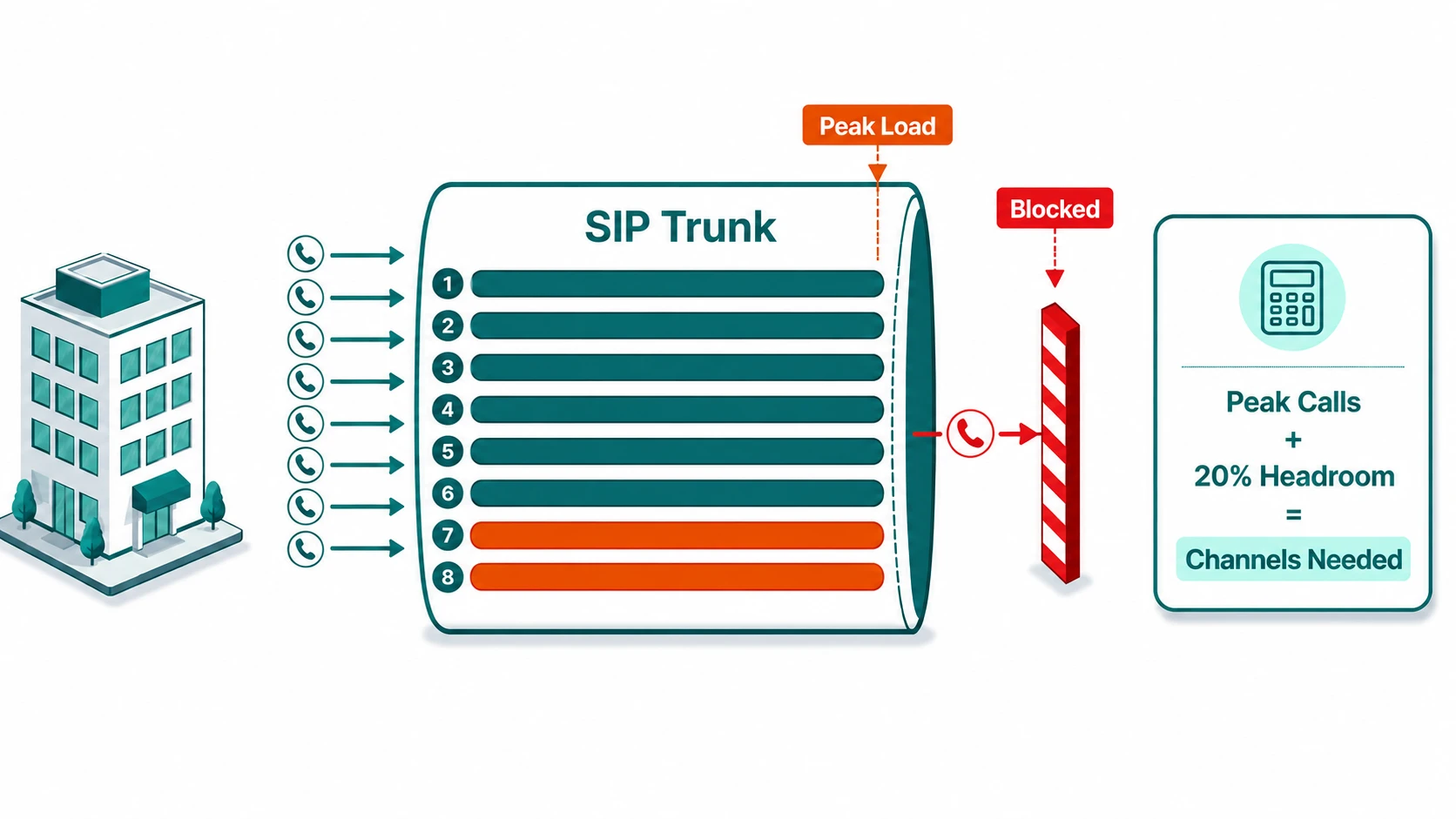
When businesses move to SIP trunking, one of the most practical questions is also one of the most commonly misunderstood: how many channels do you need? The answer is not the same as the number of phones on your desks, the number of employees, or even the number of phone numbers you own. It is the maximum number of calls your business needs to handle simultaneously at peak — and getting it wrong in either direction creates problems.
Too few channels, and calls that exceed your capacity receive a busy signal or a SIP error response — callers literally cannot connect. Trunk exhaustion is one common cause of a SIP 486 Busy Here response (the PBX cannot deliver the call) and of SIP 503 Service Unavailable (the server temporarily cannot handle the request, sometimes due to capacity limits). Too many channels, and you are paying for capacity that sits idle most of the day. This article walks through how to calculate the right number of SIP channels, what factors complicate that calculation, and how different capacity models from SIP trunk providers handle the situation when you hit your limit.
SIP Channel: A SIP trunk channel is a single concurrent call path — one active conversation, either inbound or outbound. A SIP trunk is a bundle of these channels connecting your phone system (PBX or cloud platform) to the public telephone network over an IP connection. A business with 10 SIP channels can have at most 10 simultaneous calls in progress at any moment; an eleventh caller attempting to connect at that moment will not get through.
Channels vs. Extensions: The Core Confusion
The most common planning mistake is equating channel count with extension or employee count. These are fundamentally different measurements. Extensions represent how many people or devices can be reached within your phone system. Channels represent how many of those people can be on a call at the same time.
In most business environments, the fraction of employees on a call simultaneously at peak is significantly less than the total headcount. A company with 50 employees might find through traffic analysis that the maximum simultaneous call load at peak is 12–15 calls — meaning 12–15 SIP channels would be sufficient, not 50.
The ratio depends heavily on what kind of business you run:
- General office / knowledge workers — most employees use the phone occasionally. Peak simultaneous usage is typically 15–30% of the workforce during the busiest period.
- Call center or contact center — agents spend most of their shift on calls. Peak simultaneous usage may approach 80–95% of logged-in agents. Capacity planning is tighter and more critical here.
- Retail or service businesses with a front desk — call volume concentrates at specific times. Peak might be a handful of simultaneous calls even with dozens of employees.
For businesses without historical call data, a reasonable starting point is to review existing phone bills for peak concurrent call counts if your current carrier provides that data, or to estimate based on your busiest observed periods and add a buffer. For call centers, reviewing average handle time and inbound call volume by interval gives a more precise calculation.
Calculating Channels with Traffic Intensity
Telecom engineers use the concept of traffic intensity, measured in Erlangs, to quantify how much concurrent call capacity a system needs. One Erlang represents one hour of call traffic — a single channel fully occupied for one hour.
The formula for traffic intensity is straightforward:
As an example: if your busiest hour sees 80 inbound calls, each averaging 4 minutes, the traffic intensity is (80 × 4) ÷ 60 = 5.33 Erlangs. This tells you that on average, 5.33 channels are fully occupied during that hour.
But averages are not the right planning target — peaks are. The Erlang B formula extends this to calculate how many channels you need to serve that traffic load while keeping the probability of a caller receiving a busy signal (the "blocking rate") at an acceptable level. Erlang B assumes that callers who get a busy signal do not retry — which is a reasonable model for trunk capacity planning where you simply want to ensure calls connect.
From Erlang B tables (which are widely available online and built into capacity planning tools), 5.33 Erlangs of traffic with a target blocking rate below 1% typically requires approximately 11–12 channels. The exact number depends on your acceptable blocking threshold — lowering it from 1% to 0.1% increases the required channel count. Most businesses target a blocking rate of 1% or below for planning purposes, meaning fewer than 1 in 100 call attempts would fail during the peak hour.
For outbound-heavy environments like predictive dialer campaigns, the calculation also needs to account for outbound call attempts — not just the calls that connect. A predictive dialer places multiple simultaneous outbound attempts per agent, which consumes channels even for calls that never reach a live person. Plan channel counts based on simultaneous dialing attempts, not just simultaneous connected calls.
Additional Factors That Affect Your Channel Count
Hold Time Consumes Channels
A caller on hold is still occupying a SIP channel. The hold music or on-hold message playing to that caller requires an active channel just as an active two-way conversation does. In environments with long hold times or significant queue depth — such as a customer support operation — the channels consumed by callers waiting in queue can meaningfully affect your total channel requirement. For how support operations plan call capacity, see the customer support solution page. If your call queue regularly holds 5–10 callers at a time, those callers are each consuming a channel while they wait.
Inbound and Outbound Share the Same Pool
SIP trunk channels are bidirectional — the same pool serves both inbound and outbound calls. If your business runs simultaneous inbound customer service and outbound sales dialing, both consume from the same trunk capacity. Some phone systems or providers allow you to segment capacity (dedicated inbound vs. outbound trunks), but by default they compete for the same channels. For high-volume outbound environments that route calls through the carrier layer, see the wholesale VoIP guide.
DID Numbers vs. Trunk Channels
A DID (Direct Inward Dialing) number is a telephone number that routes to your phone system — it is not itself a channel. You can have 100 DID numbers and only 10 SIP channels. The 10 channels limit how many simultaneous calls can be active, regardless of how many DIDs you have. The number of DIDs you need is based on how many distinct phone numbers your business requires, not on call volume.
Seasonal and Intraday Peaks
Many businesses have significant traffic variation by time of day, day of week, and season. A tax preparation firm may have call volumes in February and March that are three times their July baseline. Retail businesses see holiday peaks. Contact centers typically see an intraday peak between 10 AM–12 PM and again around 2–4 PM local time, with much lower volume in early morning and late evening.
Fixed channel trunks require you to provision for your peak — paying for that capacity all year. Elastic or metered trunks allow you to burst above your base allocation and pay for the additional channels only when used, which can be significantly more cost-effective for businesses with large seasonal swings.
SIP Trunk Capacity Models
Not all SIP trunking arrangements handle capacity the same way. The three common models differ in how they respond when you hit or approach your channel limit:
| Model | How capacity works | What happens at limit | Best for |
|---|---|---|---|
| Fixed channels | Set number of concurrent channels, fixed monthly cost | Hard block — new calls fail with SIP 486/503 | Predictable volume, cost control priority |
| Metered / elastic | Base allocation plus burst; pay per additional channel-minute used | Burst above base — calls succeed, usage cost increases | Variable or seasonal volume |
| Unlimited concurrent | No hard channel cap; provider manages capacity pool | Platform handles — rare hard limit scenarios still possible | High-volume or unpredictable traffic |
The specific behavior when capacity is exceeded — whether there is a brief burst allowance, a hard block, or a soft degradation — depends on your provider and your contract terms. Confirm this in writing before committing to a fixed-channel arrangement for business-critical call volume.
Bandwidth Planning Alongside Channel Count
Each SIP channel in active use consumes network bandwidth. The amount depends on the codec negotiated for that call. Using the two most common codecs for PSTN-connected SIP trunks:
- G.711 — approximately 87 kbps per concurrent call including IP header overhead. Ten simultaneous G.711 calls consume roughly 870 kbps, or just under 1 Mbps of VoIP-dedicated bandwidth.
- G.729 — approximately 26 kbps per concurrent call. The same ten simultaneous calls consume roughly 260 kbps. G.729 is significantly more bandwidth-efficient but introduces slightly more audio compression.
For a business provisioning 20 SIP channels on G.711, plan for approximately 1.75 Mbps of dedicated VoIP bandwidth, separate from your general internet traffic. VoIP traffic should be prioritized via QoS (Quality of Service) tagging so it is not competing with bulk data transfers during busy periods. For more detail on how bandwidth interacts with call quality, see VoIP call quality factors.
Recommended Planning Process
Combining the above into a practical workflow for capacity planning:
- Identify your busiest hour — review CDRs or call logs for the period with the highest simultaneous call count. If no data exists, run your current system for 30 days with monitoring before committing to a channel count.
- Calculate traffic intensity in Erlangs for that peak hour using the formula above.
- Use an Erlang B calculator to find the channel count needed for your target blocking rate (commonly 1% or lower).
- Add a headroom buffer — typically 20–30% above the Erlang B result — to absorb unexpected spikes, seasonal peaks, or growth.
- Account for any outbound dialing campaigns that run simultaneously with inbound traffic, since both draw from the same channel pool.
- Verify bandwidth availability: multiply your channel count by the per-channel bandwidth for your codec and ensure that load is provisioned and prioritized correctly.
Frequently Asked Questions
Use our free SIP Trunk & Bandwidth Calculator to determine how many SIP channels and how much bandwidth your deployment needs — supports G.711, G.729, and Opus codecs. No email required.


