IVR and call queue get conflated regularly — sometimes even in vendor marketing material, which doesn't help. They do related things in the same general area of call handling, which makes the confusion understandable. But they operate at different stages of the call journey, serve different purposes, and involve the caller in fundamentally different ways. Getting clarity on what each one does — and doesn't do — is the foundation for designing a call flow that actually works.
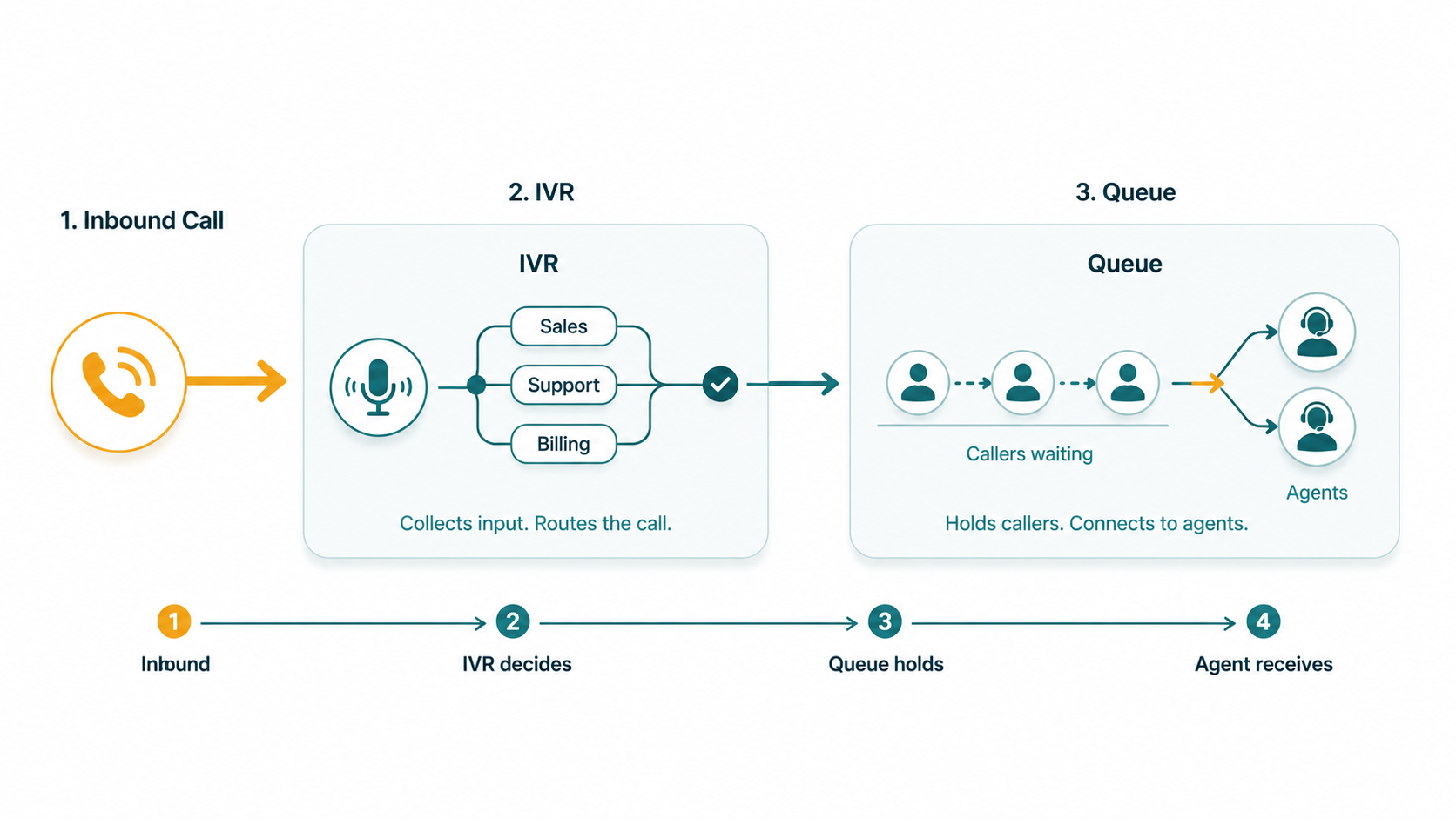
The core difference: An IVR (Interactive Voice Response) collects input from the caller and uses it to make a routing decision — determining where the call should go. A call queue holds callers and distributes them to available agents — managing the wait once the routing decision has already been made. IVR operates before the routing decision; the queue operates after it. In most contact center and business phone setups, they work together in sequence rather than as alternatives to each other.
What an IVR Does
An IVR system greets callers, presents them with options, and collects their input — either via DTMF keypad presses ("Press 1 for Sales") or speech recognition ("Say 'billing' or press 3"). Based on that input, the IVR makes a routing decision: it sends the call to a specific destination.
The IVR's output is a routing action. That destination might be a call queue (the most common case in contact centers), a specific extension or user, a voicemail box, an after-hours message, or a self-service application that handles the request without any agent involvement at all. The IVR doesn't hold callers or manage agent assignment — it classifies calls and routes them to the right place.
IVR can also provide self-service without routing anywhere at all. A caller checking their account balance, confirming an appointment, or making a payment through a fully automated flow may never speak to a human. The IVR handles the request completely using back-end integrations. This containment capability is part of what makes IVR valuable beyond just routing — a well-designed IVR can resolve a meaningful fraction of calls without consuming any agent time.
For a full treatment of how IVR systems work, see our guide on IVR systems.
What a Call Queue Does
A call queue holds callers who are waiting to speak with an agent and distributes those calls to agents as they become available, according to a defined routing strategy. The queue's job is everything that happens between "the routing decision has been made" and "the caller is speaking with an agent."
That encompasses: placing the caller on hold with music or informational messaging, tracking their position, announcing wait times or queue position, applying routing strategies (Round Robin, Longest Idle, Ring All, Linear) to select which available agent takes the next call, managing overflow when wait times exceed configured limits, and tracking queue performance metrics.
The caller's experience in a queue is passive. They're not making decisions. They're waiting. The queue is doing the work of managing that wait and distributing the call to the right agent at the right moment.
Our guide on call queues breaks down routing strategies, overflow logic, and queue metrics step by step.
Where Each Sits in the Call Flow
The clearest way to see the difference is to trace a call through both:
- Call arrives. A customer dials your main business number. The call reaches your cloud phone system.
- IVR greets and collects input. The caller hears: "Thank you for calling Acme Corp. For Sales, press 1. For Support, press 2. For Billing, press 3." The caller presses 2.
- IVR makes a routing decision. The IVR maps "press 2" to the Support queue and routes the call there.
- The queue takes over. If a Support agent is available, the call connects immediately. If all Support agents are on calls, the caller enters the queue, hears hold music, and waits.
- The queue distributes to an agent. When a Support agent finishes their current call, the queue's routing strategy selects that agent and connects the waiting caller.
- Agent answers. The caller is no longer in the queue. The queue begins managing the next waiting caller, if any.
In this flow, the IVR's work ends at step 3. The queue's work begins at step 4. They operate in sequence, not in parallel.
Direct Comparison
| Dimension | IVR | Call Queue |
|---|---|---|
| Primary function | Collect input and determine routing destination | Hold callers and distribute to available agents |
| Caller interaction | Active — presses keys or speaks commands | Passive — waits on hold |
| Position in call flow | Before the routing decision is made | After the routing decision has been made |
| Agent involvement | None at this stage (IVR runs before agents) | Directly manages which agent takes the call |
| Routing logic | Determines which queue or destination the call goes to | Determines which agent within the queue gets the call |
| Self-service capability | Yes — can handle requests without an agent | No — always ends with agent connection |
| Relationship to each other | Feeds calls into queues (among other destinations) | Receives calls from IVR (and other sources) |
Are They Alternatives or Complements?
In almost every contact center and business phone scenario, they're complements — used together in sequence, not chosen between. The question of "IVR or queue?" is rarely the right framing.
There are scenarios where you use one without the other — but those scenarios are specific enough to be worth calling out:
Queue without IVR
If every call to a given number should go to the same team with no need for caller classification, you can route calls directly to a queue without any IVR front-end. A dedicated support line for a single-product company, where every call is a support call for that product, is a reasonable example. The caller dials a number, enters the queue, and waits for the next available agent. No menu needed.
This is simpler to configure and faster for callers. The downside is that you lose all classification data — you don't know from the call itself what the caller needs before an agent answers. This is fine when all calls are genuinely uniform; it's a problem when callers have meaningfully different intents that affect how they should be handled.
IVR without a queue
There are two situations where IVR runs without connecting to a queue. The first is pure self-service: the IVR handles the caller's request fully (account info, payment processing, appointment confirmation) without any agent involvement. The caller never enters a queue because the IVR resolved the request.
The second is direct-extension routing: the IVR determines that a caller needs a specific named person (not a team), and routes directly to that person's extension rather than a queue. No queue is involved because the destination is a single extension, not a pool of agents.
Both together (the most common case)
Most contact centers and multi-department businesses use IVR to classify calls and queues to manage agent assignment. The IVR gathers intent, the queue handles the wait and distribution. Each does the job the other cannot: the IVR can't hold multiple callers in a managed line; the queue can't determine which team the caller needs. Together, they form the complete inbound call management layer.
EaseDial Call Routing
Configure IVR menus and call queues together — and adjust routing rules without IT help.